



(22,- Kc)
Pozadavky: Android 1.6 a vyšší
Popis: 3 in 1 widget. Battery, Clock and Calendar all in one. Great looking. Nice design. Plus! It has complete yet useful additional information.
Screen:
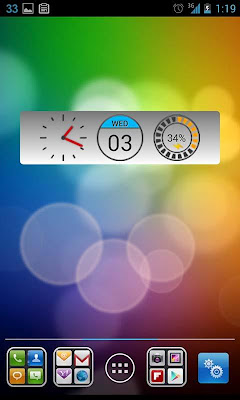
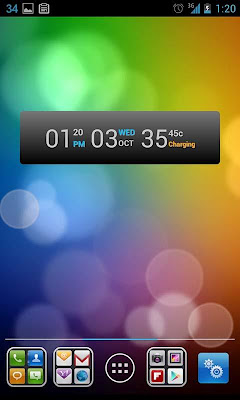
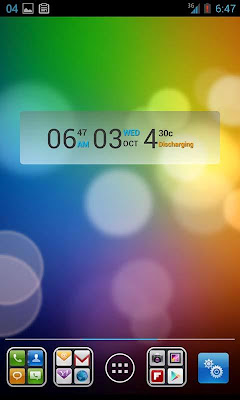
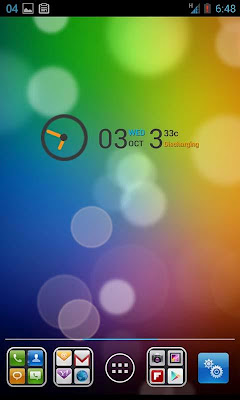
What's in this version:
+ Support more 3rd party Calendar App
For full track of changes, check our website.
Vice info:
Kód: Vybrat vše
3 in 1 widget. Battery, Clock and Calendar all in one. Great looking. Nice design. Plus! It has complete yet useful additional information.Kód: Vybrat vše
http://www.tusfiles.net/nuyx6epbwu5f
http://hugefiles.net/2dt99leu2nlc
http://unlimitzone.com/jrvwm6f2ymm4/Battery.Clock.Calendar.Full.v.4.5.b.16.crk.apk.html
http://www12.zippyshare.com/v/47974570/file.html
http://www.tusfiles.net/ldzysp4vfdyv
http://uloz.to/xUXXWiXu/battery-clock-calendar-full-v-4-5-b-16-crk-apk
http://uloz.to/xbnnu5nR/battery-clock-calendar-full-v-4-5-b-16-crk-apk3 in 1 widget. Battery, Clock and Calendar all in one. Great looking. Nice design. Plus! It has complete yet useful additional information.
Thanks to you to be here. (*.*) I appreciate your decision to buy me a cup of JAVA coffee (Full Version) to support the development
On full version you can have a choice of graphical UI instead of text display on each themes! And free semi transparent dark and light theme! Make your widget even cooler!
Features:
1. 2 Themes, Dark and Light
2. No Panel background, 50% and 75% transparency level
3. Graphical UI for clock, calendar and battery
4. Complete Text display information for clock, calendar and battery
5. Support both 12H and 24H format
6. Day will be in red color on weekends
7. For Graphical UI Battery Level display. Blue when battery level is full, orange if in intermediate, and red color when battery in low level
8. Celcius / Fahrenheit unit for battery temperature
9. Battery charging indicator
10. Enable shortcut to Alarm, Calendar and Power Consumption
11. Colored AM/PM and Battery status. Battery status turn blue when full
NB :
1. This is a widget not an application. Installation does not give you application. Instead, go to Home Screen and long press to add a Widget.
2. Tap on a widget to enter menu setting
3. If battery level does not appear, just wait for a minute or two.
4. In case of Force Close, try to remove then add the widget back to home screen or reboot your device.
5. Avoid any task killer that may stop this widget.


