One Eye Browser Spy Camera
Napsal: 13. 10. 2012 19:00
One Eye Browser v1.3.4
(50,- Kc)
Pozadavky: Android 2.3 a vyssi
Popis: One Eye: Probably the best stealth/spy camera app for Android.
Screen:
What's in this version:
For every few 1-star ratings I get without an email to try to fix the problem, I will block the app from the device in the Market instead. Thanks for your understanding!
1.3.4 (this version):
★ Fix: Force Close on changing preferences when low on memory.
Previous:
★ Fix: HD recording for SGS2+ICS.
★ Fix: CC recording on rotate phone
★ Fix: Auto-focus problem on dual cam phones
★ Fix: Shake Detection
★ Fix: Colour Effect & White Balance
★ New: Mute Ringer Volume (Volume Control beep)
Vice info:
Stahuj zde:
★ This is the paid version of One Eye Browser Beta.
★ It is probably the best, low-profile, spy cam app for Android!
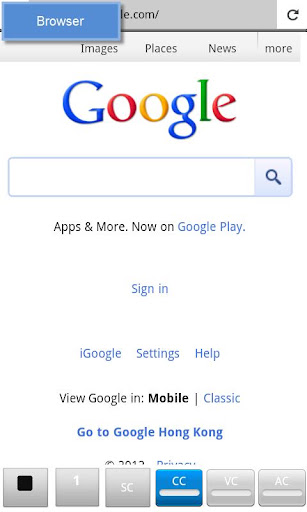
★ It is a browser *and* camera at the same time!
★ Snap pics while you browse!
☆ Similar to: Spy Phone, Mobile Hidden Camera, DeSpy Camera, Super Spy Camera, Spy Camera, Callcam, SpyCam, SilentSnap Camera, SilentCam, SilentCamera NINJA
———————————————————
Device Compatibility
———————————————————
Users have reported the following:
⇒ Tablets: can't access Bottom Panel buttons; will be resolved very soon!
⇒ HTC Desire S: video quality problem.
⇒ HTC Desire HD: can't record video in 480p.
⇒ HTC Evo 4G: FC on HD video recording.
⇒ Huawei Mercury: video and cc not working.
⇒ LG: some devices not supported; send email.
⇒ Motorola: some devices not supported; send email.
⇒ SGS2 Skyrocket SGH-I727: video recording problem.
———————————————————
WARNING
———————————————————
Buy this app only if:
1. You've tried One Eye Beta (free), and I mean it!
2. You like it!
3. You experience *no problems* with it! And...
4. You accept that Beta version may get new features first.
———————————————————
Features
———————————————————
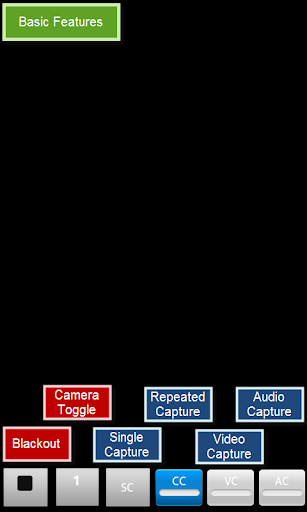
★ Supports: images, video, and audio!
★ Browser with bookmarks support (i.e. browse news, email, facebook while capturing)
★ Blackout Mode: pitch black screen, stays awake, touch to start/stop.
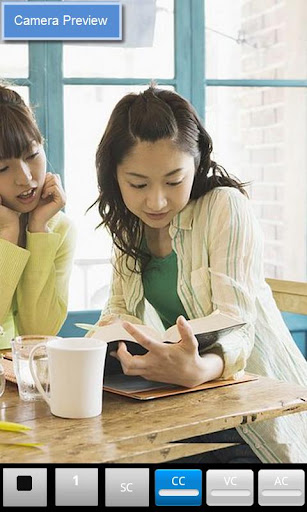
★ Camera Preview mode
★ Front camera support
★ Continuous shooting
★ No shutter sounds ("Shutter Sound Workaround" for devices that do)
★ Hi-res pics
★ HD video up to 1080p resolution
★ Vibration/silent notifications
★ Show/hide media in Gallery
★ Customizable hot keys
———————————————————
Paid Version Additional Features
———————————————————
☆ No ads
☆ Unlimited video recording length
☆ Auto-split video files (by time duration or file size)
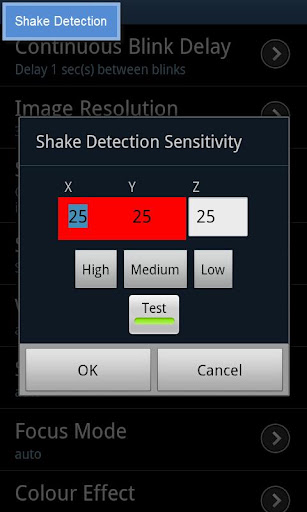
☆ Shake Detection (reduce the number of blurred pics)
☆ Full list of browser bookmarks
☆ Shortcuts: create shortcuts to One Eye using predefined or customizable preferences.
☆ Extended set of preference parameters
———————————————————
To Do List
———————————————————
★ Fixes for bug reports on each device are typically highest priority
★ Gesture trigger to show bottom panel
★ Video recording without sound option
★ PIP camera preview
★ Widget (under consideration)
———————————————————
Troubleshooting
———————————————————
To get prompt response to a problem, send me an email with:
1. Problem description (what did you try to do?)
2. Debug log (Enable Debug Mode and reproduce the problem)
———————————————————
Known Limitations
———————————————————
⇒ Capturing stops when app becomes background.
⇒ LED lights may remain on for several seconds when entering Blackout mode. For Samsung devices, turn lights off: Settings > Display > Touch key light duration
⇒ Blurry pics? Try increasing Continuous Blink Delay. Enable Shake Detection feature.
⇒ Shutter sounds? Some regional devices deliberately won't allow shutting off the shutter sound via the System volume, so it is a limitation of your device, not this app. Shutter Sound Workaround 1 and 2 allow you to workaround this problem. See the app's Help for details.
———————————————————
Tips & Tricks
———————————————————
⇒ Increase Continuous Blink Delay to help produce better quality images by allowing more time for focus and exposure between captures.
⇒ Keep your hands steady and enable Shake Detection to reduce blurred output!
⇒ Create a shortcut on your desktop to launch One Eye in different profiles.
⇒ Change app launch icon by using a shortcut creator app, or launcher such as Go Launcher.
⇒ Motorola Razr, remember to disable "pocket detect" otherwise video recording stops when that kicks in.
⇒ Gallery is slow. Use faster image viewers: e.g. QuickPic, Scalado Album
———————————————————
Permission Requirements
———————————————————
⇒ INTERNET and ACCESS_NETWORK_STATE: required for browser
⇒ READ_HISTORY_BOOKMARKS: required for listing bookmarks in browser
⇒ The rest should be obvious.
(50,- Kc)
Pozadavky: Android 2.3 a vyssi
Popis: One Eye: Probably the best stealth/spy camera app for Android.
Screen:
What's in this version:
For every few 1-star ratings I get without an email to try to fix the problem, I will block the app from the device in the Market instead. Thanks for your understanding!
1.3.4 (this version):
★ Fix: Force Close on changing preferences when low on memory.
Previous:
★ Fix: HD recording for SGS2+ICS.
★ Fix: CC recording on rotate phone
★ Fix: Auto-focus problem on dual cam phones
★ Fix: Shake Detection
★ Fix: Colour Effect & White Balance
★ New: Mute Ringer Volume (Volume Control beep)
Vice info:
Kód: Vybrat vše
https://play.google.com/store/apps/details?id=com.snugsoftware.oneeyerKód: Vybrat vše
http://uloz.to/xN2JJLk/one-eye-browser-v1-3-4-apk
http://www.directmirror.com/files/1HUFS84N
http://www.embedupload.com/?d=4HMRYXEYIH
★ It is probably the best, low-profile, spy cam app for Android!
★ It is a browser *and* camera at the same time!
★ Snap pics while you browse!
☆ Similar to: Spy Phone, Mobile Hidden Camera, DeSpy Camera, Super Spy Camera, Spy Camera, Callcam, SpyCam, SilentSnap Camera, SilentCam, SilentCamera NINJA
———————————————————
Device Compatibility
———————————————————
Users have reported the following:
⇒ Tablets: can't access Bottom Panel buttons; will be resolved very soon!
⇒ HTC Desire S: video quality problem.
⇒ HTC Desire HD: can't record video in 480p.
⇒ HTC Evo 4G: FC on HD video recording.
⇒ Huawei Mercury: video and cc not working.
⇒ LG: some devices not supported; send email.
⇒ Motorola: some devices not supported; send email.
⇒ SGS2 Skyrocket SGH-I727: video recording problem.
———————————————————
WARNING
———————————————————
Buy this app only if:
1. You've tried One Eye Beta (free), and I mean it!
2. You like it!
3. You experience *no problems* with it! And...
4. You accept that Beta version may get new features first.
———————————————————
Features
———————————————————
★ Supports: images, video, and audio!
★ Browser with bookmarks support (i.e. browse news, email, facebook while capturing)
★ Blackout Mode: pitch black screen, stays awake, touch to start/stop.
★ Camera Preview mode
★ Front camera support
★ Continuous shooting
★ No shutter sounds ("Shutter Sound Workaround" for devices that do)
★ Hi-res pics
★ HD video up to 1080p resolution
★ Vibration/silent notifications
★ Show/hide media in Gallery
★ Customizable hot keys
———————————————————
Paid Version Additional Features
———————————————————
☆ No ads
☆ Unlimited video recording length
☆ Auto-split video files (by time duration or file size)
☆ Shake Detection (reduce the number of blurred pics)
☆ Full list of browser bookmarks
☆ Shortcuts: create shortcuts to One Eye using predefined or customizable preferences.
☆ Extended set of preference parameters
———————————————————
To Do List
———————————————————
★ Fixes for bug reports on each device are typically highest priority
★ Gesture trigger to show bottom panel
★ Video recording without sound option
★ PIP camera preview
★ Widget (under consideration)
———————————————————
Troubleshooting
———————————————————
To get prompt response to a problem, send me an email with:
1. Problem description (what did you try to do?)
2. Debug log (Enable Debug Mode and reproduce the problem)
———————————————————
Known Limitations
———————————————————
⇒ Capturing stops when app becomes background.
⇒ LED lights may remain on for several seconds when entering Blackout mode. For Samsung devices, turn lights off: Settings > Display > Touch key light duration
⇒ Blurry pics? Try increasing Continuous Blink Delay. Enable Shake Detection feature.
⇒ Shutter sounds? Some regional devices deliberately won't allow shutting off the shutter sound via the System volume, so it is a limitation of your device, not this app. Shutter Sound Workaround 1 and 2 allow you to workaround this problem. See the app's Help for details.
———————————————————
Tips & Tricks
———————————————————
⇒ Increase Continuous Blink Delay to help produce better quality images by allowing more time for focus and exposure between captures.
⇒ Keep your hands steady and enable Shake Detection to reduce blurred output!
⇒ Create a shortcut on your desktop to launch One Eye in different profiles.
⇒ Change app launch icon by using a shortcut creator app, or launcher such as Go Launcher.
⇒ Motorola Razr, remember to disable "pocket detect" otherwise video recording stops when that kicks in.
⇒ Gallery is slow. Use faster image viewers: e.g. QuickPic, Scalado Album
———————————————————
Permission Requirements
———————————————————
⇒ INTERNET and ACCESS_NETWORK_STATE: required for browser
⇒ READ_HISTORY_BOOKMARKS: required for listing bookmarks in browser
⇒ The rest should be obvious.