Stránka 1 z 2

GameKeyboard

Napsal: 15. 10. 2012 06:41
od Germanicus
GameKeyboard v2.5.3

Požadavky: Android 2.1+
Obrázek Obrázek ObrázekObrázek


Popis:
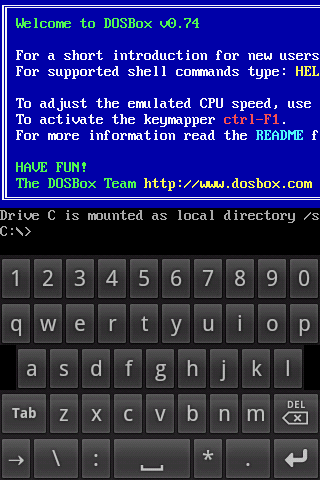
Soft keyboard tailor-made for playing games. Control keyboard/gampad-only games with touchscreen (e.g. Flash, Xperia Play or Onlive games), or control touch-only games with physical keyboard/gamepad (e.g. Street Fighter IV HD)
For any problem please check the product website or email us directly.

Features:
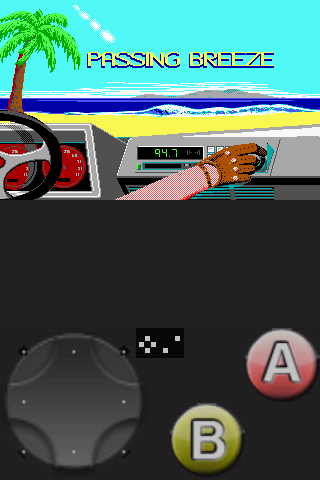
1. virtual gamepad with:
- multi-touch (depends on device and OS)
- 4/8-way d-pad, up to 12 game buttons
- resizable and customizable buttons layout
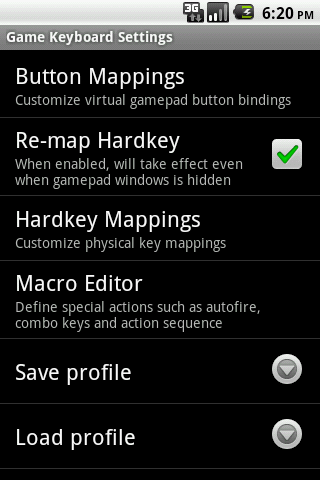
- fully configurable buttons mappings
2. re-mapping physical keys
3. save key/button mappings to profiles
4. full qwerty keyboard
5. work with Accelerometer
6. work with physical controller through OS or 3rd party tools like BluezIME and Sixaxis
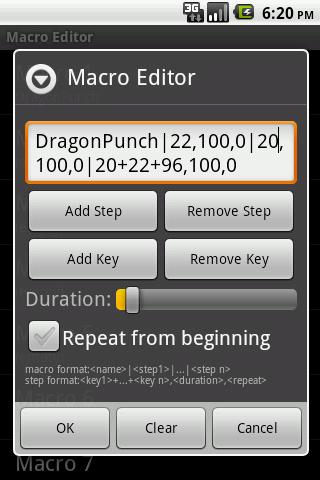
7. support user-defined macro to perform autofire, combo keys and action sequence with single button hit
8. emulate Xperia Play and Onlive Controller buttons
9. emulate Touchscreen action (need root)
10. emulate Analog Joystick (need root)

Compatibility
This app is provided as an add-on for our emulators. Various features can work with many other apps but please test to ensure compatibility. For Motorola Bionic user, there is a ROM issue where many features only work with apps which are explicitly designed to work with soft keyboard.

We recommend using Bluetooth Controller when physical controller is needed.

Depends on device, ROM and target app there are many different ways to call up soft keyboard, e.g.:
- some apps have built-in option to call up soft keyboard
- some devices support using long pressing [Menu] key to call up soft keyboard

GameKeyboard also provide two methods in case the above cannot be used:
- switch to GameKeyboard Launcher, tap on the "call out keyboard after exit" button, then switch back
- turn on "Settings->[Vol. Up] Key Action" then use [Vol. Up] as hotkey

What's in this version:
2.5.3
- [fix] Touchscreen Mode: d-pad drag action (aka "Digital Stick") now work better (e.g. FF3)
2.5.2
- [change] default button size now scale with screen size
- [new] toggle "Edit Mode" from [Back]-key Action menu
- [new] tap a button during "Edit Mode" to resize individual button
Other recent changes
-"Settings->Quick Setup" for easy common setup
-Emulate real analog joystick
-Emulate touchscreen action
-Work with BluezIME
-Non-Blocking mode
-Option to call up keyboard with Vol. Up

Další info:

Kód: Vybrat vše

https://play.google.com/store/apps/details?id=com.locnet.gamekeyboard
Download:

Kód: Vybrat vše

http://www3.zippyshare.com/v/60219183/file.html
Mirror:

Kód: Vybrat vše

http://www.embedupload.com/?d=6IWGCHIQDB
http://uploadmirrors.com/download/T1CKHZ6D/Game_Keyboardv2.5.3.apk

Re: GameKeyboard

Napsal: 23. 11. 2012 00:54
od Kamilos
GameKeyboard v3.0.2

What's in this version:
3.0.2
-[change] Separate "Advance Input Detection" to 2 options:
"Use Advance Input" - to support analog stick/touchpad
"Alternate Key Detect" - only need when cannot detect keypress
3.0.0
- Support USB Analog Stick, Xperia Play Touchpad(in GB), gaming devices(Droid X360, JXD S5110, Yinlips G18A), and solve physical keypress detection problem in most games(e.g. Samurai II, Mini Motor Racing).
Other recent changes
-"Quick Setup" options
-Emulate real analog joystick
-Emulate touchscreen action

Vice info:

Kód: Vybrat vše

https://play.google.com/store/apps/details?id=com.locnet.gamekeyboard
Stahuj zde:

Kód: Vybrat vše

http://uloz.to/xUaFw44/gamekeyboard-v3-0-2-apk
http://www.filedownloads.org/60ye1bv5zpej
http://www.directmirror.com/files/WHTS0NA8
http://www.embedupload.com/?d=0PH4YXFIQH

Re: GameKeyboard

Napsal: 02. 01. 2013 01:10
od Kamilos
GameKeyboard v3.1.0


What's in this version:
3.1.0
-[new] "Advance Input" now work with wired XBox 360 controller and MOGA Universal Driver.
-[new] "Show Keyboard First" option, for GTA cheat code users
Other recent changes
- "Use Advance Input": support USB Analog Stick, Xperia Play Touchpad(in GB), gaming devices(Droid X360, JXD S5110, Yinlips G18A)
-"Alternate Key Detect": solve physical keypress detection problem in most games (e.g. Samurai II, Mini Motor Racing)
-"Quick Setup" options

Vice info:

Kód: Vybrat vše

https://play.google.com/store/apps/details?id=com.locnet.gamekeyboard
Stahuj zde:

Kód: Vybrat vše

http://uloz.to/xYQbCfz/gamekeyboard-v3-1-0-apk
http://www58.zippyshare.com/v/33833118/file.html
http://www.directmirror.com/files/YCMNUSEA

Re: GameKeyboard

Napsal: 21. 01. 2013 15:55
od Germanicus
GameKeyboard v4.0.0

Požadavky: Android 2.1+

What's in this version:
Updated: Jan. 17, 2013
-[change] updated icon
-[new] can perform most gamepad customization in Edit Mode
-[new] remap/Calibrate USB stick axis in Edit Mode
-[change] running a Macro with no defined action will type out it's name, for easy cheat code input
-[new] mappable functions (Run Macro, Toggle Edit Mode)
-[new] Customize Gamepad option in Launcher
-[fix] various bug
Recent changes
-"Show Keyboard First" for GTA cheat code user
-control analog sticks with keyboard

Další info:

Kód: Vybrat vše

https://play.google.com/store/apps/details?id=com.locnet.gamekeyboard
Download:

Kód: Vybrat vše

http://www44.zippyshare.com/v/15204306/file.html
Mirror:

Kód: Vybrat vše

http://www.embedupload.com/?d=0JKJQDGVZI
http://directmirror.com/files/UK0KAZ1J
http://uloz.to/xDLtGGM/gamekeyboard-v4-0-0-apk

Re: GameKeyboard

Napsal: 23. 03. 2013 19:16
od Kamilos
GameKeyboard v4.0.1


What's in this version:
4.0.1
-[Experimental] "Use iCade" option for iCade controller on supported device
-[new] visual effect on binded button press in Edit Mode
-[fix] test Touchscreen Mode in Customize Gamepad screen
-[fix] 8-way diagonal
Recent changes
-"Customize Gamepad" screen
-Remap/Calibrate stick axis and added gamepad customization in Edit Mode
-"Show Keyboard First" option for cheat code user
-Text Macro: run macro with no defined action will type out it's name
-Control virtual analog sticks with keyboard

Vice info:

Kód: Vybrat vše

https://play.google.com/store/apps/details?id=com.locnet.gamekeyboard
Stahuj zde:

Kód: Vybrat vše

http://uloz.to/xtcCAvA/gamekeyboard-v4-0-1-apk
https://mega.co.nz/#!dUIShJKR!YjaFZ3jBlbVffvLMIPfE8TLRJxkT01fTMyvEngcUWo0
http://www47.zippyshare.com/v/8516856/file.html

Re: GameKeyboard

Napsal: 23. 04. 2013 14:27
od Kamilos
GameKeyboard v4.1.0

What's in this version:
4.1.0 **Please REBOOT after update**
-[Experimental] Pan camera with mouse, see homepage "Using with Mouse"
-[new] right stick output keys in keyboard mode, customizable with Button Mappings
-[change] Touchscreen Mode: physical button work normally if correponding virtual button is removed, for mixed touch+keyboard play, e.g. MC4
-[fix] Joystick Mode compatibility, e.g. Dead Trigger
-[fix] Archos Gamepad compatibility
Recent changes:
-Calibrate analog stick
-Control analog stick with keyboard

Vice info:

Kód: Vybrat vše

https://play.google.com/store/apps/details?id=com.locnet.gamekeyboard
Stahuj zde:

Kód: Vybrat vše

http://uloz.to/xArCBEPD/gamekeyboard-v4-1-0-apk
https://mega.co.nz/#!kwVlwSSI!K4MEfxzDpZiehrbOLRgFBF-Vck5c15wUu877qxI5omA
http://www47.zippyshare.com/v/80306659/file.html

Re: GameKeyboard

Napsal: 22. 05. 2013 20:43
od Kamilos
GameKeyboard v4.1.1


What's in this version:
4.1.1 **Please REBOOT when update from 4.0.1 or below **
-[change] separated option to toggle mouse touch support (Use Mouse Input), better for device with no touchscreen and rely on mouse for normal control
-[fix] Joystick Mode compatibility
Other Recent Changes
-[new] Pan camera with mouse, see homepage "Using with Mouse"
-[new] right stick output keys in keyboard mode, customizable with Button Mappings
To use right analog stick with Modern Combat 4 natively, check out MC4 Helper app

Vice info:

Kód: Vybrat vše

https://play.google.com/store/apps/details?id=com.locnet.gamekeyboard
Stahuj zde:

Kód: Vybrat vše

http://uloz.to/xsnwtXQT/gamekeyboard-v4-1-1-apk
https://mega.co.nz/#!PcZgmKQa!C3Btn24nOvFPOZKtMAykj1-JRbYBcL55blxexAchZns
http://www54.zippyshare.com/v/60000805/file.html

Re: GameKeyboard

Napsal: 30. 05. 2013 19:10
od Kamilos
GameKeyboard v4.1.2


What's in this version:
4.1.2 **Please REBOOT when update from 4.0.1 or below **
-[change] save more options to profile
-[new] add media keys to mapping list
Other Recent Changes
-[change] separated option to toggle mouse touch support (Use Mouse Input), better for device with no touchscreen and rely on mouse for normal control
-[fix] Joystick Mode compatibility
-[new] Pan camera with mouse, see homepage "Using with Mouse"
To use right analog stick with Modern Combat 4 natively, check out MC4 Helper app

Vice info:

Kód: Vybrat vše

https://play.google.com/store/apps/details?id=com.locnet.gamekeyboard
Stahuj zde:

Kód: Vybrat vše

http://uloz.to/xCYURuW4/gamekeyboard-v4-1-2-apk
https://mega.co.nz/#!7BQ3lALB!XA7J9FEwnk9PES5rV-PCTyHh8EQ7uSa0Bu1l3HtbCyI
http://www59.zippyshare.com/v/88850186/file.html

Re: GameKeyboard

Napsal: 11. 06. 2013 20:49
od Kamilos
GameKeyboard v4.2.0


What's in this version:
4.2.0 ** Please REBOOT after update **
-[Experimental] remote control thr. An2An Keyboard, benefits include better compatibility and mapping mouse buttons, see homepage [Remote control from another device].
-[fix] improve Touchscreen Mode camera pan, especially with mouse
-[fix] resized d-pad bug
Other Recent Changes
-[new] Pan camera with mouse ("Use Mouse Input"), see homepage "Using with Mouse" for details.
To use right analog stick with Modern Combat 4 natively, check out MC4 Helper app

Vice info:

Kód: Vybrat vše

https://play.google.com/store/apps/details?id=com.locnet.gamekeyboard
Stahuj zde:

Kód: Vybrat vše

http://uloz.to/xf5Ve1Nf/gamekeyboard-v4-2-0-apk
http://www9.zippyshare.com/v/65763990/file.html

Re: GameKeyboard

Napsal: 08. 09. 2013 16:02
od Kamilos
GameKeyboard v5.1.0


What's in this version:
5.1.0 (09-07)
Please reboot and email us when have problem after update
-[new] tap Mouse Middle toggle to Virtual Mouse mode, to perform general touch action quickly
-[new] switch profile from app and Edit Mode
-[fix] auto recognise Nvidia Shield analog triggers after left & right analog sticks are calibrated
Other Recent Changes:
-use mouse button, hide mouse cursor
-tap screen to toggle keyboard ("Use Hotspot")
-swipe from individual virtual button
-move uncommon options to "Internal Options"

Vice info:

Kód: Vybrat vše

https://play.google.com/store/apps/details?id=com.locnet.gamekeyboard
Stahuj zde:

Kód: Vybrat vše

http://uloz.to/xu3MPDNf/gamekeyboard-v5-1-0-4allmobile-eu-apk
https://mega.co.nz/#!s5EnnKAb!IvXRWW5R5Duzprd_czqOjUt_lHlJBmU71kmXICuJ5GY
http://www13.zippyshare.com/v/62865996/file.html
http://www4.zippyshare.com/v/33922921/file.html
http://www.tusfiles.net/ktjy24cdj5cn
http://uloz.to/xjAmmLTd/gamekeyboard-v5-1-0-apk
http://ulozto.sk/xNomm7jS/gamekeyboard-v5-1-0-apk