ActivePinger2
Napsal: 03. 11. 2012 14:15
ActivePinger2 v1.1
Pozadavky: Android 2.2 a vyssi
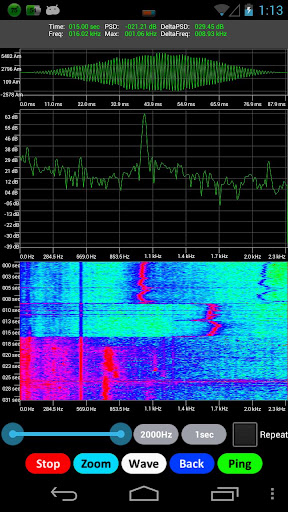
Popis: ActivePinger is an App that generates acoustic waveforms commonly used by sonar and displays the results in real-time.
Screen:

Vice info:
Stahuj zde:
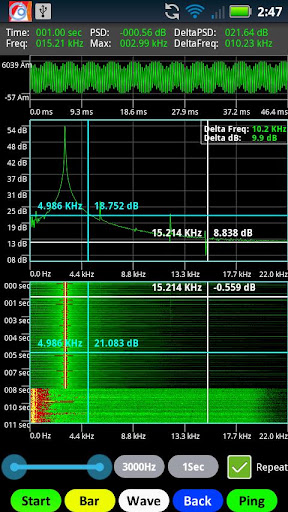
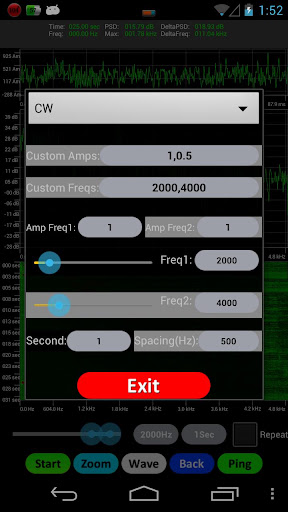
ActivePinger is an App that generates acoustic waveforms commonly used by sonar and displays the results in real-time. Depending on your surrounding environment, you can see the reverberation after pinging. Unlike most Apps, ActivePinger is actually two Apps combined into one: Signal Generator and Spectrogram display. There are six waveforms to choose from: Continuous Wave(CW), Coxcomb, Geometric Comb, Costas Waveforms, Pseudorandom waveform(PRNG) and Hyperbolic Frequency Modulation(HFM) waveform. This tool is great for students and professional engineers studying in the field of sound and vibration since you can see the results of the pinging waveforms in real-time.
*** To customers who bought the original ActivePinger ***
I sincerely apologized for not actively updating the original ActivePInger for quiet sometime. As I got around to it, Google's prevented me from releasing the update because I lost the private key file(...because of a computer crash and rebuilt...) that is required to signed my App. Without this private key file I have released a new App and hence ActivePinger2. For this reason ActivePinger2 is on sale for a limited time only for $0.99. Sincerely,VT
*** Here are the highlighted features ***
1. Three displays: Time-Domain and Frequency-Domain 2D graph and a spectrogram.
2. Selectable sample rates and FFT size. Max sample rate of 44k and max FFT size of 44100.
3. Zoom in or out for viewing data at high resolutions.
4. Matlab like windowing functions.
5. Matlab like colormaps.
6. Display 2D graph setting in line or bar chart mode.
7. Records audio data to SD card for playback.
8. Signal conditioning such as averaging or setting data threshold trigger.
9. Two crossbars for easy readout and calculating the deltas.
10. View data in landscape or portrait mode
11. The abilitiy to take screen capture and send email
12. Fixed frequency and bandwidth display at startup
13. Ability to save audio to wav file format
14. Able to adjust color intensity display to filter certain amplitude
15. Now able to calibrate by adding the dB offset for your device
16. Andy many more!
*** Hardware permission required by this App: ***
1. WRITE_SETTINGS - This is needed to change the display from sleeping.
2. RECORD_AUDIO - Data taken from microphone.
3. INTERNET - This is required for transmitting audio data over a socket.
4. WRITE_EXTERNAL_STORAGE - Save recorded audio data to SD for playback.
Pozadavky: Android 2.2 a vyssi
Popis: ActivePinger is an App that generates acoustic waveforms commonly used by sonar and displays the results in real-time.
Screen:
Vice info:
Kód: Vybrat vše
https://play.google.com/store/apps/details?id=com.idroidbot.activepinger2Kód: Vybrat vše
http://uloz.to/x9xC27d/activepinger2-apk
http://www.directmirror.com/files/QVQ3WWBC
http://www.embedupload.com/?d=1AASL1AWGI*** To customers who bought the original ActivePinger ***
I sincerely apologized for not actively updating the original ActivePInger for quiet sometime. As I got around to it, Google's prevented me from releasing the update because I lost the private key file(...because of a computer crash and rebuilt...) that is required to signed my App. Without this private key file I have released a new App and hence ActivePinger2. For this reason ActivePinger2 is on sale for a limited time only for $0.99. Sincerely,VT
*** Here are the highlighted features ***
1. Three displays: Time-Domain and Frequency-Domain 2D graph and a spectrogram.
2. Selectable sample rates and FFT size. Max sample rate of 44k and max FFT size of 44100.
3. Zoom in or out for viewing data at high resolutions.
4. Matlab like windowing functions.
5. Matlab like colormaps.
6. Display 2D graph setting in line or bar chart mode.
7. Records audio data to SD card for playback.
8. Signal conditioning such as averaging or setting data threshold trigger.
9. Two crossbars for easy readout and calculating the deltas.
10. View data in landscape or portrait mode
11. The abilitiy to take screen capture and send email
12. Fixed frequency and bandwidth display at startup
13. Ability to save audio to wav file format
14. Able to adjust color intensity display to filter certain amplitude
15. Now able to calibrate by adding the dB offset for your device
16. Andy many more!
*** Hardware permission required by this App: ***
1. WRITE_SETTINGS - This is needed to change the display from sleeping.
2. RECORD_AUDIO - Data taken from microphone.
3. INTERNET - This is required for transmitting audio data over a socket.
4. WRITE_EXTERNAL_STORAGE - Save recorded audio data to SD for playback.