NGP.emu
Napsal: 31. 12. 2012 10:48
NGP.emu v1.5.5
(95,- Kc)
Pozadavky: Android dle zarizeni
Popis: Emulate the classic Neogeo Pocket Color hand-held on your Android device
Neogeo Pocket Color emulator based on Neopop (GPL), designed and tested on the original Droid/Milestone, Xoom, Galaxy S2, Nexus 7, and Xperia Play, but works on many devices with similar specs. It's the very first NGP emulator available for Android. Note: The current version has a more accurate music tempo compared to what's shown in the youtube video.
Screen:
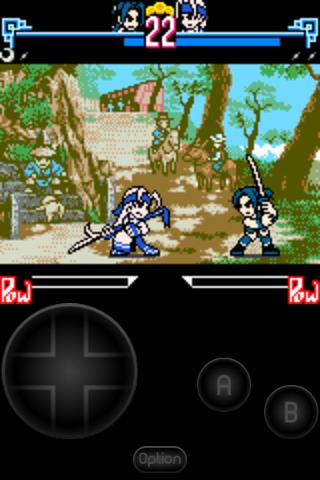
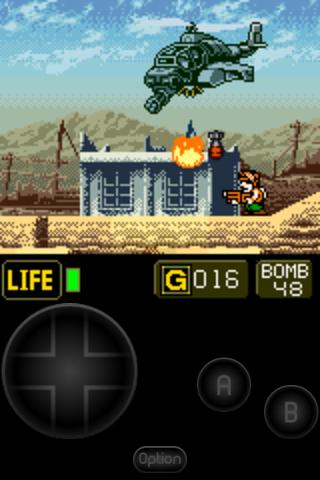
Video:
What's in this version:
* Fix blank screen on Adreno GPUs when Fast CPU->GPU Copy is on
* Remember previous rom path when selecting a save or BIOS path
* Various device-specific crash fixes
* Input latency fix for devices like R800i Xperia Play
Vice info:
Stahuj zde:
Emulate the classic Neogeo Pocket Color hand-held on your Android device
Neogeo Pocket Color emulator based on Neopop (GPL), designed and tested on the original Droid/Milestone, Xoom, Galaxy S2, Nexus 7, and Xperia Play, but works on many devices with similar specs. It's the very first NGP emulator available for Android. Note: The current version has a more accurate music tempo compared to what's shown in the youtube video.
Features include:
* PSG Sound support (DAC will be added in an update)
* English/Japanese game language switch support
* Backup memory and save state support, auto-save and ten manual slots for save states.
* Zip file support
* Configurable on-screen multi-touch controls in addition to keyboard controls (up to 4 touches supported at once), and an Xperia Play optimized button layout
* Multiplayer-capable Wiimote + Classic Controller, iControlPad, and Zeemote JS1 support (Wiimotes not yet working on Android 4.2), also works with any generic Bluetooth/USB gamepad supported by Android
No ROMs are included with this app and must be supplied by the user. A number of public domain games/demos are available at www.pdroms.de. Transfer games anywhere to your SD card and browse to them from within the app (default SD card directory is /mnt/sdcard).
(95,- Kc)
Pozadavky: Android dle zarizeni
Popis: Emulate the classic Neogeo Pocket Color hand-held on your Android device
Neogeo Pocket Color emulator based on Neopop (GPL), designed and tested on the original Droid/Milestone, Xoom, Galaxy S2, Nexus 7, and Xperia Play, but works on many devices with similar specs. It's the very first NGP emulator available for Android. Note: The current version has a more accurate music tempo compared to what's shown in the youtube video.
Screen:
Video:
What's in this version:
* Fix blank screen on Adreno GPUs when Fast CPU->GPU Copy is on
* Remember previous rom path when selecting a save or BIOS path
* Various device-specific crash fixes
* Input latency fix for devices like R800i Xperia Play
Vice info:
Kód: Vybrat vše
https://play.google.com/store/apps/details?id=com.explusalpha.NgpEmuKód: Vybrat vše
http://uloz.to/xpD6S4k/ngp-emu-v1-5-5-apk
http://www43.zippyshare.com/v/37906463/file.html
http://www.directmirror.com/files/3AMYX8BBNeogeo Pocket Color emulator based on Neopop (GPL), designed and tested on the original Droid/Milestone, Xoom, Galaxy S2, Nexus 7, and Xperia Play, but works on many devices with similar specs. It's the very first NGP emulator available for Android. Note: The current version has a more accurate music tempo compared to what's shown in the youtube video.
Features include:
* PSG Sound support (DAC will be added in an update)
* English/Japanese game language switch support
* Backup memory and save state support, auto-save and ten manual slots for save states.
* Zip file support
* Configurable on-screen multi-touch controls in addition to keyboard controls (up to 4 touches supported at once), and an Xperia Play optimized button layout
* Multiplayer-capable Wiimote + Classic Controller, iControlPad, and Zeemote JS1 support (Wiimotes not yet working on Android 4.2), also works with any generic Bluetooth/USB gamepad supported by Android
No ROMs are included with this app and must be supplied by the user. A number of public domain games/demos are available at www.pdroms.de. Transfer games anywhere to your SD card and browse to them from within the app (default SD card directory is /mnt/sdcard).