Reverse Tether
Napsal: 11. 11. 2012 17:30
Reverse Tether (build.2012.09.08.paid)
Požadavky: ROOT Android 2.2+

Popis:
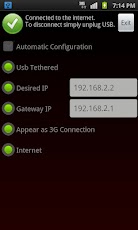
ReverseTether allows you to access your computer's internet connection on your device via USB, thus, reverse tethering. It's the first and only app of its kind on the Market, no other app does such a thing.
This app may be useful for you if:
- if you don't have a mobile data plan.
- if you have a limited plan and would like to spare your bytes and money whenever you're at home/work/school.
- if you're roaming and would like to avoid roaming data charges.
- if you prefer speed and want an internet that is faster* than any wifi/3g/4g/lte. (*as fast as your modem)
- if you don't have access to wifi / don't need wifi just for your device.
- if you don't trust the security/privacy of your wifi network.
- if your wifi connection is weak, slow or keeps disconnecting.
- if you're sick of eating terrible food at burger places just for wifi access.
- if you would like to access your local network from your device for backups or storage.
Basically, since you're already connected to usb to recharge or sync, why not also have a super fast, unlimited, secure internet connection for no additional charges, for whatever reason,
like sync your mail, contacts or calendars, download and update apps, pre-cache maps, use online-only apps/games, etc...
Key features:
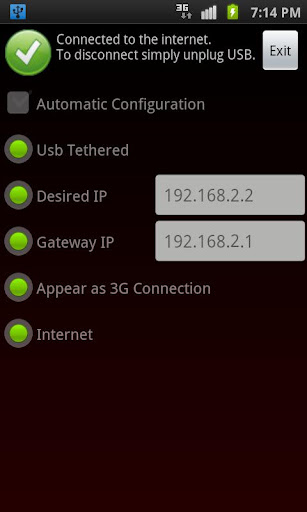
- You'll be able to connect to the internet via USB with a single click. No advanced skills required whatsoever.
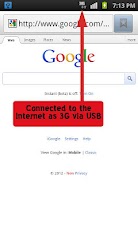
- The connection will appear on your device as 3G so that all apps including Market function seamlessly as if you're actually connected to 3G.
- It will first guide you in 2 easy steps to setup your computer for it to work.
- No pc-side software installation is needed at all.
- It provides an option to automatically connect as soon as you plug in USB.
- To disconnect, simply unplug USB. To connect again, plug back USB. Voila. Easy.
- A manual configuration option is also available for advanced users.
What's in this version:
Now supporting more devices thanks to the continuous user feedback.
Crash fix.
Další info:
Downloa:
Mirror:
Požadavky: ROOT Android 2.2+
Popis:
ReverseTether allows you to access your computer's internet connection on your device via USB, thus, reverse tethering. It's the first and only app of its kind on the Market, no other app does such a thing.
This app may be useful for you if:
- if you don't have a mobile data plan.
- if you have a limited plan and would like to spare your bytes and money whenever you're at home/work/school.
- if you're roaming and would like to avoid roaming data charges.
- if you prefer speed and want an internet that is faster* than any wifi/3g/4g/lte. (*as fast as your modem)
- if you don't have access to wifi / don't need wifi just for your device.
- if you don't trust the security/privacy of your wifi network.
- if your wifi connection is weak, slow or keeps disconnecting.
- if you're sick of eating terrible food at burger places just for wifi access.
- if you would like to access your local network from your device for backups or storage.
Basically, since you're already connected to usb to recharge or sync, why not also have a super fast, unlimited, secure internet connection for no additional charges, for whatever reason,
like sync your mail, contacts or calendars, download and update apps, pre-cache maps, use online-only apps/games, etc...
Key features:
- You'll be able to connect to the internet via USB with a single click. No advanced skills required whatsoever.
- The connection will appear on your device as 3G so that all apps including Market function seamlessly as if you're actually connected to 3G.
- It will first guide you in 2 easy steps to setup your computer for it to work.
- No pc-side software installation is needed at all.
- It provides an option to automatically connect as soon as you plug in USB.
- To disconnect, simply unplug USB. To connect again, plug back USB. Voila. Easy.
- A manual configuration option is also available for advanced users.
What's in this version:
Now supporting more devices thanks to the continuous user feedback.
Crash fix.
Další info:
Kód: Vybrat vše
https://play.google.com/store/apps/details?id=com.littlelan.ReverseTether.PaidKód: Vybrat vše
http://www25.zippyshare.com/v/58671690/file.htmlKód: Vybrat vše
http://www.embedupload.com/?d=6UG3D2KZEW
http://uploadmirrors.com/download/0W9WQC6D/reverse_tether_full__paid.apk