Android Firewall - Donate
Napsal: 02. 02. 2013 19:27
Android Firewall - Donate v2.1.0
(20,- Kc)
Pozadavky: Android 2.2 a vyssi + ROOT
Popis: This is a fork of the popular application Droidwall that uses iptables to limit data usage and add security to Android.
Screen:
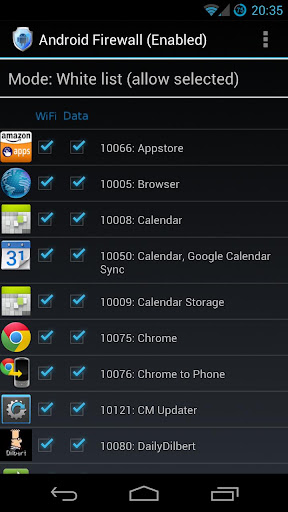
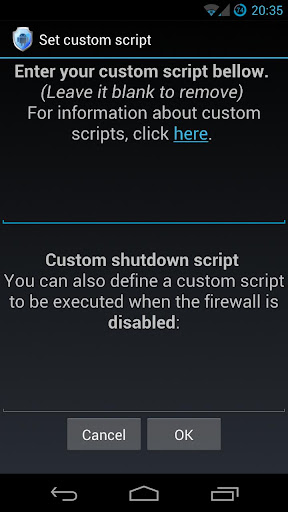
What's in this version:
Changes in version 2.1.0:
Invert option added for Data/Wifi for users who swap between Whitelist/Blacklist.
Profiles functionality added.
Notifications no longer appear for updated apps.
Menu overhaul. Menu now more user friendly.
Vice info:
Stahuj zde:
**This is the DONATE version of Android Firewall.**
There is no difference between this version and the free version. This is simply a donate version in case you feel my work is worth it.
This is a fork of the popular application Droidwall that uses iptables to limit data usage and add security to Android. Droidwall was originally created by developer Rodrigo Zechin Rosauro. The app was discontinued and did not function correctly on Android 4.x. So I decided to fix it.
***ROOT ACCESS IS REQUIRED***
Android Firewall has all of the capabilities of Droidwall. It supports Android 2.2 and greater.
A firewall on Android is a great tool when it comes to the tiered data plans carriers have moved to and that's not even talking about the added security a firewall brings.
If you install Android Firewall and find that the software does not work correctly please install BusyBox and a Terminal Emulator. Both applications can be found on the Play Store. Open the Terminal Emulator and type "busybox route" without the quotes. Please send an e-mail to me with the output from that command to help in my troubleshooting.
NOTE: HTC Thunderbolt users on Android 4.x ROMS can now block cellular data if you are running ROM's based on Liquid MR3.
Android Firewall is open source software under GPL v3.
****Profile instructions****
Profiles are based off of exported rules files. The rules files contain ALL settings and not just app rules. This means things like Notifications, IPv6, Logs can be controlled by the profile as well. You can have up to 6 different profiles. They can be quickly activated by the drop down spinner.
1. Set up your rules.
2. Set up your options.
3. Export your rules.
4. Menu -> Profile Management -> Create Profile
5. Choose which profile you want to create/modify.
6. Choose the rules file you want to assign to that profile.
7. Load the profile through the menu or through the spinner drop down.
(20,- Kc)
Pozadavky: Android 2.2 a vyssi + ROOT
Popis: This is a fork of the popular application Droidwall that uses iptables to limit data usage and add security to Android.
Screen:
What's in this version:
Changes in version 2.1.0:
Invert option added for Data/Wifi for users who swap between Whitelist/Blacklist.
Profiles functionality added.
Notifications no longer appear for updated apps.
Menu overhaul. Menu now more user friendly.
Vice info:
Kód: Vybrat vše
https://play.google.com/store/apps/details?id=com.jtschohl.donate.androidfirewallKód: Vybrat vše
http://uloz.to/xU6J9oz/android-firewall-donate-v2-1-0-apk
http://www12.zippyshare.com/v/72972452/file.html
http://www.embedupload.com/?d=9OEWMWQZALThere is no difference between this version and the free version. This is simply a donate version in case you feel my work is worth it.
This is a fork of the popular application Droidwall that uses iptables to limit data usage and add security to Android. Droidwall was originally created by developer Rodrigo Zechin Rosauro. The app was discontinued and did not function correctly on Android 4.x. So I decided to fix it.
***ROOT ACCESS IS REQUIRED***
Android Firewall has all of the capabilities of Droidwall. It supports Android 2.2 and greater.
A firewall on Android is a great tool when it comes to the tiered data plans carriers have moved to and that's not even talking about the added security a firewall brings.
If you install Android Firewall and find that the software does not work correctly please install BusyBox and a Terminal Emulator. Both applications can be found on the Play Store. Open the Terminal Emulator and type "busybox route" without the quotes. Please send an e-mail to me with the output from that command to help in my troubleshooting.
NOTE: HTC Thunderbolt users on Android 4.x ROMS can now block cellular data if you are running ROM's based on Liquid MR3.
Android Firewall is open source software under GPL v3.
****Profile instructions****
Profiles are based off of exported rules files. The rules files contain ALL settings and not just app rules. This means things like Notifications, IPv6, Logs can be controlled by the profile as well. You can have up to 6 different profiles. They can be quickly activated by the drop down spinner.
1. Set up your rules.
2. Set up your options.
3. Export your rules.
4. Menu -> Profile Management -> Create Profile
5. Choose which profile you want to create/modify.
6. Choose the rules file you want to assign to that profile.
7. Load the profile through the menu or through the spinner drop down.