Shake - Screen Off
Napsal: 22. 02. 2013 21:04
Shake - Screen Off v8.2
(25,- Kc)
Pozadavky: Android 2.2 a vyssi
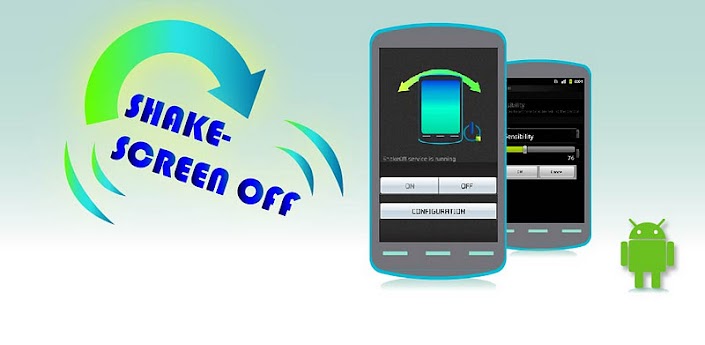
Popis: Power key is hard to press? Lock the screen with a shake!
Screen:
What's in this version:
## FIX several bugs.
1. Add "auto kill all processes when screen off" option;
2. Optimized to reduce battery cost;
3. Improve your battery life greatly;
## How to Uninstall this app ##
1. Open "Settings" in Home;
2. Select "Location & Security-> Select device administrators";
3. ShakeOff - Deactivate;
4. Uninstall ShakeOff normally;
Vice info:
Stahuj zde:
Power key is hard to press? Lock the screen with a shake!
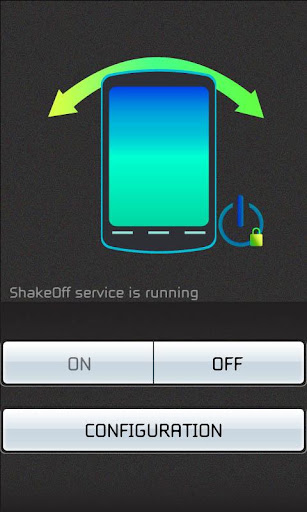
"Shake - Screen Off" is very easy to use to help lock your screen with a simple hand shake!
"Shake - Screen Off" is also a battery saver app, which can help to kill all background processes when screen off. You won't need other battery saver tools, "Shake - Screen Off" can help you save your phone's battery as you wish.
With "Shake - Screen Off", you don't need to press power button again when you want your device turn to sleep mode. Just a "Shake" make it! To help you save your battery life greatly in this simple way.
Tiny size, only 200k!
## BEWARE ##
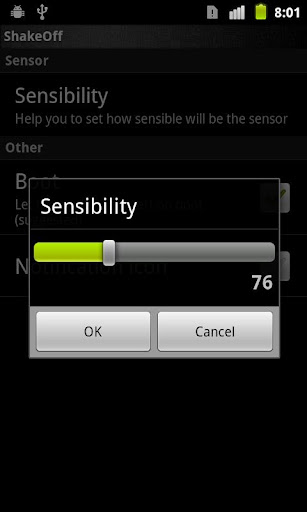
Take care when you are trying to adjust the sensibility of the sensor! Be carefully when you are trying to adjust it to the max value!
## How to turn it off when sensor is too sensitive? ##
Please call this phone; ShakeOff won't work when calling in.
Turn it off or adjust the sensor lower when calling.
## PERMISSIONS ##
+ INTERNET_ACCESS, READ_BOOKMARK, ACCESS_NETWORK_STATE are required for AirPush.
+ READ_PHONE_STATE, INSTALL_SHORTCUT, ACCESS_COARSE_LOCATION are required by LeadBolt.
## How to Uninstall ##
1. Open "Settings" in Home;
2. Select "Location & Security-> Select device administrators";
3. ShakeOff - Deactivate;
4. Uninstall ShakeOff normally;
## STATEMENT ##
"Shake - Screen Off" doesn't use any tricky way to prevent uninstalling. It just uses a system level permission (Device Policy Manager) to turn screen off which needs the user's confirmation. The user need to remove the permission authorization before uninstalling this app.
(25,- Kc)
Pozadavky: Android 2.2 a vyssi
Popis: Power key is hard to press? Lock the screen with a shake!
Screen:
What's in this version:
## FIX several bugs.
1. Add "auto kill all processes when screen off" option;
2. Optimized to reduce battery cost;
3. Improve your battery life greatly;
## How to Uninstall this app ##
1. Open "Settings" in Home;
2. Select "Location & Security-> Select device administrators";
3. ShakeOff - Deactivate;
4. Uninstall ShakeOff normally;
Vice info:
Kód: Vybrat vše
https://play.google.com/store/apps/details?id=com.droiddev.shake
https://play.google.com/store/apps/details?id=com.droiddev.unlocker_shakeoffKód: Vybrat vše
http://uloz.to/xEizfY7/shake-screen-off-v8-2-zip
https://mega.co.nz/#!qBV3Vbjb!JGbQRy5IfrNO_4xGSFJ4h0jF5DMGYyAaYdB_jznfB-M
http://www22.zippyshare.com/v/84194477/file.html"Shake - Screen Off" is very easy to use to help lock your screen with a simple hand shake!
"Shake - Screen Off" is also a battery saver app, which can help to kill all background processes when screen off. You won't need other battery saver tools, "Shake - Screen Off" can help you save your phone's battery as you wish.
With "Shake - Screen Off", you don't need to press power button again when you want your device turn to sleep mode. Just a "Shake" make it! To help you save your battery life greatly in this simple way.
Tiny size, only 200k!
## BEWARE ##
Take care when you are trying to adjust the sensibility of the sensor! Be carefully when you are trying to adjust it to the max value!
## How to turn it off when sensor is too sensitive? ##
Please call this phone; ShakeOff won't work when calling in.
Turn it off or adjust the sensor lower when calling.
## PERMISSIONS ##
+ INTERNET_ACCESS, READ_BOOKMARK, ACCESS_NETWORK_STATE are required for AirPush.
+ READ_PHONE_STATE, INSTALL_SHORTCUT, ACCESS_COARSE_LOCATION are required by LeadBolt.
## How to Uninstall ##
1. Open "Settings" in Home;
2. Select "Location & Security-> Select device administrators";
3. ShakeOff - Deactivate;
4. Uninstall ShakeOff normally;
## STATEMENT ##
"Shake - Screen Off" doesn't use any tricky way to prevent uninstalling. It just uses a system level permission (Device Policy Manager) to turn screen off which needs the user's confirmation. The user need to remove the permission authorization before uninstalling this app.