Samsung Multi Window Manager Pro
Napsal: 23. 03. 2013 11:43
Samsung Multi Window Manager Pro v1.3.2
Požadavky: ROOT Android 4.1.2+
ONLY SAMSUNG ROMS SUPPORT MULTI WINDOW...CYANOGENMOD, AOSP, AOKP, ETC CANNOT USE THIS APP
Popis:
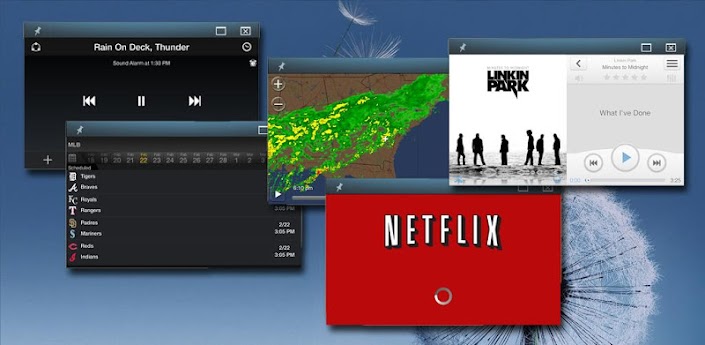
Samsung has added a new multi window feature to a few of their Jelly Bean devices.
However...there is only a limited set of apps compatible with this new feature.
Using this Multi Window Manager, you can enable ANY app to take advantage of this awesome new feature.
This app is now compatible with the following Samsung Galaxy devices:
S3
Note
Note II
Note 10.1
Check out the Pro version for these additional features:
- Create shortcuts on your homescreen to open apps or web bookmarks in windowed mode (Note 10.1 tablet only)
- Specify custom window sizes for shortcuts (Note 10.1 tablet only)
- Open multiple instances of some apps (This is limited by whether or not a particular app permits multiple instances...
I've yet to find an internet browser that allows this, however there are many other useful apps that do allow it)
- Fast reboot...cuts reboot time to less than half that of a normal reboot (No reboot at all for phones)
- Detect new app installs and prompt to enable multi window
- Backup and restore your enabled apps list
What’s in this version:
Updated: Mar. 22, 2013
1.3.2
- Fixed bug causing XML read/parse errors
- Applications natively supporting multi window will automatically be included in the enabled list
- Added patches for the SCH-I939 and SHV-E210
1.3.1
- Phones (Note, Note 2, GS3) can now apply settings without reboot (Pro) (Requires Busybox)
1.3
- Added compatibility with the Note, Note II, and GS3
Další info:
Download:
Mirror:
Požadavky: ROOT Android 4.1.2+
ONLY SAMSUNG ROMS SUPPORT MULTI WINDOW...CYANOGENMOD, AOSP, AOKP, ETC CANNOT USE THIS APP
Popis:
Samsung has added a new multi window feature to a few of their Jelly Bean devices.
However...there is only a limited set of apps compatible with this new feature.
Using this Multi Window Manager, you can enable ANY app to take advantage of this awesome new feature.
This app is now compatible with the following Samsung Galaxy devices:
S3
Note
Note II
Note 10.1
Check out the Pro version for these additional features:
- Create shortcuts on your homescreen to open apps or web bookmarks in windowed mode (Note 10.1 tablet only)
- Specify custom window sizes for shortcuts (Note 10.1 tablet only)
- Open multiple instances of some apps (This is limited by whether or not a particular app permits multiple instances...
I've yet to find an internet browser that allows this, however there are many other useful apps that do allow it)
- Fast reboot...cuts reboot time to less than half that of a normal reboot (No reboot at all for phones)
- Detect new app installs and prompt to enable multi window
- Backup and restore your enabled apps list
What’s in this version:
Updated: Mar. 22, 2013
1.3.2
- Fixed bug causing XML read/parse errors
- Applications natively supporting multi window will automatically be included in the enabled list
- Added patches for the SCH-I939 and SHV-E210
1.3.1
- Phones (Note, Note 2, GS3) can now apply settings without reboot (Pro) (Requires Busybox)
1.3
- Added compatibility with the Note, Note II, and GS3
Další info:
Kód: Vybrat vše
https://play.google.com/store/apps/details?id=com.bjbinc.multiwindowmanagerKód: Vybrat vše
http://www64.zippyshare.com/v/79206109/file.htmlKód: Vybrat vše
http://www.embedupload.com/?d=3ULEI1YGZE
http://directmirror.com/files/14WWC1FN
http://uloz.to/xEY5qjb/samsung-multi-window-manager-pro-v1-3-2-apk