Android Calendar Dialer
Napsal: 01. 04. 2013 19:44
Android Calendar Dialer v1.7.1
(38,- Kc)
Pozadavky: Android 2.0 a vyssi
Popis: Now it is possible to dial directly from the built-in Calendar application on some devices.
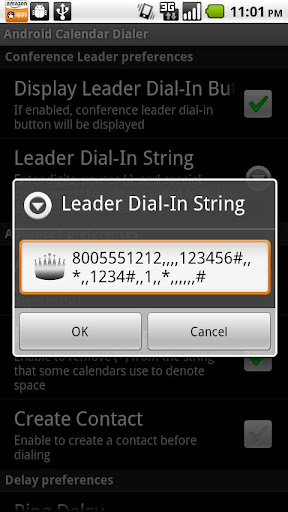
The Android Calendar Dialer is a utility for processing the data in the built-in Calendar's event location field. It permits telephone numbers with extensions, conference bridge numbers, passcodes, DTMF menu entry, etc. to be dialed with no text entry and very few clicks. See the Known Issues section and check out the screen shots to see just how simple it will make dialing into your next conference call!
Screen:


What's in this version:
(v1.7.1)
- bug fix: default/existing preference values are now shown when the Preferences are edited
- Added "ACD Today's Events" in Launcher to view current day calendar appointments and to launch Android Calendar Dialer
- Added button to dial in as Conference Leader. Show/Hide button w/ preferences & disabled until "Leader Dial-In String" is setup in Preferences.
Vice info:
Stahuj zde:
Android Calendar Dialer also filters out superfluous text from the event location, such as conference room locations, so that it's possible to just dial the number. It's not a replacement calendar - it's an intuitive app that handles numerous types of entries encountered in the Calendar's location field and let's you dial the phone number and extensions.
Supported formats will typically have the dial-in number followed by any of the letters 'p' 'w' 'x', comma (,), semi-colon (;), or character strings such as "ext", or just about any other text. Pauses are automatically inserted between the number to dial and the digits to enter after the call has been answered.
*** READ THIS - If your Calendar app does not allow you to select both the number to dial and the extension _simultaneously_ (both number and extension must be in a single link!), this app will NOT work on your device unless you a) launch the app from the (included) ACD-Today's Events icon, b) install a third-party Calendar app which does (see support site). or c) rely on the favorites feature by clicking on the passcode but then inserting the dial-in number from a stored favorite ***
To make your life just a bit simpler, please explain to your meeting organizers that they must put the conference call dial-in numbers and passcodes in the meeting event location field because you are using the Android Calendar Dialer.
(38,- Kc)
Pozadavky: Android 2.0 a vyssi
Popis: Now it is possible to dial directly from the built-in Calendar application on some devices.
The Android Calendar Dialer is a utility for processing the data in the built-in Calendar's event location field. It permits telephone numbers with extensions, conference bridge numbers, passcodes, DTMF menu entry, etc. to be dialed with no text entry and very few clicks. See the Known Issues section and check out the screen shots to see just how simple it will make dialing into your next conference call!
Screen:
What's in this version:
(v1.7.1)
- bug fix: default/existing preference values are now shown when the Preferences are edited
- Added "ACD Today's Events" in Launcher to view current day calendar appointments and to launch Android Calendar Dialer
- Added button to dial in as Conference Leader. Show/Hide button w/ preferences & disabled until "Leader Dial-In String" is setup in Preferences.
Vice info:
Kód: Vybrat vše
https://play.google.com/store/apps/details?id=com.util.androcaldialerKód: Vybrat vše
http://uloz.to/xEys8wX/android-calendar-dialer-v1-7-1-apk
https://mega.co.nz/#!sUhk0S6C!a0tk9Xwl3yZR1v7K9SX5_BTL1UhO0YyfcMk0tZiUagQ
http://www49.zippyshare.com/v/54827542/file.htmlSupported formats will typically have the dial-in number followed by any of the letters 'p' 'w' 'x', comma (,), semi-colon (;), or character strings such as "ext", or just about any other text. Pauses are automatically inserted between the number to dial and the digits to enter after the call has been answered.
*** READ THIS - If your Calendar app does not allow you to select both the number to dial and the extension _simultaneously_ (both number and extension must be in a single link!), this app will NOT work on your device unless you a) launch the app from the (included) ACD-Today's Events icon, b) install a third-party Calendar app which does (see support site). or c) rely on the favorites feature by clicking on the passcode but then inserting the dial-in number from a stored favorite ***
To make your life just a bit simpler, please explain to your meeting organizers that they must put the conference call dial-in numbers and passcodes in the meeting event location field because you are using the Android Calendar Dialer.