Smart Answer Call
Napsal: 06. 04. 2013 14:01
Smart Answer Call v3.1
(36,- Kc)
Pozadavky: Android 2.2 a vyssi
Popis: To answer a incoming call, just close the phone to your ear.
Screen:
What's in this version:
[ v 3.1 ]
- Fixed for JellyBean Version
[ v 2.7 ]
- Enhanced shaking sensitivity
- Modified answer call algorithm
- Bug fixed : screen-off problem after call in automatic mode.
- Fixed the minor bugs
[ v 2.5 ]
- Added New Feature : Home screen after end call
- Added New Feature : Blank screen during call
- Added the Speakerphone Mode Widget
- Modified the speakerphone function on outgoing call.
- Fixed the problem of ring volume on Voice caller ID.
- Fixed the minor bugs
Vice info:
Stahuj zde:
To end call during a call, just turn the phone over.
You will experience the various and amazing speakerphone features ! By registering on the home screen widget is more convenient to use.
And this app also supports the voice output of caller ID on incoming call.
For more convenience, 'Home screen after end call' and 'Blank screen during call' features were added.
[ Major Features ]
◆ Answer Call Mode ◆
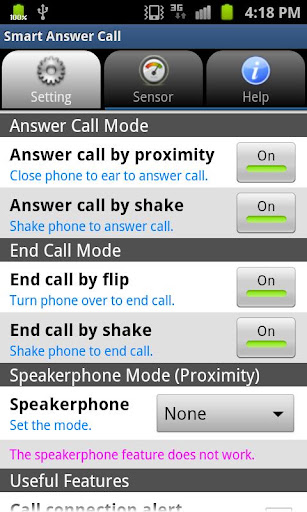
1. Answer call by proximity
To answer a incoming call, just close the phone to your ear. You can answer an incoming call easily by proximity sensor. If the phone is in your pocket or bag when an incoming call, take phone out, and then close the phone to your ear after 1 second(check caller ID).
2. Answer call by shake
Shake the phone to answer call.
◆ End Call Mode ◆
1. End call by flip
To end call during a call, just turn the phone over.
2. End call by shake
Shake the phone to end call.
◆ Speakerphone Mode (Proximity) ◆
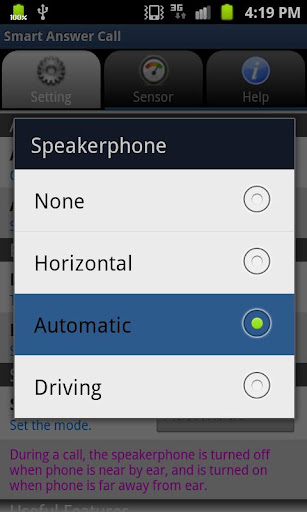
1. Horizontal Mode
It works only with the phone horizontal state (on the table), and also can answer/end a call by proximity sensor. If it is difficult to answer a call by dirty hands, this feature is very useful.
2. Automatic Mode
During a call, the speakerphone is turned off when phone is near by ear, and is turned on when phone is far away from ear.
3. Driving Mode
It works only speakerphone mode, and also can answer/end a call by proximity sensor. It can be used as handsfree while driving.
◆ Useful Features ◆
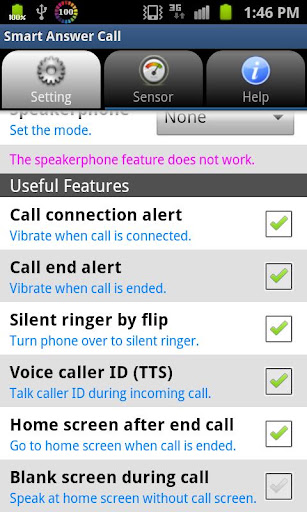
1. Call connection alert
The vibrator will sound when call connected.
2. Call end alert
The vibrator will sound when call disconnected.
3. Silent ringer by flip
Turn phone over to silent ringer.
4. Voice Caller ID (Text-to-Speech)
This feature will speak the caller information(caller name or number) instead of ringtone on incoming call. This is designed to work on the ring volume.
5. Home screen after end call
This feature will return to home screen directly when call is ended.
6. Blank screen during call
This feature will be possible to speak at home screen without call screen during call.
◆ Sensor Sensitivity ◆
1. Proximity Sensitivity
2 Shake Sensitivity
(36,- Kc)
Pozadavky: Android 2.2 a vyssi
Popis: To answer a incoming call, just close the phone to your ear.
Screen:
What's in this version:
[ v 3.1 ]
- Fixed for JellyBean Version
[ v 2.7 ]
- Enhanced shaking sensitivity
- Modified answer call algorithm
- Bug fixed : screen-off problem after call in automatic mode.
- Fixed the minor bugs
[ v 2.5 ]
- Added New Feature : Home screen after end call
- Added New Feature : Blank screen during call
- Added the Speakerphone Mode Widget
- Modified the speakerphone function on outgoing call.
- Fixed the problem of ring volume on Voice caller ID.
- Fixed the minor bugs
Vice info:
Kód: Vybrat vše
https://play.google.com/store/apps/details?id=com.hardrock.smartanswercallKód: Vybrat vše
http://uloz.to/xVUjeaeW/smart-answer-call-v3-1-apk
https://mega.co.nz/#!xNYi3bgR!LXO5Fix-b7i5VSPuRCQqVQb8AJkmHYWpiKmYWACz0NY
http://www9.zippyshare.com/v/58109926/file.htmlYou will experience the various and amazing speakerphone features ! By registering on the home screen widget is more convenient to use.
And this app also supports the voice output of caller ID on incoming call.
For more convenience, 'Home screen after end call' and 'Blank screen during call' features were added.
[ Major Features ]
◆ Answer Call Mode ◆
1. Answer call by proximity
To answer a incoming call, just close the phone to your ear. You can answer an incoming call easily by proximity sensor. If the phone is in your pocket or bag when an incoming call, take phone out, and then close the phone to your ear after 1 second(check caller ID).
2. Answer call by shake
Shake the phone to answer call.
◆ End Call Mode ◆
1. End call by flip
To end call during a call, just turn the phone over.
2. End call by shake
Shake the phone to end call.
◆ Speakerphone Mode (Proximity) ◆
1. Horizontal Mode
It works only with the phone horizontal state (on the table), and also can answer/end a call by proximity sensor. If it is difficult to answer a call by dirty hands, this feature is very useful.
2. Automatic Mode
During a call, the speakerphone is turned off when phone is near by ear, and is turned on when phone is far away from ear.
3. Driving Mode
It works only speakerphone mode, and also can answer/end a call by proximity sensor. It can be used as handsfree while driving.
◆ Useful Features ◆
1. Call connection alert
The vibrator will sound when call connected.
2. Call end alert
The vibrator will sound when call disconnected.
3. Silent ringer by flip
Turn phone over to silent ringer.
4. Voice Caller ID (Text-to-Speech)
This feature will speak the caller information(caller name or number) instead of ringtone on incoming call. This is designed to work on the ring volume.
5. Home screen after end call
This feature will return to home screen directly when call is ended.
6. Blank screen during call
This feature will be possible to speak at home screen without call screen during call.
◆ Sensor Sensitivity ◆
1. Proximity Sensitivity
2 Shake Sensitivity