MP3 InCall Recorder & Voice PRO
Napsal: 03. 05. 2013 20:02
MP3 InCall Recorder & Voice PRO v1.2
Pozadavky: Android 2.3.3 a vyssi
Popis: Convenient and simple as it sounds!!
High Quality MP3 Calls & Voice recorder in one!!!
Screen:
Video:
What's in this version:
New features on version 1.2:
1. Application Password - Protects audio files from exposure.
2. delete or save the last recording in Auto mode.(optional)
3. Select the file save location and folder name (external or internal SD card).
4. Sync to Dropbox!: single file, multiple files, or sync every recording at the end of it automatically.
Files will be saved in folders sorted by contact / phone number and inside by date.
5. Automatically recording selection to specific contacts or phone numbers.
Vice info:
Stahuj zde:
------notice:-------
Recording calls is not simple issue on android phones so if you notice a problem please email us to get support instead of writing a review!!!
In a saturated market of calls recording applications that provide only a small part of the user caprices and not give much room for intervention, joins a new application calls 'InCall Recorder' that meets all requirements.
InCall Recorder Allows full control of Recorded Calls.
You can choose when to start recording and saving battery power and reduce size of the audio file.
There is also a choice of automatically recording all conversations interactions unattended.
Quick start tape recorder creating high-quality audio.
'InCall Recorder' lets you manage all the audio files conveniently and efficiently.
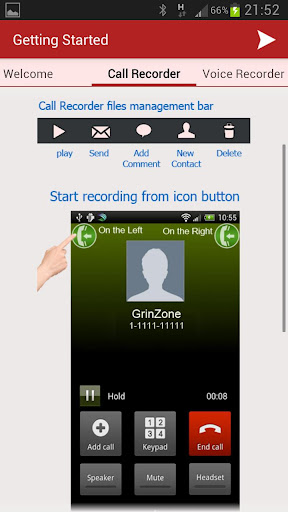
You can choose where to place the recording start button.
You can play, share, or add a note to each call recorded.
To enjoy better audio quality than other competitors in the market, we added a patch filter for you to significantly improve the audio quality of the recording file.
Join the rest of users enjoying today the best and most convenient recording android App!!
----------------------------------
Why InCall Recorder??
Our advantages over the competitors:
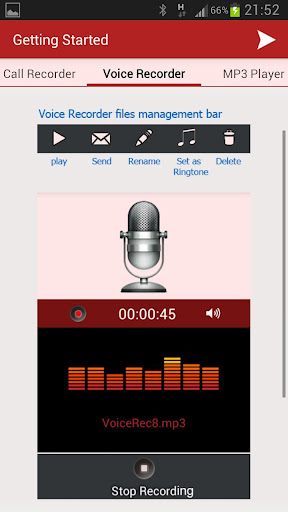
• 2 in 1: Mp3 format calls Recording and high-quality Voice recorder.
• Two options in Call Recording mode: Manually select or automatically record all calls.
• Recording long periods of time create a small audio file: 1 hour recording ~ 7 Mb.
• In order to overcome the Low audio quality problem existing in other applications we have added a tool to amplify sound for clearer and better audio files.
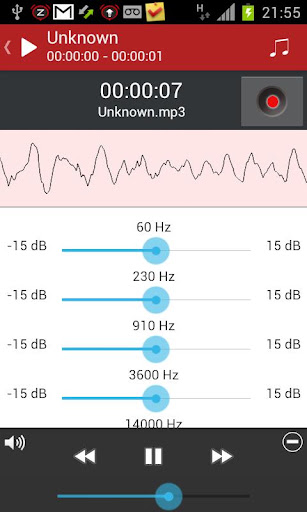
• Addition of equalizer to the MP3 player to adjust and repair the audio file.
• Creating a new MP3 file from existing one after repairing and removal of a specific section of your choice.
• Convenient and clear interface.
• Continue recording even during incoming waiting call and the transition to her.
More features:
• Add a contact from a recording of an unknown number.
• Adding a comment to any recorded call.
• Send files using any sharing software (Whatsapp, Gmail, Dropbox, etc.).
• One-click self-email to any audio file.
• Select the recording start button placement or activate recording from notification bar (optional).
• Select the recording source: directly from the phone line or from the microphone (not supported on all devices).
• In order to record a call done in Bluetooth it is necessary to switch to the phone speaker - alert message will appear.
• Voice recorder quick launch from notification bar - optional.
• Set recorded audio files as ringtones or as notifications sounds.
Pozadavky: Android 2.3.3 a vyssi
Popis: Convenient and simple as it sounds!!
High Quality MP3 Calls & Voice recorder in one!!!
Screen:
Video:
What's in this version:
New features on version 1.2:
1. Application Password - Protects audio files from exposure.
2. delete or save the last recording in Auto mode.(optional)
3. Select the file save location and folder name (external or internal SD card).
4. Sync to Dropbox!: single file, multiple files, or sync every recording at the end of it automatically.
Files will be saved in folders sorted by contact / phone number and inside by date.
5. Automatically recording selection to specific contacts or phone numbers.
Vice info:
Kód: Vybrat vše
https://play.google.com/store/apps/details?id=com.grinzone.incallrecorderKód: Vybrat vše
http://uloz.to/xt23MNNf/mp3-incall-recorder-voice-pro-v1-2-apk
https://mega.co.nz/#!y9w3hCaB!LOTQemeagNQXp1_TIyukxkhoEoQPzXP8V5McAhUZmAE
http://www62.zippyshare.com/v/28740118/file.htmlRecording calls is not simple issue on android phones so if you notice a problem please email us to get support instead of writing a review!!!
In a saturated market of calls recording applications that provide only a small part of the user caprices and not give much room for intervention, joins a new application calls 'InCall Recorder' that meets all requirements.
InCall Recorder Allows full control of Recorded Calls.
You can choose when to start recording and saving battery power and reduce size of the audio file.
There is also a choice of automatically recording all conversations interactions unattended.
Quick start tape recorder creating high-quality audio.
'InCall Recorder' lets you manage all the audio files conveniently and efficiently.
You can choose where to place the recording start button.
You can play, share, or add a note to each call recorded.
To enjoy better audio quality than other competitors in the market, we added a patch filter for you to significantly improve the audio quality of the recording file.
Join the rest of users enjoying today the best and most convenient recording android App!!
----------------------------------
Why InCall Recorder??
Our advantages over the competitors:
• 2 in 1: Mp3 format calls Recording and high-quality Voice recorder.
• Two options in Call Recording mode: Manually select or automatically record all calls.
• Recording long periods of time create a small audio file: 1 hour recording ~ 7 Mb.
• In order to overcome the Low audio quality problem existing in other applications we have added a tool to amplify sound for clearer and better audio files.
• Addition of equalizer to the MP3 player to adjust and repair the audio file.
• Creating a new MP3 file from existing one after repairing and removal of a specific section of your choice.
• Convenient and clear interface.
• Continue recording even during incoming waiting call and the transition to her.
More features:
• Add a contact from a recording of an unknown number.
• Adding a comment to any recorded call.
• Send files using any sharing software (Whatsapp, Gmail, Dropbox, etc.).
• One-click self-email to any audio file.
• Select the recording start button placement or activate recording from notification bar (optional).
• Select the recording source: directly from the phone line or from the microphone (not supported on all devices).
• In order to record a call done in Bluetooth it is necessary to switch to the phone speaker - alert message will appear.
• Voice recorder quick launch from notification bar - optional.
• Set recorded audio files as ringtones or as notifications sounds.