Notebooks Pro
Napsal: 21. 05. 2013 20:16
Notebooks Pro v3.8
(38,- Kc)
Pozadavky: Android 2.0 a vyssi
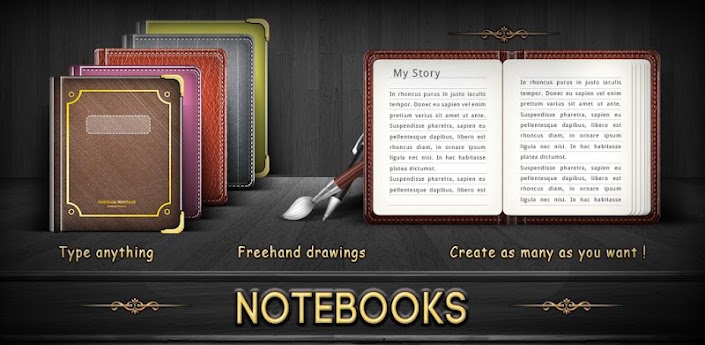
Popis: Take notes and even attach your free hand drawing, everything in style and completely without papers!
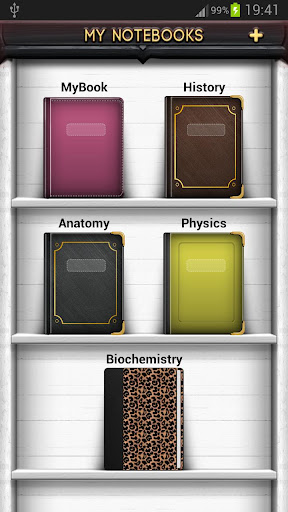
Create multiple notebooks for every subject and avoid messing up your notes.
Notebooks is the only application you will ever need for all your note making needs.
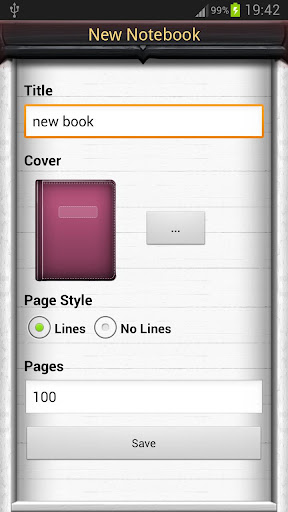
Designed with flexibility and ease of use in mind, taking notes is now at it simplest with our application. With multiple colors and custom title for each notebook cover, you will enjoy creating a notebook for every subject you want.
Notebooks is a must have application for students, business men and for anyone using their phones and tablets for taking notes.
Screen:
What's in this version:
Version 3.8
Minor bug fixes
Version 3.6
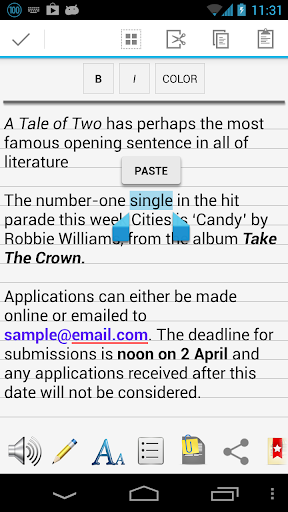
* Apply text-styles: Bold, Italics and Highlight text. (Double tap on any word in the page to get the text-style controls)
* Share the page content.
Vice info:
Stahuj zde:
Features:
1. Create multiple notebooks.
2. Customizable cover, title, number of pages and page style for every notebook.
3. Password protected.
4. Set a title for every page.
5. Instant search within each notebook.
6. Attach image files.
7. Bookmark a page.
8. Create your own free hand drawing.
9. Easily find your entries.
10. Custom fonts for each notebooks.
11. Set theme for each notebook.
12. Export the entire book or a page to a PDF with attachments. (Currently supports English only)
13.Apply text styles such as Bold, Italics and Colored-Highlights.
How to use?
1. Use '+' mark in the home screen to create new books.
2. Long tap on any book to edit/delete the book.
3. Use 'Password' option in the Menu to set/reset the password.
4. On the Page tap on Page Header to set the Title for the page.
5. Tap on book shelf header to change the theme.
6. Make use of different editing options provided at the bottom of the page.
How to apply font styles, such as bold, italics or color?
1. Double tap on a word in the page, to get the style controls.
2. Adjust the selection range and apply styles.
3. Tap anywhere on the page to hide the style controls.
(38,- Kc)
Pozadavky: Android 2.0 a vyssi
Popis: Take notes and even attach your free hand drawing, everything in style and completely without papers!
Create multiple notebooks for every subject and avoid messing up your notes.
Notebooks is the only application you will ever need for all your note making needs.
Designed with flexibility and ease of use in mind, taking notes is now at it simplest with our application. With multiple colors and custom title for each notebook cover, you will enjoy creating a notebook for every subject you want.
Notebooks is a must have application for students, business men and for anyone using their phones and tablets for taking notes.
Screen:
What's in this version:
Version 3.8
Minor bug fixes
Version 3.6
* Apply text-styles: Bold, Italics and Highlight text. (Double tap on any word in the page to get the text-style controls)
* Share the page content.
Vice info:
Kód: Vybrat vše
https://play.google.com/store/apps/details?id=com.sleepwalkers.notebooks.proKód: Vybrat vše
http://uloz.to/x8x82P7K/notebooks-pro-v3-8-apk
https://mega.co.nz/#!zAhWRagC!aZtz_SgrFyxoI8ZmLuXvLn7ekuVNvFG4BqUhHkD-k44
http://www5.zippyshare.com/v/93282669/file.html1. Create multiple notebooks.
2. Customizable cover, title, number of pages and page style for every notebook.
3. Password protected.
4. Set a title for every page.
5. Instant search within each notebook.
6. Attach image files.
7. Bookmark a page.
8. Create your own free hand drawing.
9. Easily find your entries.
10. Custom fonts for each notebooks.
11. Set theme for each notebook.
12. Export the entire book or a page to a PDF with attachments. (Currently supports English only)
13.Apply text styles such as Bold, Italics and Colored-Highlights.
How to use?
1. Use '+' mark in the home screen to create new books.
2. Long tap on any book to edit/delete the book.
3. Use 'Password' option in the Menu to set/reset the password.
4. On the Page tap on Page Header to set the Title for the page.
5. Tap on book shelf header to change the theme.
6. Make use of different editing options provided at the bottom of the page.
How to apply font styles, such as bold, italics or color?
1. Double tap on a word in the page, to get the style controls.
2. Adjust the selection range and apply styles.
3. Tap anywhere on the page to hide the style controls.