InstaCamera Pro
Napsal: 21. 07. 2013 17:58
InstaCamera Pro v2.00
(37,- Kc)
Pozadavky: Android 2.2 a vyssi
Popis: Aplikace pro rychle porizeni fotky prostrednictvim widgetu na plose..
InstaCamera is the quickest way to take a photo with your phone.
There's no long process: just press the widget and it takes a photo, then closes just as quickly.
Screen:
Video:
What's in this version:
- Repaired media browse.
- Upgraded UI to utilize fancier ICS motif for ICS and also JB equipments.
(uz je venku sice verze 2.10, ale tu jsem nesehnal)
Vice info:
Stahuj zde:
## Why should I pay for this when there's a free version?
* This one's quicker. Like, seriously 'turbo computer-brains Skynet' quicker
* There are no ads
* You can choose the folder your images get saved in
* Because you want to say "awesome!" with money
## Why is it so awesome?
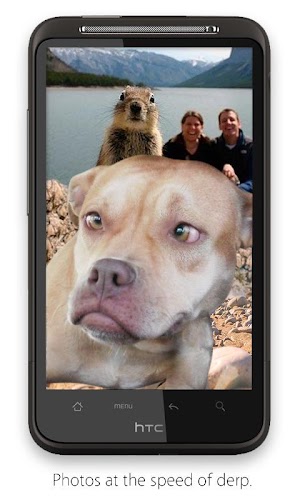
InstaCamera is perfect for when you want to take a photo but there's tons of pesky seals and squirrels and dogs around who you KNOW are gonna pop up in front to spoil the shot. And then they're all, 'oh, I was smelling something' but really they're jealous of your Android phone and opposable thumbs and want to ruin your whole day with their stupid faces. But you've got a super-fast camera app, so you've snapped a photo before they've even decided which face to pull. Take that, nature!
## Settings
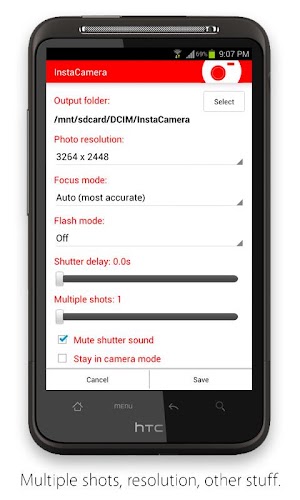
Even though the app is super-simple, you can change how it works. Open the settings (the wrench icon on the widget) and you can make these adjustments:
* choose the folder your photos get saved in
* take multiple shots in a row (up to five)
* mute the shutter sound
* turn the "Image Saved" confirmation off
* change the photo resolution (default is max)
* set the focus mode (including fixed, infinite, auto and macro focus modes)
* set the shutter delay (from not-even-focusing to two seconds) in case your camera hardware needs extra time
* stay in camera mode after taking instant photos (then you touch the screen to take more, and back button to quit)
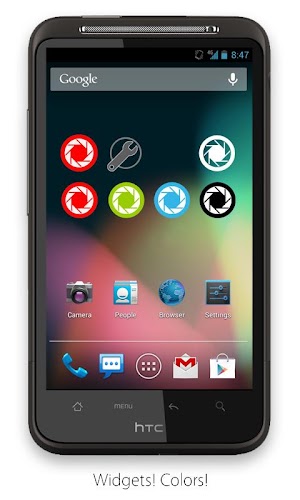
There are two widgets: the 1x1, which is just the camera button, and the 2x1, which has a camera button and a settings button.
## Permissions
We got it down to three permissions in this version:
Storage: the app needs to save photos on your phone.
Hardware controls: the app needs to access the camera.
Wakelock: the app needs enough time to save your photo if you turn the screen off before it's 100% done. (Not the scary, battery-draining kind of wakelock. The cool kind that's chilled out.)
Note: there's also a Google thing called Check License which doesn't show up in the permission screen, but it's in the app. It pings the Market every once in a while and says the app is legit.
(37,- Kc)
Pozadavky: Android 2.2 a vyssi
Popis: Aplikace pro rychle porizeni fotky prostrednictvim widgetu na plose..
InstaCamera is the quickest way to take a photo with your phone.
There's no long process: just press the widget and it takes a photo, then closes just as quickly.
Screen:
Video:
What's in this version:
- Repaired media browse.
- Upgraded UI to utilize fancier ICS motif for ICS and also JB equipments.
(uz je venku sice verze 2.10, ale tu jsem nesehnal)
Vice info:
Kód: Vybrat vše
https://play.google.com/store/apps/details?id=longwell.instant.camera.proKód: Vybrat vše
http://uloz.to/xE4391Td/instacamera-pro-v2-00-4allmobile-eu-apk
https://mega.co.nz/#!VR9H1YTS!Lfg8YyGpHXnxo75FrhVW5kzTYL4POqedkqkXOL4O2eE
http://www33.zippyshare.com/v/36929956/file.html* This one's quicker. Like, seriously 'turbo computer-brains Skynet' quicker
* There are no ads
* You can choose the folder your images get saved in
* Because you want to say "awesome!" with money
## Why is it so awesome?
InstaCamera is perfect for when you want to take a photo but there's tons of pesky seals and squirrels and dogs around who you KNOW are gonna pop up in front to spoil the shot. And then they're all, 'oh, I was smelling something' but really they're jealous of your Android phone and opposable thumbs and want to ruin your whole day with their stupid faces. But you've got a super-fast camera app, so you've snapped a photo before they've even decided which face to pull. Take that, nature!
## Settings
Even though the app is super-simple, you can change how it works. Open the settings (the wrench icon on the widget) and you can make these adjustments:
* choose the folder your photos get saved in
* take multiple shots in a row (up to five)
* mute the shutter sound
* turn the "Image Saved" confirmation off
* change the photo resolution (default is max)
* set the focus mode (including fixed, infinite, auto and macro focus modes)
* set the shutter delay (from not-even-focusing to two seconds) in case your camera hardware needs extra time
* stay in camera mode after taking instant photos (then you touch the screen to take more, and back button to quit)
There are two widgets: the 1x1, which is just the camera button, and the 2x1, which has a camera button and a settings button.
## Permissions
We got it down to three permissions in this version:
Storage: the app needs to save photos on your phone.
Hardware controls: the app needs to access the camera.
Wakelock: the app needs enough time to save your photo if you turn the screen off before it's 100% done. (Not the scary, battery-draining kind of wakelock. The cool kind that's chilled out.)
Note: there's also a Google thing called Check License which doesn't show up in the permission screen, but it's in the app. It pings the Market every once in a while and says the app is legit.