iOS 7 Keyboard
Napsal: 13. 10. 2013 10:52
iOS 7 Keyboard v1.2
(69,- Kc)
Pozadavky: Android 4.0 a vyssi
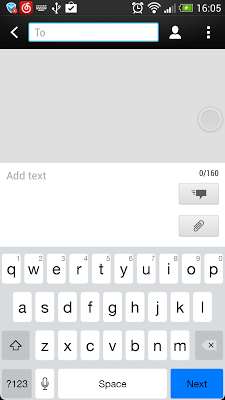
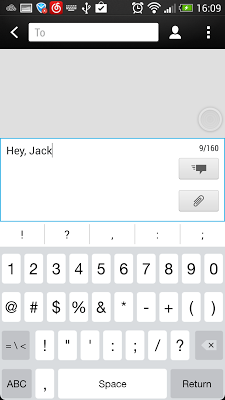
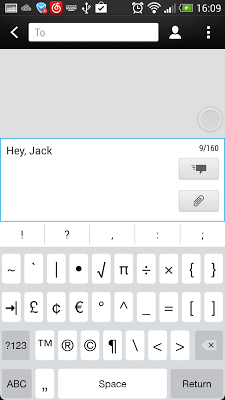
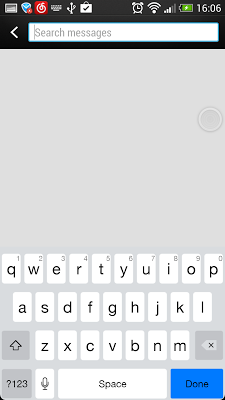
Popis: iOS 7 Keyboard is iOS 7 Style Keyboard Emulator. Looks and feels exactly like iOS 7 keyboard with Android capability.
Screen:
What's in this version:
v1.2
- Polish the keyboard layout
- Fix the typo issue
Vice info:
Stahuj zde:
iOS 7 Keyboard is iOS 7 Style Keyboard Emulator.
Looks and feels exactly like iOS 7 keyboard with Android capability.
Features:
- iOS 7 layout.
- The suggestion of English input.
- English Dictionary during input
- Auto correction
- Show correction suggestions
- language: English(US),English(UK),Arabic,Croatian,Czech,Danish,Dutch,Finnish,French(Canada),
French(Switzerland),German,German QWERTY,Hebrew, Hungarian-Italian,Norwegian Bokmal,Polish,
Portuguese,Russian,Serbian,Spanish,Swedish,Turkish
How to enable the iOS 7 Keyboard:
- Open the "iOS 7 Keyboard" app.
- Click the "Enable iOS 7 Keyboard", then enable the "iOS 7 Keyboard" in the system input settings.
How to set it as default keyboard:
- Open the "iOS 7 Keyboard" app.
- Click the "Set As Default keyboard", you can change an input as default keyboard.
How to change input keyboard:
- Click the "Space Bar" to change your input method in iOS 7 Emoji keyboard.
(69,- Kc)
Pozadavky: Android 4.0 a vyssi
Popis: iOS 7 Keyboard is iOS 7 Style Keyboard Emulator. Looks and feels exactly like iOS 7 keyboard with Android capability.
Screen:
What's in this version:
v1.2
- Polish the keyboard layout
- Fix the typo issue
Vice info:
Kód: Vybrat vše
https://play.google.com/store/apps/details?id=com.kuandroid.ios7.keyboardKód: Vybrat vše
http://uloz.to/xwL7yDPD/ios-7-keyboard-v1-2-4allmobile-eu-apk
http://www31.zippyshare.com/v/31414546/file.htmlLooks and feels exactly like iOS 7 keyboard with Android capability.
Features:
- iOS 7 layout.
- The suggestion of English input.
- English Dictionary during input
- Auto correction
- Show correction suggestions
- language: English(US),English(UK),Arabic,Croatian,Czech,Danish,Dutch,Finnish,French(Canada),
French(Switzerland),German,German QWERTY,Hebrew, Hungarian-Italian,Norwegian Bokmal,Polish,
Portuguese,Russian,Serbian,Spanish,Swedish,Turkish
How to enable the iOS 7 Keyboard:
- Open the "iOS 7 Keyboard" app.
- Click the "Enable iOS 7 Keyboard", then enable the "iOS 7 Keyboard" in the system input settings.
How to set it as default keyboard:
- Open the "iOS 7 Keyboard" app.
- Click the "Set As Default keyboard", you can change an input as default keyboard.
How to change input keyboard:
- Click the "Space Bar" to change your input method in iOS 7 Emoji keyboard.