DriveDroid (Paid)
Napsal: 15. 11. 2013 19:45
DriveDroid (Paid) v0.8.5
(62,- Kc)
Pozadavky: Android 2.2 a vyssi + ROOT
Popis: DriveDroid allows you to boot your PC from ISO/IMG files stored on your phone. This is ideal for trying Linux distributions or always having a rescue-system on the go... without the need to burn different CDs or USB pendrives. The paid version of DriveDroid does not include ads and helps the developer.
Screen:
What's in this version:
v0.8.5
* Fixed crash for Android 2.x
Vice info:
Stahuj zde:
* This application requires root *
DriveDroid allows you to boot your PC from ISO/IMG files stored on your phone. This is ideal for trying Linux distributions or always having a rescue-system on the go... without the need to burn different CDs or USB pendrives. The paid version of DriveDroid does not include ads and helps the developer.
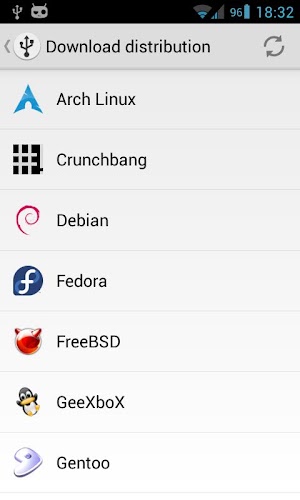
DriveDroid also includes a convenient download menu where you can download USB-images of a number of operating systems from your phone.
You can also create blank USB-images which allows you to have a blank USB-drive. From your PC you can store files onto the USB-drive, but also use tools on your PC to write images to the drive. More information can be found on the website of DriveDroid.
How to use:
* Upon first starting DriveDroid follow the setup guide. It will set everything up correctly and tests whether your device is compatible.
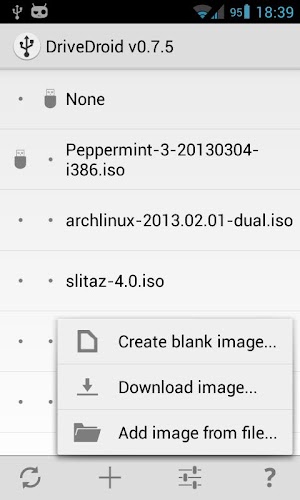
* Next you can download an image file from the + menu or create a blank image.
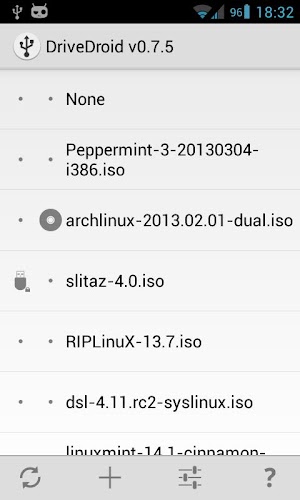
* The downloaded/created image will show up in DriveDroids imagelist and you can press it to 'host' the image.
* When doing so you have the option to host the image as an read-only USB stick, a writable USB stick or (if supported) a CD-rom drive.
* Now you can reboot your PC and make sure the correct boot priority is set in the bios.
* The image should now be booted on your PC.
Requirements:
* Root
* USB cable (from phone to PC)
Notes:
* Some .iso files do not support being booted over USB, but most popular Linux distibutions are. All images that are downloadable through DriveDroid are supported.
* There are custom kernels that support emulating a CD-drive, which allows you to boot any ISO. More information on this is available on DriveDroids website.
* Do NOT use DriveDroid while your SD card is mounted (being used on your PC). This can cause loss of data.
* There are a few devices that have trouble with Mass Storage, which causes them to not work out-of-the-box. More information on this is available on DriveDroids website.
(62,- Kc)
Pozadavky: Android 2.2 a vyssi + ROOT
Popis: DriveDroid allows you to boot your PC from ISO/IMG files stored on your phone. This is ideal for trying Linux distributions or always having a rescue-system on the go... without the need to burn different CDs or USB pendrives. The paid version of DriveDroid does not include ads and helps the developer.
Screen:
What's in this version:
v0.8.5
* Fixed crash for Android 2.x
Vice info:
Kód: Vybrat vše
https://play.google.com/store/apps/details?id=com.softwarebakery.drivedroid.paidKód: Vybrat vše
http://uloz.to/xmEBGxKw/drivedroid-paid-v0-8-5-4allmobile-eu-apk
http://www46.zippyshare.com/v/43284936/file.htmlDriveDroid allows you to boot your PC from ISO/IMG files stored on your phone. This is ideal for trying Linux distributions or always having a rescue-system on the go... without the need to burn different CDs or USB pendrives. The paid version of DriveDroid does not include ads and helps the developer.
DriveDroid also includes a convenient download menu where you can download USB-images of a number of operating systems from your phone.
You can also create blank USB-images which allows you to have a blank USB-drive. From your PC you can store files onto the USB-drive, but also use tools on your PC to write images to the drive. More information can be found on the website of DriveDroid.
How to use:
* Upon first starting DriveDroid follow the setup guide. It will set everything up correctly and tests whether your device is compatible.
* Next you can download an image file from the + menu or create a blank image.
* The downloaded/created image will show up in DriveDroids imagelist and you can press it to 'host' the image.
* When doing so you have the option to host the image as an read-only USB stick, a writable USB stick or (if supported) a CD-rom drive.
* Now you can reboot your PC and make sure the correct boot priority is set in the bios.
* The image should now be booted on your PC.
Requirements:
* Root
* USB cable (from phone to PC)
Notes:
* Some .iso files do not support being booted over USB, but most popular Linux distibutions are. All images that are downloadable through DriveDroid are supported.
* There are custom kernels that support emulating a CD-drive, which allows you to boot any ISO. More information on this is available on DriveDroids website.
* Do NOT use DriveDroid while your SD card is mounted (being used on your PC). This can cause loss of data.
* There are a few devices that have trouble with Mass Storage, which causes them to not work out-of-the-box. More information on this is available on DriveDroids website.