PhotoFun Pro
Napsal: 17. 11. 2013 17:27
PhotoFun Pro v2.725.PPG
(39,- Kc)
Pozadavky: Android 2.1 a vyssi
Popis: An interesting app to create awesome photorealistic collages with funny clip-arts.
Screen:



Video:
What's in this version:
Images download on demand to SD card cache to reduce application size.
Samsung camera as a input source bug fixed.
New stickers!
Vice info:
Stahuj zde:
How to decorate photos with the graphics:
• Choose a photo from your phone's gallery or use your camera to create it.
• To add graphics, click on an icon from the list that appears at the bottom of the screen.
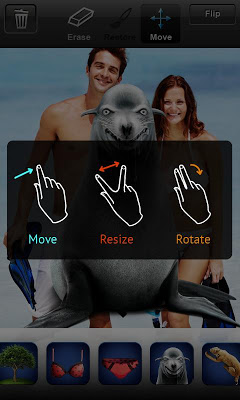
• After it's shown in the photo area, you can rotate, move, and scale graphics using multi-touch gestures.
• To flip the picture, click the Flip button.
• Use the Erase/Restore tools to put templates behind the objects in photos or simply delete parts of clip art graphics.
• Add as many images as you want.
• Ones you've finished working, save your images to the gallery or share them with the world!
(39,- Kc)
Pozadavky: Android 2.1 a vyssi
Popis: An interesting app to create awesome photorealistic collages with funny clip-arts.
Screen:
Video:
What's in this version:
Images download on demand to SD card cache to reduce application size.
Samsung camera as a input source bug fixed.
New stickers!
Vice info:
Kód: Vybrat vše
https://play.google.com/store/apps/details?id=com.keyspice.photofunproKód: Vybrat vše
http://uloz.to/x51Wx8tg/photofun-pro-v2-725-ppg-4allmobile-eu-apk
http://www12.zippyshare.com/v/64119520/file.html• Choose a photo from your phone's gallery or use your camera to create it.
• To add graphics, click on an icon from the list that appears at the bottom of the screen.
• After it's shown in the photo area, you can rotate, move, and scale graphics using multi-touch gestures.
• To flip the picture, click the Flip button.
• Use the Erase/Restore tools to put templates behind the objects in photos or simply delete parts of clip art graphics.
• Add as many images as you want.
• Ones you've finished working, save your images to the gallery or share them with the world!