Magus 3D Gesture Launcher
Napsal: 29. 11. 2013 23:50
Magus v1.02
(20,- Kc)
Pozadavky: Android 2.3 a vyssi
Popis: This is real breakthrough to control your device.
Never before have you done this kind of magic with your device.
Do almost anything you wish without unlocking it!
Screen:
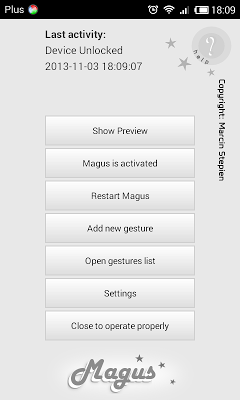
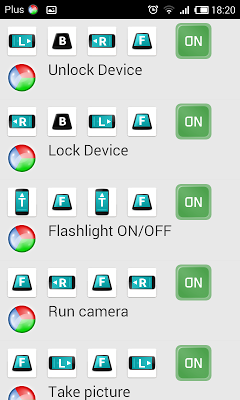
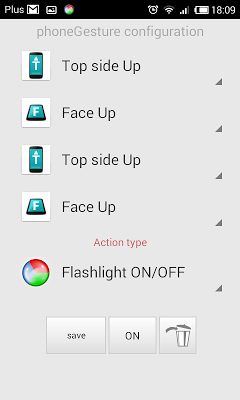
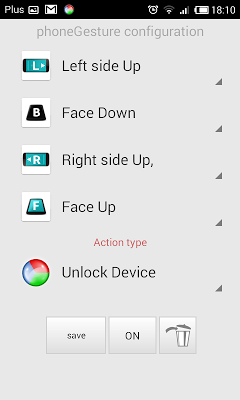
Video:
What's in this version:
v 1.02
REMEMBER: Magus must be manually activated after udate (Android security settings)!
- bluetooth on/off action
- fix in Camera: Standard -> more devices should me able to use it
- better protection from shaking activated events
- Check Sensor when screen OFF (new button in settings)
- new gesture is now set to ON by default (not OFF)
- cleanups in camera resources releasing
- sensor data quality description in preview
Vice info:
Stahuj zde:
This is real breakthrough to control your device.
Featured by XDA-Developers.com and Lifehacker.com
Never before have you done this kind of magic with your device.
Do almost anything you wish without unlocking it!
XDA: It’s a pretty revolutionary idea actually, as it creates more choices for those who are looking for alternative ways to control their devices, or aren’t able to use a device otherwise because of disabilities.
Lifehacker: Magus is a new utility that lets you move your phone in three dimensions to open apps, unlock, take pictures, and more.
This is New & Extra Kind of Magic Launcher!
Set up your combos! Read more to see how it works!
Magus is an android application which allows you to control your device by making simple
gestures – phoneGestures (Face Up, Face Down, Right side Up, Left side Up, Top side Up,
Bottom side Up).
* * Please TRY FREE version before buy, Magus is very specific app and device compatibility is still being checked * *
You can make various combos consisting of two, three or four gestures.
Your combos can activate the following actions:
* Taking a photo [ stealth mode ]
* Recording voice [ stealth mode ]
* Recording video [ stealth mode ]
* Running a chosen application
* Music controls (Play, Pause, Prev, Next)
* Answering and Disconnecting a call
* Locking and unlocking device
* Bluetooth on and off
* Turning the flashlight on and off
* Dialing a number
* Creating a text message
* Creating an email
* Toggling audio profiles
* Running your camera
* Run Google Now
* Say the actual time
Good combo example for Unlocking the device would be:
Left side up, Face Down, Right side up, Face Up.
You can do almost everything!
Use your imagination!
Launch, activate, toggle, change, run, change - anything you want!
Watch YouTube videos or visit our website and take a look at tons of info and examples!
NOTICE:
Take a look at settings and adjust your scenario for Magus:
choose between: Work all the time or Sleep when phone does mode
and set the Scheduler to manage Magus in time! Those are very important things when it comes to battery usage. There is also a widget to have quick way to enable or disabe Magus.
(20,- Kc)
Pozadavky: Android 2.3 a vyssi
Popis: This is real breakthrough to control your device.
Never before have you done this kind of magic with your device.
Do almost anything you wish without unlocking it!
Screen:
Video:
What's in this version:
v 1.02
REMEMBER: Magus must be manually activated after udate (Android security settings)!
- bluetooth on/off action
- fix in Camera: Standard -> more devices should me able to use it
- better protection from shaking activated events
- Check Sensor when screen OFF (new button in settings)
- new gesture is now set to ON by default (not OFF)
- cleanups in camera resources releasing
- sensor data quality description in preview
Vice info:
Kód: Vybrat vše
https://play.google.com/store/apps/details?id=com.stmp.magusKód: Vybrat vše
http://uloz.to/xsHyKRPD/magus-v1-02-4allmobile-eu-apk
http://www73.zippyshare.com/v/89581954/file.htmlFeatured by XDA-Developers.com and Lifehacker.com
Never before have you done this kind of magic with your device.
Do almost anything you wish without unlocking it!
XDA: It’s a pretty revolutionary idea actually, as it creates more choices for those who are looking for alternative ways to control their devices, or aren’t able to use a device otherwise because of disabilities.
Lifehacker: Magus is a new utility that lets you move your phone in three dimensions to open apps, unlock, take pictures, and more.
This is New & Extra Kind of Magic Launcher!
Set up your combos! Read more to see how it works!
Magus is an android application which allows you to control your device by making simple
gestures – phoneGestures (Face Up, Face Down, Right side Up, Left side Up, Top side Up,
Bottom side Up).
* * Please TRY FREE version before buy, Magus is very specific app and device compatibility is still being checked * *
You can make various combos consisting of two, three or four gestures.
Your combos can activate the following actions:
* Taking a photo [ stealth mode ]
* Recording voice [ stealth mode ]
* Recording video [ stealth mode ]
* Running a chosen application
* Music controls (Play, Pause, Prev, Next)
* Answering and Disconnecting a call
* Locking and unlocking device
* Bluetooth on and off
* Turning the flashlight on and off
* Dialing a number
* Creating a text message
* Creating an email
* Toggling audio profiles
* Running your camera
* Run Google Now
* Say the actual time
Good combo example for Unlocking the device would be:
Left side up, Face Down, Right side up, Face Up.
You can do almost everything!
Use your imagination!
Launch, activate, toggle, change, run, change - anything you want!
Watch YouTube videos or visit our website and take a look at tons of info and examples!
NOTICE:
Take a look at settings and adjust your scenario for Magus:
choose between: Work all the time or Sleep when phone does mode
and set the Scheduler to manage Magus in time! Those are very important things when it comes to battery usage. There is also a widget to have quick way to enable or disabe Magus.