AutoShare FULL
Napsal: 29. 12. 2013 17:34
AutoShare FULL v2.0.1
(Full version features are enabled!!)
Pozadavky: Android 2.2 a vyssi
Popis: Send text or files to Tasker from any app and react to it however you want!
Screen:
Video:
What's in this version:
- AutoShare intents: call many other apps with a growing list of actions you can call from AutoShare
- Import intents from the AutoShare web site: http://joaoapps.com/autoshare/intents/
- Direct sharing: choose the app you want to share with BEFORE the actual share so you don't have to always select it manually.
Vice info:
Stahuj zde:
Add Tasker support to any app with AutoShare! Do anything on an ever growing number of apps with AutoShare intents available here:http://goo.gl/r1ibqy. You can also share to AutoShare from the regular Android share menu and get the share info into Tasker.
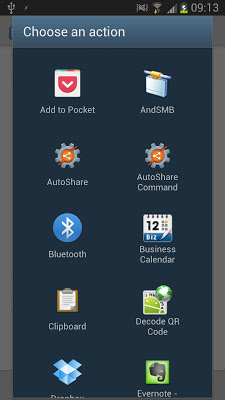
Simply use the regular Android share menu and choose AutoShare from the list and the Subject, Text or files will be sent to Tasker where you can do what you want with them! On the corresponding Enter Task you have several variables available:
- %assender (contains the sender app's package name; the app that shared to AutoShare)
- %assubject (contains the subject of the share)
- %astext (contains the text of the share)
- %asfile1, %asfile2, %asfile3, etc (contains path to files shared; can be accessed in tasker as an array named %asfile)
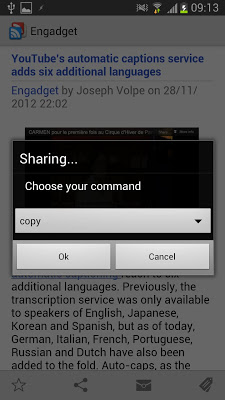
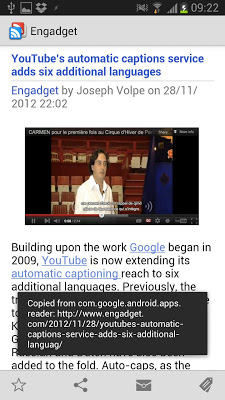
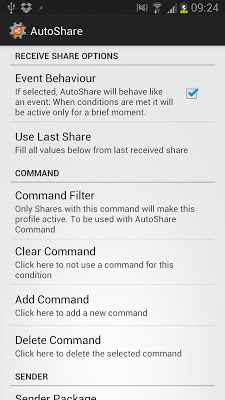
With the AutoShare command feature you can easily tell Tasker what you want to do with what you are sharing. For instance, use the "copy" command in a profile and in the corresponding task, copy %astext to the clipboard. Then share with the AutoShare Command and choose "copy" from the dropdown list, and whatever you shared will be available on your device's clipboard
(Full version features are enabled!!)
Pozadavky: Android 2.2 a vyssi
Popis: Send text or files to Tasker from any app and react to it however you want!
Screen:
Video:
What's in this version:
- AutoShare intents: call many other apps with a growing list of actions you can call from AutoShare
- Import intents from the AutoShare web site: http://joaoapps.com/autoshare/intents/
- Direct sharing: choose the app you want to share with BEFORE the actual share so you don't have to always select it manually.
Vice info:
Kód: Vybrat vše
https://play.google.com/store/apps/details?id=com.joaomgcd.autoshareKód: Vybrat vše
http://ul.to/kio39zhy
http://www.tusfiles.net/uorr9p2sgepj
http://hugefiles.net/unbpl33j476bSimply use the regular Android share menu and choose AutoShare from the list and the Subject, Text or files will be sent to Tasker where you can do what you want with them! On the corresponding Enter Task you have several variables available:
- %assender (contains the sender app's package name; the app that shared to AutoShare)
- %assubject (contains the subject of the share)
- %astext (contains the text of the share)
- %asfile1, %asfile2, %asfile3, etc (contains path to files shared; can be accessed in tasker as an array named %asfile)
With the AutoShare command feature you can easily tell Tasker what you want to do with what you are sharing. For instance, use the "copy" command in a profile and in the corresponding task, copy %astext to the clipboard. Then share with the AutoShare Command and choose "copy" from the dropdown list, and whatever you shared will be available on your device's clipboard