FRep - Finger Replayer
Napsal: 03. 01. 2014 00:25
FRep - Finger Replayer v2.8patched + Unlock Key
(88,- Kc)
Pozadavky: Android 2.3.3 a vyssi
Popis: FRep is Finger Record/Replay App. Once you record the routine operation, you can replay it by single trigger. Your own automatic operation button will be easily created.
- Record and Replay/Repeat/Edit operations of touchscreen and/or keystroke
- Easy record/play on current app, by pushing the button of floating console
- Console shows/hides depending on playable records for current app
Unlock key provides the unlimited number of records & Tasker/Locale plugin functionality.
Screen:
Video:
What's in this version:
[2.8/patched] (Need USB connection to PC/Mac/Android to complete update)
- Modified Tap control / Tap center of Wait Image control under heavy CPU load*
- Fixed repeated "Image Search will take long time" popup
- Fixed error on retrieving app info (Thanks for report)
(patched)
- Fixed error on Image Search(Similarity) (Thanks for report)
- Added Visit Support Site menus
*With too heavy load, the tap control may still fails. For better reproducibility, record and use actual tap operation.
Vice info:
Stahuj zde:
Usage Example
- Recording analog Push/Swipe/Flick operations for automatic process/scroll/gesture
- Playing continuous virtual space key push with interval for browsing
- Preload delayed or continuous pushing in prospect of processing delay, such as CPU load or network communication
- Avoid blind area or blurring by the finger operation
- Combination with automation App through FRep replay shortcut/Tasker plugin
- Demonstrate your App in actual device
=== Initial Setup ===
FRep needs the initial setup below. If your Android is ROOTED, you can skip this section by permitting su.
To setup FRep initially or when Android rebooted, you need USB connection to Win/Mac/Linux/Android. Please retrieve and run the setup tool from following URL.
Show/Hide console
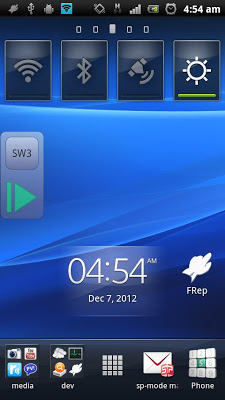
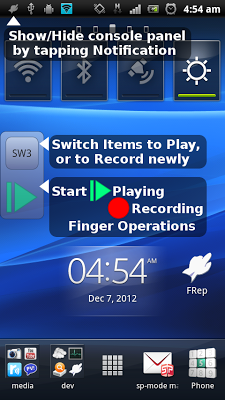
After starting service, FRep will stay in the notification. By tapping it, the console shows/hides. Once you record by the recording circle button, FRep automatically show console on the app on recorded. Then, the record can be replayed by the playing triangle button.
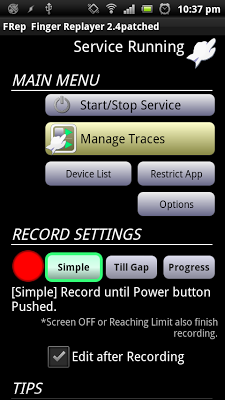
Recording mode
Choose which you like at the FRep front app;
Simple: record until Power push.
Till Gap: record until designated seconds of no input.
Progress: record and construct editable sequence separated by input gap.
*Time limit: 10 min per record.
Repeat/Edit playing
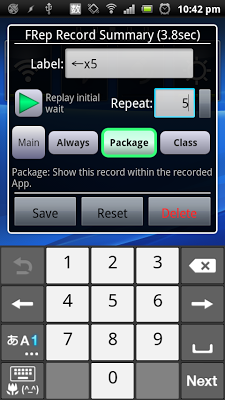
By setting the Repeat number >1 in Manage Traces, FRep play the record continuously by the count. You can also create/edit the playing sequence consisting of multiple records/controls. In addition, each stroke in traces can be moved/set wait/clipped.
Power button
FRep do not record Power push, which will finish any recording/playing immediately.
Restrict by current App
In record/replay, occasional call or App change may cause a problem. To avoid that, FRep is restricted on Phone, Google Play and FRep itself. You can configure restriction for other Apps.
Interruption of playing
To abort replaying, you can interrupt easily by the overlapping the operation.
Virtual keyboard
Double-tapping the upper button on the console, you can open another page which has key operation editor.
Customization
Notification type/icon, console size/transparency, drag/flick sensitivity, default settings, etc.
(88,- Kc)
Pozadavky: Android 2.3.3 a vyssi
Popis: FRep is Finger Record/Replay App. Once you record the routine operation, you can replay it by single trigger. Your own automatic operation button will be easily created.
- Record and Replay/Repeat/Edit operations of touchscreen and/or keystroke
- Easy record/play on current app, by pushing the button of floating console
- Console shows/hides depending on playable records for current app
Unlock key provides the unlimited number of records & Tasker/Locale plugin functionality.
Screen:
Video:
What's in this version:
[2.8/patched] (Need USB connection to PC/Mac/Android to complete update)
- Modified Tap control / Tap center of Wait Image control under heavy CPU load*
- Fixed repeated "Image Search will take long time" popup
- Fixed error on retrieving app info (Thanks for report)
(patched)
- Fixed error on Image Search(Similarity) (Thanks for report)
- Added Visit Support Site menus
*With too heavy load, the tap control may still fails. For better reproducibility, record and use actual tap operation.
Vice info:
Kód: Vybrat vše
https://play.google.com/store/apps/details?id=com.x0.strai.frep
https://play.google.com/store/apps/details?id=com.x0.strai.frepkeyKód: Vybrat vše
http://www.tusfiles.net/13jlvn5y68nh
http://hugefiles.net/eocgqf8khqgq
http://rapidgator.net/file/8ea5df9f1a3df0ef41334cfb24cad9ee/FRep_-_Finger_Replayer_v2.8Full.rar.html- Recording analog Push/Swipe/Flick operations for automatic process/scroll/gesture
- Playing continuous virtual space key push with interval for browsing
- Preload delayed or continuous pushing in prospect of processing delay, such as CPU load or network communication
- Avoid blind area or blurring by the finger operation
- Combination with automation App through FRep replay shortcut/Tasker plugin
- Demonstrate your App in actual device
=== Initial Setup ===
FRep needs the initial setup below. If your Android is ROOTED, you can skip this section by permitting su.
To setup FRep initially or when Android rebooted, you need USB connection to Win/Mac/Linux/Android. Please retrieve and run the setup tool from following URL.
Show/Hide console
After starting service, FRep will stay in the notification. By tapping it, the console shows/hides. Once you record by the recording circle button, FRep automatically show console on the app on recorded. Then, the record can be replayed by the playing triangle button.
Recording mode
Choose which you like at the FRep front app;
Simple: record until Power push.
Till Gap: record until designated seconds of no input.
Progress: record and construct editable sequence separated by input gap.
*Time limit: 10 min per record.
Repeat/Edit playing
By setting the Repeat number >1 in Manage Traces, FRep play the record continuously by the count. You can also create/edit the playing sequence consisting of multiple records/controls. In addition, each stroke in traces can be moved/set wait/clipped.
Power button
FRep do not record Power push, which will finish any recording/playing immediately.
Restrict by current App
In record/replay, occasional call or App change may cause a problem. To avoid that, FRep is restricted on Phone, Google Play and FRep itself. You can configure restriction for other Apps.
Interruption of playing
To abort replaying, you can interrupt easily by the overlapping the operation.
Virtual keyboard
Double-tapping the upper button on the console, you can open another page which has key operation editor.
Customization
Notification type/icon, console size/transparency, drag/flick sensitivity, default settings, etc.