Remote Launcher
Napsal: 13. 01. 2014 22:24
Remote Launcher v0.3.7
(37,- Kc)
Pozadavky: Android 1.6 a vyssi
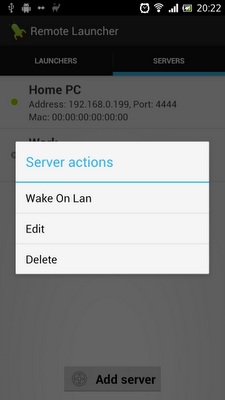
Popis: Remote Launcher is an easy to use tool that enables you to launch applications remotely on your PC via your Android device with a single click. It can also be used to start your PC up, even if it is turned off, with the built in support for Wake On Lan (WOL). It consists of an Android app and a small server program for your PC.
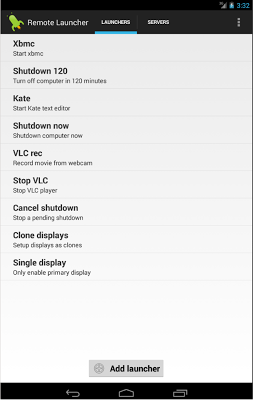
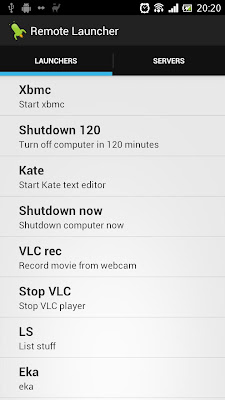
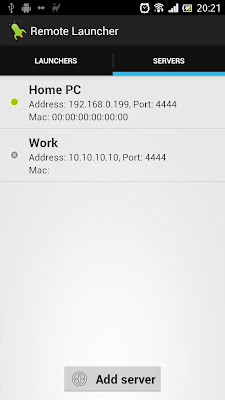
Screen:
What's in this version:
v0.3.7 (2013-11-18)
- Create home screen shortcuts directly within the app
- New intent handling so intents are handled completely in the background
- Fixed force close issues
v0.3.6 (2013-09-19)
- Added function for adding, editing and deleting launchers directly within the app (full version only, version 0.2.16 of server required)
- Don't flash the UI when launching from shortcuts or intents (e.g. with Tasker)
- Added retries when launching from shortcuts or intents
Vice info:
Stahuj zde:
*** An excellent app - Editor's Choice from DroidAppOfTheDay.com ***
Remote Launcher is an easy to use tool that enables you to launch applications remotely on your PC via your Android device with a single click. It can also be used to start your PC up, even if it is turned off, with the built in support for Wake On Lan (WOL). It consists of an Android app and a small server program for your PC.
There is also support for Android shortcuts and widgets (size 1x1) available to start programs even quicker.
You can configure Remote Launcher to start any application on your PC, e.g. start your mediacenter (xbmc etc), shutdown/restart the computer or run a custom script.
It's also possible to automate Remote Launcher using Android intents or shortcuts. That makes it possible to use it together with tools such as Tasker or Llama to perform tasks at certain events, e.g. "shutdown computer when I leave home" or "send wake on lan packet to computer and start xbmc when I get back home". You can even do things like muting your computer when there's an incoming call and unmuting it when the call finishes. The imagination is the limit.
To use Remote Launcher you need to install the Remote Launcher Server on your PC. Downloads, installation instructions, user guides and examples are available on the project wiki
The Remote Launcher server is written in Java so it should work on any pc with the Java Runtime Enviromnment installed (version 1.6 or later), be it Linux, Windows or Mac OS. It has been tested on Ubuntu and Windows 7.
Remote Launcher is a nice alternative to more complex remote control solutions such as vnc or ssh when you just need to start specific programs.
Remote Launcher works both with wifi and cellular connections. However, if you use cellular and the pc running Remote Launcher Server is behind a router, you will have to configure port forwarding on your router to forward the port 4444 to your pc. You will also need to configure the Remote Launcher app to use the IP address of the router instead of the pc in this case.
(37,- Kc)
Pozadavky: Android 1.6 a vyssi
Popis: Remote Launcher is an easy to use tool that enables you to launch applications remotely on your PC via your Android device with a single click. It can also be used to start your PC up, even if it is turned off, with the built in support for Wake On Lan (WOL). It consists of an Android app and a small server program for your PC.
Screen:
What's in this version:
v0.3.7 (2013-11-18)
- Create home screen shortcuts directly within the app
- New intent handling so intents are handled completely in the background
- Fixed force close issues
v0.3.6 (2013-09-19)
- Added function for adding, editing and deleting launchers directly within the app (full version only, version 0.2.16 of server required)
- Don't flash the UI when launching from shortcuts or intents (e.g. with Tasker)
- Added retries when launching from shortcuts or intents
Vice info:
Kód: Vybrat vše
https://play.google.com/store/apps/details?id=com.owtroid.remotelauncherKód: Vybrat vše
http://adf.ly/c2msg
http://uloz.to/xh6axBeW/remote-launcher-v0-3-7-apk
http://ul.to/6ptbbhkxRemote Launcher is an easy to use tool that enables you to launch applications remotely on your PC via your Android device with a single click. It can also be used to start your PC up, even if it is turned off, with the built in support for Wake On Lan (WOL). It consists of an Android app and a small server program for your PC.
There is also support for Android shortcuts and widgets (size 1x1) available to start programs even quicker.
You can configure Remote Launcher to start any application on your PC, e.g. start your mediacenter (xbmc etc), shutdown/restart the computer or run a custom script.
It's also possible to automate Remote Launcher using Android intents or shortcuts. That makes it possible to use it together with tools such as Tasker or Llama to perform tasks at certain events, e.g. "shutdown computer when I leave home" or "send wake on lan packet to computer and start xbmc when I get back home". You can even do things like muting your computer when there's an incoming call and unmuting it when the call finishes. The imagination is the limit.
To use Remote Launcher you need to install the Remote Launcher Server on your PC. Downloads, installation instructions, user guides and examples are available on the project wiki
The Remote Launcher server is written in Java so it should work on any pc with the Java Runtime Enviromnment installed (version 1.6 or later), be it Linux, Windows or Mac OS. It has been tested on Ubuntu and Windows 7.
Remote Launcher is a nice alternative to more complex remote control solutions such as vnc or ssh when you just need to start specific programs.
Remote Launcher works both with wifi and cellular connections. However, if you use cellular and the pc running Remote Launcher Server is behind a router, you will have to configure port forwarding on your router to forward the port 4444 to your pc. You will also need to configure the Remote Launcher app to use the IP address of the router instead of the pc in this case.