Root Freezer Pro
Napsal: 23. 01. 2014 15:05
Root Freezer Pro v1.1
(26,- Kc)
Pozadavky: Android 2.1 a vyssi
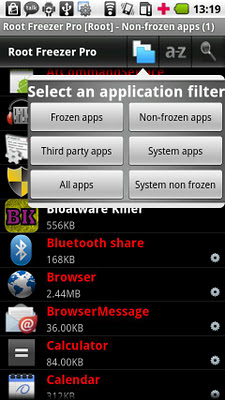
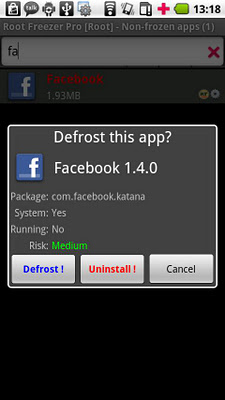
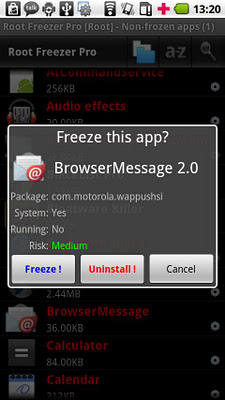
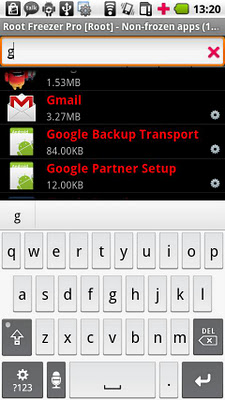
Popis: This app is designed to simplify the freeze/defrost and delete system apps using Root Uninstaller technology.
Screen:
What's in this version:
V 1.1
- Improve for Jelly Bean
Vice info:
Stahuj zde:
This app is designed to simplify the freeze/defrost and delete system apps using Root Uninstaller technology.
Root permission required
Feature:
☆ Freeze/defrost apps (both system and regular) in single click
☆ Uninstall system app in single click
☆ Very simple interface and easy to use
Use cases:
1. You phone is in low memory or short battery life. You need to remove bloatwares that you don't need anymore. But you are scared by side effect when you remove a system apps.
-> Solution: Freeze them first and see if the system works smoothly, then delete them later.
2. Your carrier pre-loads a lot of useless app and you need more room for your lovely apps
-> Solution: Freeze them. If you are sure that you don't need them in the future, delete them.
(26,- Kc)
Pozadavky: Android 2.1 a vyssi
Popis: This app is designed to simplify the freeze/defrost and delete system apps using Root Uninstaller technology.
Screen:
What's in this version:
V 1.1
- Improve for Jelly Bean
Vice info:
Kód: Vybrat vše
https://play.google.com/store/apps/details?id=com.rootuninstaller.freezerKód: Vybrat vše
http://www.kingfiles.net/kkq9h9uo7d46/Root_Freezer_Pro_1.1.apk
http://www.tusfiles.net/ukc1r4pkxqg1
http://ul.to/rbsvhxpq
http://unlimitzone.com/1h0lt979svej/Root_Freezer_Pro_1.1.apk.html
http://www54.zippyshare.com/v/7358467/file.html
http://www.tusfiles.net/43e5qn5q4a77
http://uloz.to/xaDjt97K/root-freezer-pro-1-1-apk
http://ulozto.sk/xQPZbQ2G/root-freezer-pro-1-1-apkRoot permission required
Feature:
☆ Freeze/defrost apps (both system and regular) in single click
☆ Uninstall system app in single click
☆ Very simple interface and easy to use
Use cases:
1. You phone is in low memory or short battery life. You need to remove bloatwares that you don't need anymore. But you are scared by side effect when you remove a system apps.
-> Solution: Freeze them first and see if the system works smoothly, then delete them later.
2. Your carrier pre-loads a lot of useless app and you need more room for your lovely apps
-> Solution: Freeze them. If you are sure that you don't need them in the future, delete them.