PebbleTasker
Napsal: 02. 02. 2014 19:29
PebbleTasker v1.6.1
(39,- Kc)
Pozadavky: Android 2.3.3 a vyssi
Popis: Control Tasker directly from your Pebble watch.
Screen:
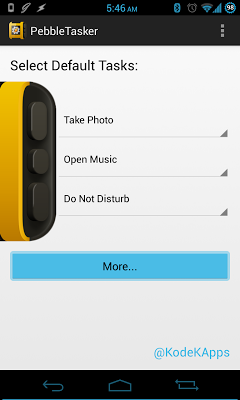
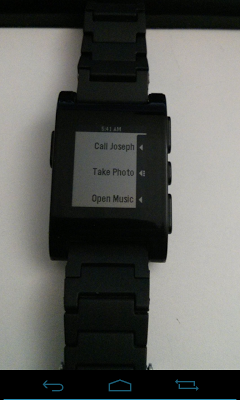
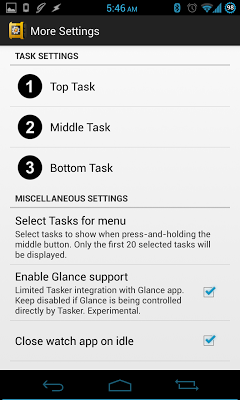
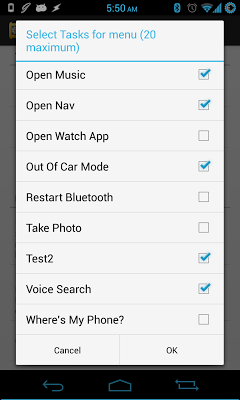
Video:
What's in this version:
Version 1.6.1:
- Fixed bug with variables in the bottom-most field. Please update your PebbleTasker actions by opening them up and hitting the back button to save.
- Updated SDK 2.0 app to fix a few BETA 4 bugs. Contact me if you have any issues with it!
Vice info:
Stahuj zde:
Control Tasker directly from your Pebble watch.
Choose three tasks to activate anytime without taking your phone out of your pocket. Have these tasks change based on Tasker profiles. Want to access navigation tasks while driving, but also have home automation tasks while at home? Need more than three tasks? Chain tasks together or take advantage of the 20-task secondary menu (by holding the middle button). Program PebbleTasker to open up or close based on Tasker events, so that your three tasks are ready to be used as soon as you get in your car or get home.
No constantly running background services required, allowing for great battery life and performance.
REQUIRES TASKER BY CRAFTY APPS. Make sure you have Tasker installed before installing PebbleTasker.
Also requires latest Pebble firmware. Check the firmware inside the Pebble app if you have any issues.
Link to Tasker: https://play.google.com/store/apps/deta ... id.taskerm
INSTRUCTIONS: Inside Tasker, go to the Preferences menu, and under the Misc tab, make sure "Allow External Access" is enabled.
Tasker must already be installed before installing this app. If PebbleTasker still doesn't work, please uninstall and reinstall the app.
If you're getting a "Loading..." screen that won't go away, you need to update your Pebble's firmware to the latest version. Check inside the Pebble app under the 3-dot menu for the "Check for FW Update" option. If you're running the latest version, restart the watch by pressing the middle button for more than 10 seconds, and toggle the Bluetooth on your phone. That should fix it.
PLEASE CONTACT ME BEFORE LEAVING A REVIEW IF YOU'RE NOT COMPLETELY HAPPY! I will do my best to try to solve whatever issues you are having so that you can enjoy the app to its full potential!
(39,- Kc)
Pozadavky: Android 2.3.3 a vyssi
Popis: Control Tasker directly from your Pebble watch.
Screen:
Video:
What's in this version:
Version 1.6.1:
- Fixed bug with variables in the bottom-most field. Please update your PebbleTasker actions by opening them up and hitting the back button to save.
- Updated SDK 2.0 app to fix a few BETA 4 bugs. Contact me if you have any issues with it!
Vice info:
Kód: Vybrat vše
https://play.google.com/store/apps/details?id=com.kodek.pebbletaskerKód: Vybrat vše
http://adf.ly/cyoWh
http://www.tusfiles.net/99iug5drjm7l
http://ul.to/792zemhd
http://www30.zippyshare.com/v/1224395/file.html
http://www.tusfiles.net/gdj777zg2cy7
http://uloz.to/x3bXByNX/pebbletasker-v1-6-1-apk
http://ulozto.sk/xSbabXcE/pebbletasker-v1-6-1-apkChoose three tasks to activate anytime without taking your phone out of your pocket. Have these tasks change based on Tasker profiles. Want to access navigation tasks while driving, but also have home automation tasks while at home? Need more than three tasks? Chain tasks together or take advantage of the 20-task secondary menu (by holding the middle button). Program PebbleTasker to open up or close based on Tasker events, so that your three tasks are ready to be used as soon as you get in your car or get home.
No constantly running background services required, allowing for great battery life and performance.
REQUIRES TASKER BY CRAFTY APPS. Make sure you have Tasker installed before installing PebbleTasker.
Also requires latest Pebble firmware. Check the firmware inside the Pebble app if you have any issues.
Link to Tasker: https://play.google.com/store/apps/deta ... id.taskerm
INSTRUCTIONS: Inside Tasker, go to the Preferences menu, and under the Misc tab, make sure "Allow External Access" is enabled.
Tasker must already be installed before installing this app. If PebbleTasker still doesn't work, please uninstall and reinstall the app.
If you're getting a "Loading..." screen that won't go away, you need to update your Pebble's firmware to the latest version. Check inside the Pebble app under the 3-dot menu for the "Check for FW Update" option. If you're running the latest version, restart the watch by pressing the middle button for more than 10 seconds, and toggle the Bluetooth on your phone. That should fix it.
PLEASE CONTACT ME BEFORE LEAVING A REVIEW IF YOU'RE NOT COMPLETELY HAPPY! I will do my best to try to solve whatever issues you are having so that you can enjoy the app to its full potential!