Smart Cover Pro (Screen Off)
Napsal: 09. 02. 2014 17:08
Smart Cover Pro (Screen Off) v1.39
(38,- Kc)
Pozadavky: Android 2.2 a vyssi
Popis: This app is a paid version of the Smart Cover Lite(Screen Off).
Screen:
Video:
What's in this version:
Ver 1.3.9
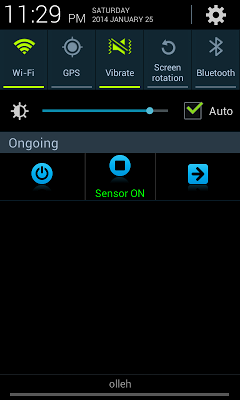
. Sensor ON/OFF in Notification
. Clean cache when cover closed
. Clean history when cover closed
Ver 1.3.8
. Battery reduced due to restriction of the use of the receiver screen
. Adjust the font combo box(Some devices)
. Update language(CS)
Ver 1.3.7
.Add 2 language(CS,SK)
.Add screen off in notification (over android version 4.1)
.Add whiteList(except apps) on memory cleaner
Ver 1.3.6
. Battery reduced
Ver 1.35
.When turned on, Lock Screen On/Off added
.Two sounds added
Vice info:
Stahuj zde:
★ ★ ★ Flip Cover Explanation ★ ★ ★
1. This app is a paid version of the Smart Cover Lite(Screen Off).
2. I recommend to using the beta version before purchase this.
3. This app is using the proximity sensor can control the Screen On / Off.
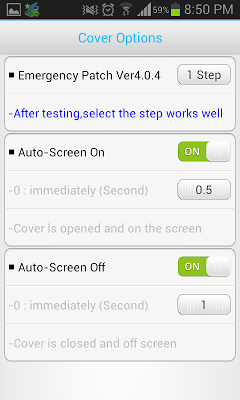
4. After testing about 10 times on each step, select the step that work very well .
5. After updated ,the used step may not be appropriate. Then please select other step.
★ ★ ★ Main Functions ★ ★ ★
1. When you open or close the cover, the screen turns on and off automatically.
2. Landscape Mode
- When Landscape Mode( like camera, game) is running,Sensor pause (Only Pro Version)
3. Special App
- When it is running, Sensor pause.
4. Show icon in Notification area.
- Screen off and Sensor On/off
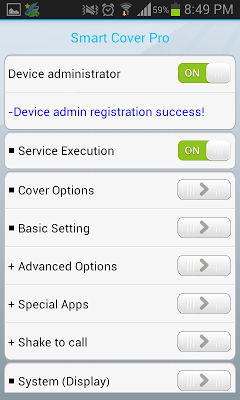
5. Service execute automatically when the phone restart.
6. Vibration when the screen is closed.
7. Sound when the screen is closed.
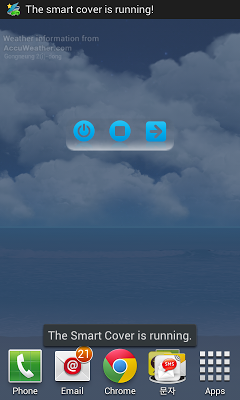
8. Widget add (1 x 2, 1 x 1)
- Power Button
- Service On/Off Button
- App Link Button
9. Memory Cleaner
- Memory automatically cleaned when screen off
10. Receiving a call with shake
★ ★ ★ How to save battery ★ ★ ★
1. During sleep time, the sensor will be stopped.
2. When using Landscape mode or Phone Call Option, the sensor will be stopped
3. When Special apps be not in use, it is effective to option to OFF.
4. When only necessary ,It is effective to use Vibration.
5. When you use only one of the options(Turn on or turn off the screen)
- SCREEN-OFF ON, SCREEN-OFF OFF : When the screen is on, the sensor stops
- SCREEN-OFF,SCREEN-OFF ON : When the screen is off, the sensor stops
6 If the battery is low, only use the default options.
★ ★ ★ Notices ★ ★ ★
- To delete this app, Service-Execute button must be OFF.
(38,- Kc)
Pozadavky: Android 2.2 a vyssi
Popis: This app is a paid version of the Smart Cover Lite(Screen Off).
Screen:
Video:
What's in this version:
Ver 1.3.9
. Sensor ON/OFF in Notification
. Clean cache when cover closed
. Clean history when cover closed
Ver 1.3.8
. Battery reduced due to restriction of the use of the receiver screen
. Adjust the font combo box(Some devices)
. Update language(CS)
Ver 1.3.7
.Add 2 language(CS,SK)
.Add screen off in notification (over android version 4.1)
.Add whiteList(except apps) on memory cleaner
Ver 1.3.6
. Battery reduced
Ver 1.35
.When turned on, Lock Screen On/Off added
.Two sounds added
Vice info:
Kód: Vybrat vše
https://play.google.com/store/apps/details?id=com.skyarmy.sensornearcover.proKód: Vybrat vše
http://adf.ly/dKePM
http://depositfiles.com/files/yj7jld393
http://unlimitzone.com/zb1pbpkrnqgz/com-skyarmy-sensornearcover-pro-39-5023819-72c42dc3dcbbd1dfd92139ee268028f7.apk.html
https://play.google.com/store/apps/details?id=com.skyarmy.sensornearcover.pro
http://www78.zippyshare.com/v/98040759/file.html
http://www.tusfiles.net/v1lixrh96cd8
http://uloz.to/xqBJZvNf/smart-cover-pro-screen-off-v1-39-apk
http://ulozto.sk/xHbhPeXu/smart-cover-pro-screen-off-v1-39-apk1. This app is a paid version of the Smart Cover Lite(Screen Off).
2. I recommend to using the beta version before purchase this.
3. This app is using the proximity sensor can control the Screen On / Off.
4. After testing about 10 times on each step, select the step that work very well .
5. After updated ,the used step may not be appropriate. Then please select other step.
★ ★ ★ Main Functions ★ ★ ★
1. When you open or close the cover, the screen turns on and off automatically.
2. Landscape Mode
- When Landscape Mode( like camera, game) is running,Sensor pause (Only Pro Version)
3. Special App
- When it is running, Sensor pause.
4. Show icon in Notification area.
- Screen off and Sensor On/off
5. Service execute automatically when the phone restart.
6. Vibration when the screen is closed.
7. Sound when the screen is closed.
8. Widget add (1 x 2, 1 x 1)
- Power Button
- Service On/Off Button
- App Link Button
9. Memory Cleaner
- Memory automatically cleaned when screen off
10. Receiving a call with shake
★ ★ ★ How to save battery ★ ★ ★
1. During sleep time, the sensor will be stopped.
2. When using Landscape mode or Phone Call Option, the sensor will be stopped
3. When Special apps be not in use, it is effective to option to OFF.
4. When only necessary ,It is effective to use Vibration.
5. When you use only one of the options(Turn on or turn off the screen)
- SCREEN-OFF ON, SCREEN-OFF OFF : When the screen is on, the sensor stops
- SCREEN-OFF,SCREEN-OFF ON : When the screen is off, the sensor stops
6 If the battery is low, only use the default options.
★ ★ ★ Notices ★ ★ ★
- To delete this app, Service-Execute button must be OFF.