Light Manager Pro
Napsal: 25. 02. 2014 17:03
Light Manager Pro v5.7
(30,- Kc)
Pozadavky: Android 2.1 a vyssi
Popis: Note: This is exactly same as free version of Light Manager but with no advertisement. Please try the free version first to see if your device is compatible before purchasing. Note that there is no internet permission in paid version, so your private data is safe.
Screen:
Video:
What's in this version:
V5.7:
- Fixed missed call notification LED remains blinking after swiped off
- Added battery charged threshold 80% and 85%
- Added option to allow recreate of Hangouts notification to fix false LED in normal mode
- Do not light up LED for received Gmail at Social, Promotions, Updates, Forums tab
- Added add contact function for Handcent SMS from Android 4.3 onwards
- Only display required notification access banner when notification access is not enabled
Vice info:
Stahuj zde:
Note: This is exactly same as free version of Light Manager but with no advertisement. Please try the free version first to see if your device is compatible before purchasing. Note that there is no internet permission in paid version, so your private data is safe.
*You may need to restart your device after you have restored from backup.
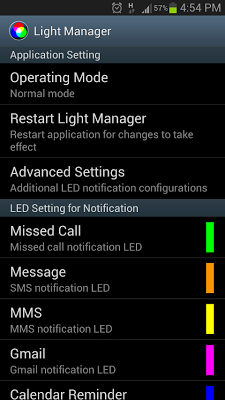
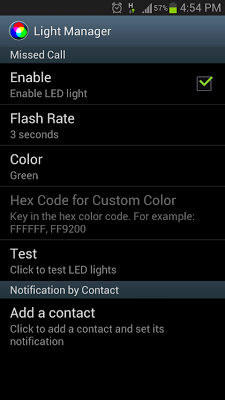
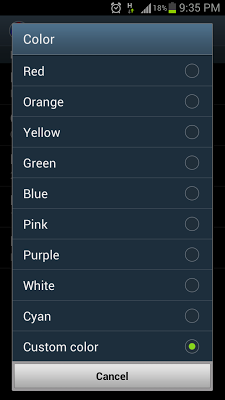
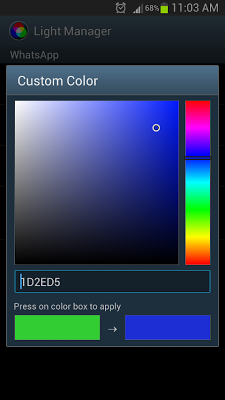
Configure LED color and its flashing frequency for notification as shown below:
- Miss call
- SMS
- MMS
- Gmail
- Calendar reminder
- Hangouts
- *Email
- *Facebook
- *Facebook Messenger
- *Twitter
- *WhatsApp
- *BBM
- *LINE
- *GO SMS Pro
- *Handcent SMS
- *chomp SMS
- *Any 3rd party apps
- Low battery
- Battery charging
- Battery charged
- No signal
- No 3G/4G
- No Wifi
- Silent Mode On
- Vibration Mode On
- Ringer Mode On
- Mobile Data On
- Wifi On
- Wifi Hotspot On
- Bluetooth On
On Android 4.1 and 4.2, ROOT is required for those mark with asterisk *. After grant the ROOT permission, you need to restart Light Manager for changes to take effect. However ROOT is not required anymore from Android 4.3 onwards. You need to enable the Notification Access for Light Manager at Setting > Security > Notification Access > Light Manager.
There are two operating modes:
1) Normal Mode - Only LED color for the first notification will be flashing
2) Alternating Mode - A few LED colors will be flashing alternately when multiple notifications are received
You may go to the test section to test whether this app works for your device.
For Samsung Galaxy SIII (JB):
- Device's screen needs to be turned off in order for the notification LED to work
- You need to go to Setting > Display > LED indicator and enable "Notifications" in order for this application to work
(30,- Kc)
Pozadavky: Android 2.1 a vyssi
Popis: Note: This is exactly same as free version of Light Manager but with no advertisement. Please try the free version first to see if your device is compatible before purchasing. Note that there is no internet permission in paid version, so your private data is safe.
Screen:
Video:
What's in this version:
V5.7:
- Fixed missed call notification LED remains blinking after swiped off
- Added battery charged threshold 80% and 85%
- Added option to allow recreate of Hangouts notification to fix false LED in normal mode
- Do not light up LED for received Gmail at Social, Promotions, Updates, Forums tab
- Added add contact function for Handcent SMS from Android 4.3 onwards
- Only display required notification access banner when notification access is not enabled
Vice info:
Kód: Vybrat vše
https://play.google.com/store/apps/details?id=com.koo.lightmanagerproKód: Vybrat vše
http://www.tusfiles.net/px02ttw6xj45
http://www.kingfiles.net/uho3wxzerib9/lm.Pro.v.5.7.zip
http://unlimitzone.com/u7arhomm4qdw/lm.Pro.v.5.7.zip.html
http://rapidgator.net/file/8bd808df442e8d6a0c2233a2c6dc7971/lm.Pro.v.5.7.zip.html
http://www23.zippyshare.com/v/54737667/file.html
http://www.tusfiles.net/ckvocu4r4pje
http://uloz.to/xf2Hrh4M/light-manager-pro-v5-7-apk
http://ulozto.sk/xSqLufPv/light-manager-pro-v5-7-apk*You may need to restart your device after you have restored from backup.
Configure LED color and its flashing frequency for notification as shown below:
- Miss call
- SMS
- MMS
- Gmail
- Calendar reminder
- Hangouts
- *Facebook Messenger
- *BBM
- *LINE
- *GO SMS Pro
- *Handcent SMS
- *chomp SMS
- *Any 3rd party apps
- Low battery
- Battery charging
- Battery charged
- No signal
- No 3G/4G
- No Wifi
- Silent Mode On
- Vibration Mode On
- Ringer Mode On
- Mobile Data On
- Wifi On
- Wifi Hotspot On
- Bluetooth On
On Android 4.1 and 4.2, ROOT is required for those mark with asterisk *. After grant the ROOT permission, you need to restart Light Manager for changes to take effect. However ROOT is not required anymore from Android 4.3 onwards. You need to enable the Notification Access for Light Manager at Setting > Security > Notification Access > Light Manager.
There are two operating modes:
1) Normal Mode - Only LED color for the first notification will be flashing
2) Alternating Mode - A few LED colors will be flashing alternately when multiple notifications are received
You may go to the test section to test whether this app works for your device.
For Samsung Galaxy SIII (JB):
- Device's screen needs to be turned off in order for the notification LED to work
- You need to go to Setting > Display > LED indicator and enable "Notifications" in order for this application to work