Gallery Drive Sync Pro
Napsal: 24. 03. 2014 13:57
Gallery Drive Sync Pro v1.60.5
(40,- Kc)
Pozadavky: Android 2.2 a vyssi
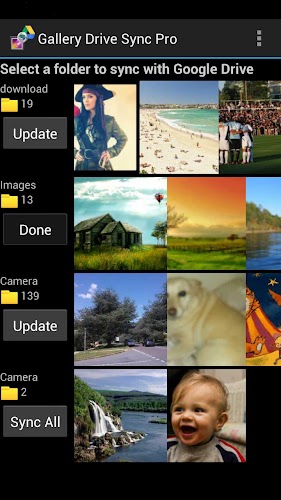
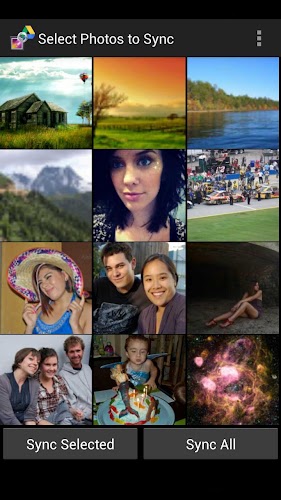
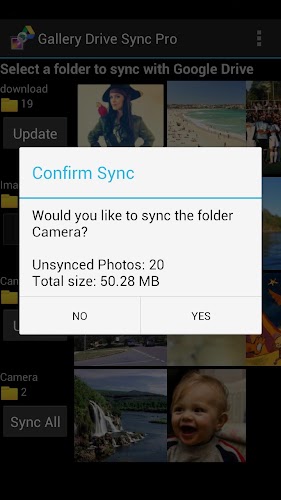
Popis: Keep your photos safe in Google Drive and save storage space on your phone. This app is for people who want to backup their photos in the cloud, but not automatically (or inadvertently) share them with the world like Google+ does.
Screen:
What's in this version:
Version 1.60.5:
- Fixed a bug that could cause a crash during photo download
Version 1.60.4:
- Auto sync is now enabled by default
- Settings have been re-organised for greater clarity
- You can now auto delete when uploading manually
Version 1.60.3:
- You can now optionally select in the settings whether to auto sync immediately after taking a photo
Vice info:
Stahuj zde:
Keep your photos safe in Google Drive and save storage space on your phone. This app is for people who want to backup their photos in the cloud, but not automatically (or inadvertently) share them with the world like Google+ does.
The pro version includes the following features above the free version:
- Ad free
- User selectable auto sync interval (from 5 mins to 24 hrs)
- Sync videos
- Auto download photos that were uploaded by another device
- Optionally upload PNGs
- Optionally upload GIFs
- Option to automatically delete photos during auto sync
- Option to automatically delete videos during auto sync
- Full screen photo view
- Function to manually delete a photo from your phone and Drive simultaneously
This is a standalone app from the free version of Gallery Drive sync. If you have previously used the free version you can uninstall it and all of your settings will be retained.
At the click of a button Gallery Drive Sync Pro will upload the images in your photo gallery to Google Drive. The app still retains all the images on your phone but can optionally re-scale them to occupy only 10-15% of the storage they used before. The photos look just the same when displayed on your phone screen, but can save you gigabytes of internal storage (great for Nexus users)!
After your photos have been stored on Google Drive they are easily shared selectively with friends and family.
Note: it is OK to move or change the names of uploaded sub folders and images in your Google Drive. The app will still remember which files have been uploaded, however if you delete a generated sub folder it will be recreated on the next upload.
(40,- Kc)
Pozadavky: Android 2.2 a vyssi
Popis: Keep your photos safe in Google Drive and save storage space on your phone. This app is for people who want to backup their photos in the cloud, but not automatically (or inadvertently) share them with the world like Google+ does.
Screen:
What's in this version:
Version 1.60.5:
- Fixed a bug that could cause a crash during photo download
Version 1.60.4:
- Auto sync is now enabled by default
- Settings have been re-organised for greater clarity
- You can now auto delete when uploading manually
Version 1.60.3:
- You can now optionally select in the settings whether to auto sync immediately after taking a photo
Vice info:
Kód: Vybrat vše
https://play.google.com/store/apps/details?id=com.gallery.drive.sync.proKód: Vybrat vše
http://www.kingfiles.net/i7h6hxn349yo
http://ul.to/eey10ci1
http://turbobit.net/2wdwptecp61g.html
http://unlimitzone.com/r19u478ym70u
http://www9.zippyshare.com/v/28001329/file.html
http://www.tusfiles.net/jtrp2x7qwrv2
http://uloz.to/xcvNWHP3/gallery-drive-sync-pro-v1-60-5-apk
http://ulozto.sk/xBLESbMY/gallery-drive-sync-pro-v1-60-5-apkThe pro version includes the following features above the free version:
- Ad free
- User selectable auto sync interval (from 5 mins to 24 hrs)
- Sync videos
- Auto download photos that were uploaded by another device
- Optionally upload PNGs
- Optionally upload GIFs
- Option to automatically delete photos during auto sync
- Option to automatically delete videos during auto sync
- Full screen photo view
- Function to manually delete a photo from your phone and Drive simultaneously
This is a standalone app from the free version of Gallery Drive sync. If you have previously used the free version you can uninstall it and all of your settings will be retained.
At the click of a button Gallery Drive Sync Pro will upload the images in your photo gallery to Google Drive. The app still retains all the images on your phone but can optionally re-scale them to occupy only 10-15% of the storage they used before. The photos look just the same when displayed on your phone screen, but can save you gigabytes of internal storage (great for Nexus users)!
After your photos have been stored on Google Drive they are easily shared selectively with friends and family.
Note: it is OK to move or change the names of uploaded sub folders and images in your Google Drive. The app will still remember which files have been uploaded, however if you delete a generated sub folder it will be recreated on the next upload.