OWM for Outlook Email OWA
Napsal: 25. 03. 2014 13:52
Outlook Web Mobile (OWA EMail) v2.91
(99,- Kc)
Pozadavky: Android 2.2 a vyssi
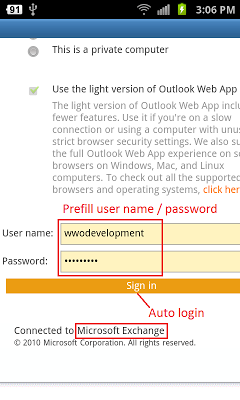
Popis: OWM Web Email is an app for Outlook OWA, it let you use Microsoft Exchange 2007 Outlook Web Access (OWA) or 2010 / 2013 Outlook Web App in a smart phone friendly layout, with Auto Login and Email / Meeting Notification.
Supports Office 365 with Exchange 2010 / 2013 (some ADFS login types not supported) *.
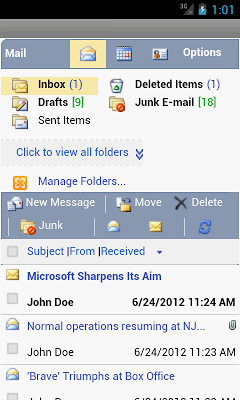
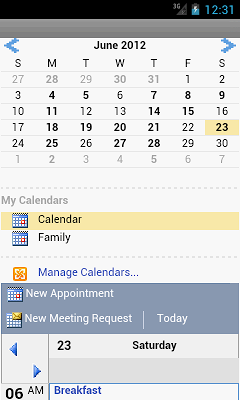
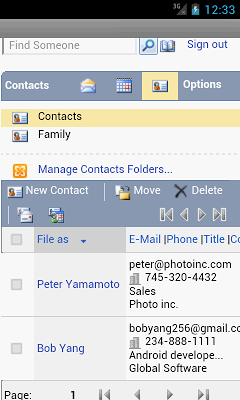
Access your Outlook Mail, Calendar and Contacts in a much easier way compare to the regular OWA.
Screen:
What's in this version:
2.91
Fixed some notification issues for different languages.
2.90
Fixed some calendar download issues.
2.89
Fixed windows authentication issue on some devices.
2.88
Bug fixes for Android 4.4 KitKat.
2.87
Bug fixes for Android 4.4 KitKat.
2.86
Can now download calendar without calendar event reminder.
Bug fixes.
2.85
Bug fixes.
2.84
Fixed more 403 access denied issues.
Vice info:
Stahuj zde:
Feature list:
- Email notification, auto check for new email on a timed interval **
- Calendar appointment and meeting reminder, when enabled, auto set an alarm to alert you before the event **
- Download basic information of calendar events to local calendar, for offline view, to use with third party widget, etc.
- Blink LED indicator for new email and appointment/meeting reminder. (If device is compatible)
- Screen layout reformatted to improve usability on smart phone screen
- Wide screen mode for tablet
- Prefill username, password, auto login
- Schedule "Off Time" to lower power and data usage, or if you don't want to be attached to work email 24/7. When enabled, the app will not check for new email or new/updated Calendar event during the specified time interval, for example, from 6 PM to 7 AM. Applies to Notification only, you can still launch the app to check email manually.
Email:
- New mail, reply, reply all, forward, move, delete, junk
- Download, upload and view attachment ***
- Multi select for action, mark as read/unread
- Sort by importance, subject, from, received
- Contact lookup, check name, recently used
- Manage folders
Calendar:
- Month view, day view
- Appointment, meeting request, recurring
Contact:
- New, edit, delete, move, sort
Search:
- Email, contact, address book
Supports Microsoft Exchange 2007 Outlook Web Access and 2010 / 2013 Outlook Web App, 2003 is not supported.
(99,- Kc)
Pozadavky: Android 2.2 a vyssi
Popis: OWM Web Email is an app for Outlook OWA, it let you use Microsoft Exchange 2007 Outlook Web Access (OWA) or 2010 / 2013 Outlook Web App in a smart phone friendly layout, with Auto Login and Email / Meeting Notification.
Supports Office 365 with Exchange 2010 / 2013 (some ADFS login types not supported) *.
Access your Outlook Mail, Calendar and Contacts in a much easier way compare to the regular OWA.
Screen:
What's in this version:
2.91
Fixed some notification issues for different languages.
2.90
Fixed some calendar download issues.
2.89
Fixed windows authentication issue on some devices.
2.88
Bug fixes for Android 4.4 KitKat.
2.87
Bug fixes for Android 4.4 KitKat.
2.86
Can now download calendar without calendar event reminder.
Bug fixes.
2.85
Bug fixes.
2.84
Fixed more 403 access denied issues.
Vice info:
Kód: Vybrat vše
https://play.google.com/store/apps/details?id=com.wwongdev.outlookwebmobileKód: Vybrat vše
http://www.tusfiles.net/4wizge4ovwy3
http://unlimitzone.com/kv0rx1yvxrkt/Outlook.Web.Mobile.(OWA.EMail)_v2.9.1.apk.html
http://hugefiles.net/uxljoaq2nxtz
http://www19.zippyshare.com/v/6213911/file.html
http://www.tusfiles.net/x4v9fcmsht8h
http://uloz.to/xZBMrAt7/outlook-web-mobile-v2-91-apk
http://ulozto.sk/xMQjAkiQ/outlook-web-mobile-v2-91-apk- Email notification, auto check for new email on a timed interval **
- Calendar appointment and meeting reminder, when enabled, auto set an alarm to alert you before the event **
- Download basic information of calendar events to local calendar, for offline view, to use with third party widget, etc.
- Blink LED indicator for new email and appointment/meeting reminder. (If device is compatible)
- Screen layout reformatted to improve usability on smart phone screen
- Wide screen mode for tablet
- Prefill username, password, auto login
- Schedule "Off Time" to lower power and data usage, or if you don't want to be attached to work email 24/7. When enabled, the app will not check for new email or new/updated Calendar event during the specified time interval, for example, from 6 PM to 7 AM. Applies to Notification only, you can still launch the app to check email manually.
Email:
- New mail, reply, reply all, forward, move, delete, junk
- Download, upload and view attachment ***
- Multi select for action, mark as read/unread
- Sort by importance, subject, from, received
- Contact lookup, check name, recently used
- Manage folders
Calendar:
- Month view, day view
- Appointment, meeting request, recurring
Contact:
- New, edit, delete, move, sort
Search:
- Email, contact, address book
Supports Microsoft Exchange 2007 Outlook Web Access and 2010 / 2013 Outlook Web App, 2003 is not supported.