Xposed GEL Settings Donate
Napsal: 08. 04. 2014 12:59
Xposed GEL Settings Donate v1.5.2
Donate features are unlocked!!
Pozadavky: Android4.1 a vyssi + Xposed Framework
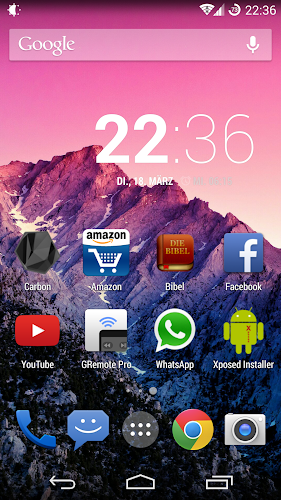
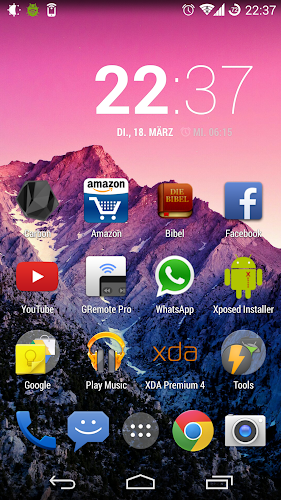
Popis: I don't understand why Google wants me to have this omnipresent search bar on every home screen
if there obviously is Google Now / Google Search embedded into the launcher if you go to the left page.
So after some searching I found a way to hide it. But it will show again if you go to the left screen; no functionality is lost.
Of course digging through the code I found some more things which are customizable.
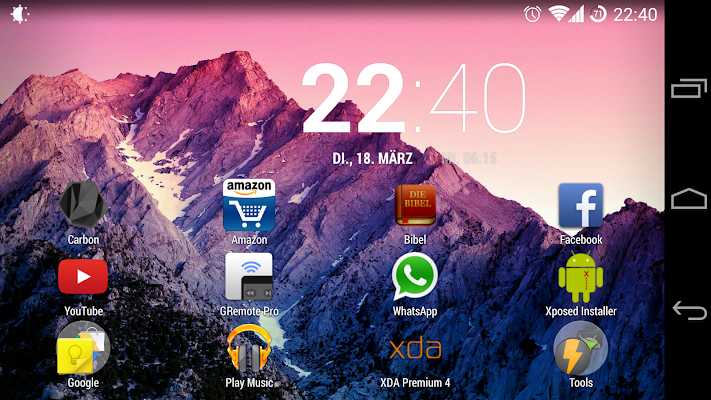
Screen:
What's in this version:
New gestures:
Swipe up left, middle, right
Swipe down left, middle, right
Swipe down to close app drawer
Swipe up to toggle between all apps and widgets
Double tap
added: hide widgets (found under general)
added: margins on homescreen
added: customizable folders
added: autohide option if dock is hidden
added: change dock color even if it's not hidden
added: option to show power off button on every screen
added: increased choosable grid sizes
Bugfixes
Vice info:
Stahuj zde:
!!!! Requires Xposed Framework !!!!
!!!! Only for Google Now Launcher and Trebuchet !!!!
I don't understand why Google wants me to have this omnipresent search bar on every home screen if there obviously is Google Now / Google Search embedded into the launcher if you go to the left page. So after some searching I found a way to hide it. But it will show again if you go to the left screen; no functionality is lost. Of course digging through the code I found some more things which are customizable
++ Features ++
Hide:
- Google search bar / automatically show search bar on Google Now
- apps from the app drawer
- widgets
- page indicator
- app dock / auto hide
- all apps button
- icon labels
Gestures: [some require In-App-Purchase]
- swipe down left, middle, right
- swipe up left, middle, right
-> Gesture actions
- pull down notification bar
- pull down quicksettings panel
- open app drawer
- open last app from recents
- open android settings
- go to sleep
- toggle hide/show app dock
- launch an app
Change grid:
- homescreen
- app drawer
- app dock
- homescreen margins
Customization:
- app drawer background
- folder colors (background, font, preview)
- text colors on homescreen and app drawer
Icons:
- resize icons
- resize icon texts
- hide shadows
System UI:
- hide clock on default homescreen
- open the app drawer when pressing the home button on default homescreen
- change the icon of the home button to an app drawer icon on default homescreen
- go to sleep when pressing back button on every screen or only on default homescreen
- change the icon of the back button to a power off button
Misc:
- rotate launcher
- all widgets are fully resizeable
- set your own default homescreen
- lock desktop
- continuous scroll (experimental)
- overscroll left or right to open the app drawer
- overscroll in app drawer goes back to homescreen
- close app drawer after launching an app
- disable wallpaper scrolling
Backup/Restore: [requires In-App-Purchase]
- backup / restore homescreen layout (icon and folders)
Donate features are unlocked!!
Pozadavky: Android4.1 a vyssi + Xposed Framework
Popis: I don't understand why Google wants me to have this omnipresent search bar on every home screen
if there obviously is Google Now / Google Search embedded into the launcher if you go to the left page.
So after some searching I found a way to hide it. But it will show again if you go to the left screen; no functionality is lost.
Of course digging through the code I found some more things which are customizable.
Screen:
What's in this version:
New gestures:
Swipe up left, middle, right
Swipe down left, middle, right
Swipe down to close app drawer
Swipe up to toggle between all apps and widgets
Double tap
added: hide widgets (found under general)
added: margins on homescreen
added: customizable folders
added: autohide option if dock is hidden
added: change dock color even if it's not hidden
added: option to show power off button on every screen
added: increased choosable grid sizes
Bugfixes
Vice info:
Kód: Vybrat vše
https://play.google.com/store/apps/details?id=de.theknut.xposedgelsettingsKód: Vybrat vše
http://ul.to/ywwdwld5
http://unlimitzone.com/yrl65wji2fm7/Xposed_GEL_Settings_1.5.2.zip.html
http://www49.zippyshare.com/v/78320046/file.html
http://hugefiles.net/tqkbb7jiov4d
http://uloz.to/xWwbosQT/xposed-gel-settings-1-5-2-apk
http://ulozto.sk/xNp7PGiQ/xposed-gel-settings-1-5-2-apk
!!!! Only for Google Now Launcher and Trebuchet !!!!
I don't understand why Google wants me to have this omnipresent search bar on every home screen if there obviously is Google Now / Google Search embedded into the launcher if you go to the left page. So after some searching I found a way to hide it. But it will show again if you go to the left screen; no functionality is lost. Of course digging through the code I found some more things which are customizable
++ Features ++
Hide:
- Google search bar / automatically show search bar on Google Now
- apps from the app drawer
- widgets
- page indicator
- app dock / auto hide
- all apps button
- icon labels
Gestures: [some require In-App-Purchase]
- swipe down left, middle, right
- swipe up left, middle, right
-> Gesture actions
- pull down notification bar
- pull down quicksettings panel
- open app drawer
- open last app from recents
- open android settings
- go to sleep
- toggle hide/show app dock
- launch an app
Change grid:
- homescreen
- app drawer
- app dock
- homescreen margins
Customization:
- app drawer background
- folder colors (background, font, preview)
- text colors on homescreen and app drawer
Icons:
- resize icons
- resize icon texts
- hide shadows
System UI:
- hide clock on default homescreen
- open the app drawer when pressing the home button on default homescreen
- change the icon of the home button to an app drawer icon on default homescreen
- go to sleep when pressing back button on every screen or only on default homescreen
- change the icon of the back button to a power off button
Misc:
- rotate launcher
- all widgets are fully resizeable
- set your own default homescreen
- lock desktop
- continuous scroll (experimental)
- overscroll left or right to open the app drawer
- overscroll in app drawer goes back to homescreen
- close app drawer after launching an app
- disable wallpaper scrolling
Backup/Restore: [requires In-App-Purchase]
- backup / restore homescreen layout (icon and folders)