Cozy Magnifier & Microscope +
Napsal: 14. 04. 2014 20:24
Cozy Magnifier & Microscope + v1.80
(20,- Kc)
Pozadavky: Android 2.2 a vyssi
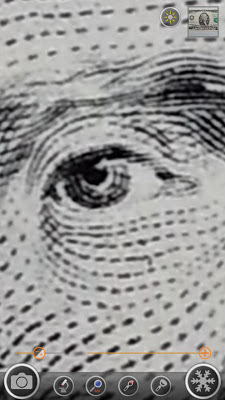
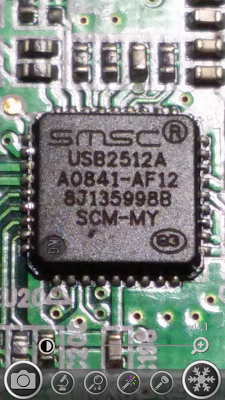
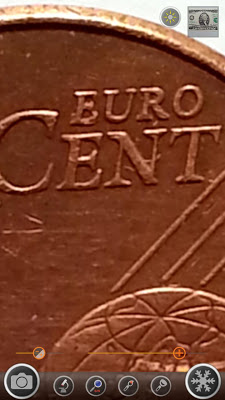
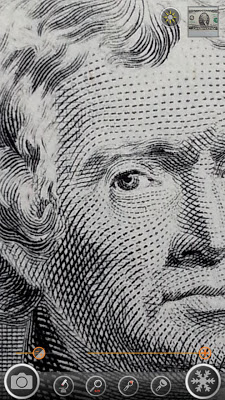
Popis: This app turns your phone to a digital magnifier(magnifying glass). You don't need to carry a magnifier anymore.
Screen:
Video:
What's in this version:
v1.80
- Target button.
- Bug fixed.
~v1.74
- Auto hiding option.
- Support Galaxy Note 10.1 2014 Edition.
- Support Galaxy NX, Galaxy S4 Zoom.
- Magnification rate display.
- Support landscape.
- Support Google Talkback.
- Support Exposure control.
Vice info:
Stahuj zde:
* Free version features
⊙ Magnification (H/W, S/W)
⊙ Microscope (more fine picture)
⊙ LED Flashlight
⊙ Macro Camera
⊙ Image Freezing
⊙ Embedded photo viewer
⊙ Image filters(Negative, Sepia, Mono)
⊙ WYSIWYG saves
* Plus version features
★ Free version features
★ No Ads
★ Full screen mode
★ Enhanced gallery viewer
★ Exposure control
★ Saving low definition pictures
Do you have to remove your glasses to read a business card?
Do you have to carry a big magnifying glass to read the model number of a tiny semiconductor?
Do you use a microscope to observe legs of a tiny insect?
Fantastic solution is here!
Use your smartphone as a nice magnifying glass!
Use your smartphone as a nice microscope!
Use your smartphone as a nice macro camera!
CozyMagPlus makes you a smart guy!
1. Magnifying glass
- Live H/W magnification.
- Live S/W magnification(x4).
- Taking pictures.
- Continuous auto focusing(Some ICS & Jellybean phones),
Galaxy S3/S4, Galaxy Note2/3, Optimus LTE2, Optimus G/G Pro/G2, Galaxy Nexus are tested.
2. Freeze shot
- Freezing screen to see picture stably.
- Useful in moving car.
- Useful to write a memo on paper.
3. Microscope
- More fine picture than Magnifying glass mode.
- More magnification.
4. Zooming controls
- Zooming control bar.
- Pinching to zoom everywhere.
5. Image Effects
- Support frequently used picture effects.(Negative, Sepia, Mono)
6. Flash light
- Flash light ON/OFF
- Volume-down button to turn flash light on or off.
7. Taking pictures
- Taking a picture by pressing volume-up button or touching camera icon.
- Saving a picture by touching save icon.
- Support WYSIWYG(What You See Is What You Get) saving in microscope mode & freezing mode.
8. Image Viewer
- Quick image viewing for saved image.
- Image effects.(Negative, Mono, Sepia)
- Image sharing.
- Image rotation.
9. Full Screen
- 'Menu' button switches full screen on & off.
* Some devices can't use some functions.
* This is not a real microscope
(20,- Kc)
Pozadavky: Android 2.2 a vyssi
Popis: This app turns your phone to a digital magnifier(magnifying glass). You don't need to carry a magnifier anymore.
Screen:
Video:
What's in this version:
v1.80
- Target button.
- Bug fixed.
~v1.74
- Auto hiding option.
- Support Galaxy Note 10.1 2014 Edition.
- Support Galaxy NX, Galaxy S4 Zoom.
- Magnification rate display.
- Support landscape.
- Support Google Talkback.
- Support Exposure control.
Vice info:
Kód: Vybrat vše
https://play.google.com/store/apps/details?id=com.hantor.CozyMagPlusKód: Vybrat vše
http://www12.zippyshare.com/v/27280043/file.html
http://hugefiles.net/zdtqtinz38hx
http://uloz.to/xYF6UHiQ/cozy-magnifier-microscope-v1-80-apk
http://ulozto.sk/xY6syAjS/cozy-magnifier-microscope-v1-80-apk⊙ Magnification (H/W, S/W)
⊙ Microscope (more fine picture)
⊙ LED Flashlight
⊙ Macro Camera
⊙ Image Freezing
⊙ Embedded photo viewer
⊙ Image filters(Negative, Sepia, Mono)
⊙ WYSIWYG saves
* Plus version features
★ Free version features
★ No Ads
★ Full screen mode
★ Enhanced gallery viewer
★ Exposure control
★ Saving low definition pictures
Do you have to remove your glasses to read a business card?
Do you have to carry a big magnifying glass to read the model number of a tiny semiconductor?
Do you use a microscope to observe legs of a tiny insect?
Fantastic solution is here!
Use your smartphone as a nice magnifying glass!
Use your smartphone as a nice microscope!
Use your smartphone as a nice macro camera!
CozyMagPlus makes you a smart guy!
1. Magnifying glass
- Live H/W magnification.
- Live S/W magnification(x4).
- Taking pictures.
- Continuous auto focusing(Some ICS & Jellybean phones),
Galaxy S3/S4, Galaxy Note2/3, Optimus LTE2, Optimus G/G Pro/G2, Galaxy Nexus are tested.
2. Freeze shot
- Freezing screen to see picture stably.
- Useful in moving car.
- Useful to write a memo on paper.
3. Microscope
- More fine picture than Magnifying glass mode.
- More magnification.
4. Zooming controls
- Zooming control bar.
- Pinching to zoom everywhere.
5. Image Effects
- Support frequently used picture effects.(Negative, Sepia, Mono)
6. Flash light
- Flash light ON/OFF
- Volume-down button to turn flash light on or off.
7. Taking pictures
- Taking a picture by pressing volume-up button or touching camera icon.
- Saving a picture by touching save icon.
- Support WYSIWYG(What You See Is What You Get) saving in microscope mode & freezing mode.
8. Image Viewer
- Quick image viewing for saved image.
- Image effects.(Negative, Mono, Sepia)
- Image sharing.
- Image rotation.
9. Full Screen
- 'Menu' button switches full screen on & off.
* Some devices can't use some functions.
* This is not a real microscope


