Infiniti Adv (OBD) for Torque
Napsal: 15. 05. 2014 18:17
Infiniti Adv (OBD) for Torque v1.1 build 1
(110,- Kc)
Pozadavky: Android 1.6 a vyssi
Popis: Monitor specific Infiniti parameters in real-time, including engine and automatic transmission advanced sensor data by adding this plugin to Torque Pro.
Screen:
What's in this version:
- na GP se zatim neuvadi
Vice info:
Stahuj zde:
Original Apk
Patched Apk
Monitor specific Infiniti parameters in real-time, including engine and automatic transmission advanced sensor data by adding this plugin to Torque Pro.
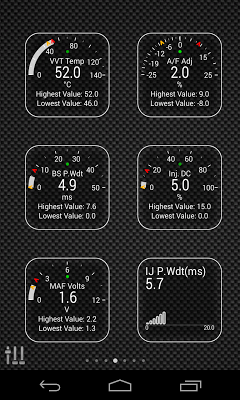
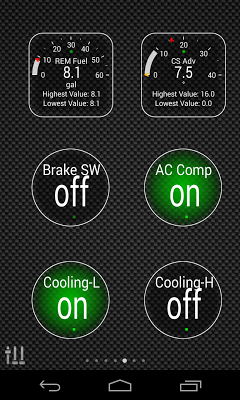
Infiniti Advanced is a plugin for Torque Pro, extending the PID/Sensor list with more than 10 specific parameters from Infiniti vehicles, including:
* VVT Oil Temperature (*)
* Base Fuel Injection Pulse Width
* Fuel Injector Pulse Width / Duty Cycle
* Mass Air Flow (*)
* MAF Volts (*)
* EVAP Purge Duty
* A/F Ratio Adjustment
* Camshaft Advance Angle (*)
* Cruise Control Speed (*)
* Cooling Fan Activation
* A/C Compressor Activation
* Idle Controller / Brake Switch
Sensors marked with (*) are not available on all cars, as it depends on special engine/parts.
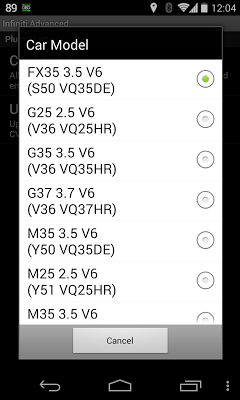
*PLEASE NOTE* that other Infiniti models/engines may be supported, but the plugin was tested only on the following models/engines equipped with DiagOnCan (CANBUS ONLY):
* EX25 2.5 V6 (J50 VQ25HR)
* EX35 3.5 V6 (J50 VQ35HR)
* EX37 3.7 V6 (J50 VQ37HR)
* FX35 3.5 V6 (S50 VQ35DE)
* G25 2.5 V6 (V36 VQ25HR)
* G35 3.5 V6 (V36 VQ35HR)
* G37 3.7 V6 (V36 VQ37HR)
* M35 3.5 V6 (Y50 VQ35DE)
* M25 2.5 V6 (Y51 VQ25HR)
* M35 3.5 V6 (Y51 VQ35HR)
Plugin Installation
-------------------------
1) After purchasing the plugin on Google Play, make sure that you see the plugin listed on your Android device installed applications list.
2) Launch Torque Pro and click on the "Infiniti Advanced" icon
3) Select the appropriate engine type and return to Torque Pro main screen
4) Go to Torque Pro "Settings"
5) Make sure that you can see the plugin listed also on Torque Pro by clicking "Settings" > "Plugins"> "Installed Plugins".
6) Scroll down to "Manage extra PIDs/Sensors"
7) Usually this screen will not display any entries, unless you have added any pre-defined or custom PIDs in the past.
8) From the menu, choose "Add predefined set"
9) If your license is validated on Google Play you should see an entry for your engine. You may see predefined sets for other engine types, so make sure you pick the right one. If you don't see anything, probably you have an installation problem or validation error on Google Play. In this case, go back and repeat the installation procedure.
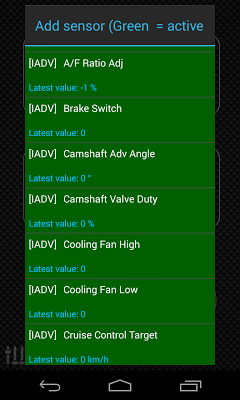
10) After clicking on the entry from the previous step, you should see several entries added to the Extra PIDs/Sensors list.
Note: Some sensors will be calculated real-time based on others. Make sure that you keep all sensors to avoid calculation errors.
(110,- Kc)
Pozadavky: Android 1.6 a vyssi
Popis: Monitor specific Infiniti parameters in real-time, including engine and automatic transmission advanced sensor data by adding this plugin to Torque Pro.
Screen:
What's in this version:
- na GP se zatim neuvadi
Vice info:
Kód: Vybrat vše
https://play.google.com/store/apps/details?id=com.ideeo.inadvancedOriginal Apk
Kód: Vybrat vše
http://www10.zippyshare.com/v/29828991/file.html
http://uploaded.net/file/rh1oa2d7/Infiniti_Advanced_1.1.apk
http://billionuploads.com/8t5ksz3cedl8
http://hugefiles.net/j3taucdq8i0k
Patched Apk
Kód: Vybrat vše
http://www25.zippyshare.com/v/63509829/file.html
http://uploaded.net/file/u95ugctw/Infiniti_Advanced_1.1_Patched.apk
http://billionuploads.com/z68z86d5ggyf
http://hugefiles.net/di3ba4vjzspk
http://rapidgator.net/file/ca60b6933f2deebf9b13d6b4f4a61c1a/Infiniti_Advanced_1.1_Patched.apk.html
http://www.tusfiles.net/t0qgu9btezbkInfiniti Advanced is a plugin for Torque Pro, extending the PID/Sensor list with more than 10 specific parameters from Infiniti vehicles, including:
* VVT Oil Temperature (*)
* Base Fuel Injection Pulse Width
* Fuel Injector Pulse Width / Duty Cycle
* Mass Air Flow (*)
* MAF Volts (*)
* EVAP Purge Duty
* A/F Ratio Adjustment
* Camshaft Advance Angle (*)
* Cruise Control Speed (*)
* Cooling Fan Activation
* A/C Compressor Activation
* Idle Controller / Brake Switch
Sensors marked with (*) are not available on all cars, as it depends on special engine/parts.
*PLEASE NOTE* that other Infiniti models/engines may be supported, but the plugin was tested only on the following models/engines equipped with DiagOnCan (CANBUS ONLY):
* EX25 2.5 V6 (J50 VQ25HR)
* EX35 3.5 V6 (J50 VQ35HR)
* EX37 3.7 V6 (J50 VQ37HR)
* FX35 3.5 V6 (S50 VQ35DE)
* G25 2.5 V6 (V36 VQ25HR)
* G35 3.5 V6 (V36 VQ35HR)
* G37 3.7 V6 (V36 VQ37HR)
* M35 3.5 V6 (Y50 VQ35DE)
* M25 2.5 V6 (Y51 VQ25HR)
* M35 3.5 V6 (Y51 VQ35HR)
Plugin Installation
-------------------------
1) After purchasing the plugin on Google Play, make sure that you see the plugin listed on your Android device installed applications list.
2) Launch Torque Pro and click on the "Infiniti Advanced" icon
3) Select the appropriate engine type and return to Torque Pro main screen
4) Go to Torque Pro "Settings"
5) Make sure that you can see the plugin listed also on Torque Pro by clicking "Settings" > "Plugins"> "Installed Plugins".
6) Scroll down to "Manage extra PIDs/Sensors"
7) Usually this screen will not display any entries, unless you have added any pre-defined or custom PIDs in the past.
8) From the menu, choose "Add predefined set"
9) If your license is validated on Google Play you should see an entry for your engine. You may see predefined sets for other engine types, so make sure you pick the right one. If you don't see anything, probably you have an installation problem or validation error on Google Play. In this case, go back and repeat the installation procedure.
10) After clicking on the entry from the previous step, you should see several entries added to the Extra PIDs/Sensors list.
Note: Some sensors will be calculated real-time based on others. Make sure that you keep all sensors to avoid calculation errors.