Secret Safe Password Manager
Napsal: 24. 05. 2014 12:38
Secret Safe Password Manager v3.3.4
(50,- Kc)
Pozadavky: Android 1.6 a vyssi
Popis: The password manager with the highest level of security combined with an easy to use interface.
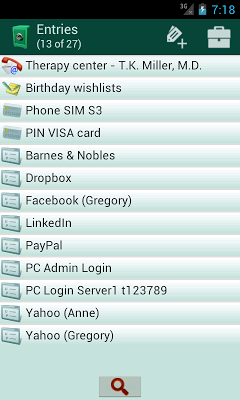
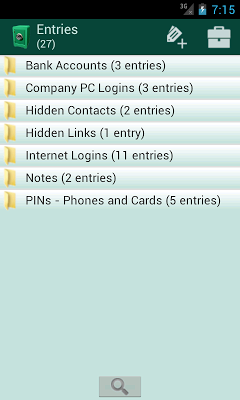
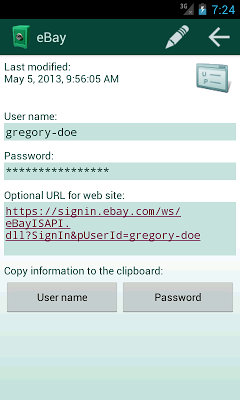
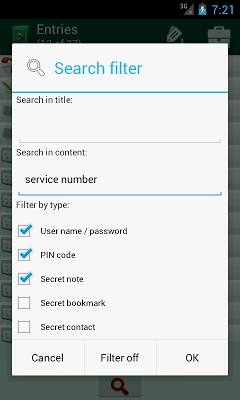
Screen:
What's in this version:
Version 3.3.4
* The name of the backup file can be changed now. It must match only the pattern backup*.zip, where * can be any text.
* Bugfix for the restoration of a backup file.
Vice info:
Stahuj zde:
The password manager with the highest level of security combined with an easy to use interface.
No other password vault offers more possibilites to store your confidential
* login information and credentials (user name, password, clickable logon URL),
* PIN of credit cards, ATM cards or phone locks PINs,
* secret text notes,
* secret contacts (email, phone numbers) and
* secret bookmarks and hyperlinks
in one single application. And no other password manager has more security features, like
* application master PIN or master text password
* data encryption with 256 bit keys based on a combination of SHA-256, AES and Twofish, the most secure hash and encryption algorithms available today's cryptography
* encryption keys are not directly derived from the master password, to prevent brute-force password cracking using cracking hardware (e.g. graphic card clusters), when the phone was lost or stolen
* only one Android permission is necessary for the app: access to SD card for backup / restore (no internet access needed and no ads!)
* backup function for all stored passwords and other confidential data based on ZIP AES 256 encryption (backup can be read on your PC with normal UNZIP software)
* backup can be SEND directly to a safe storage via bluetooth, email or cloud storage
* the backup file is overwritten on the deletion, so that it cannot be restored by recovery tools
* initial data load using the restore function based on CSV import file
* app is locked automatically, when there is was user input for 2 minutes (timeout is configurable)
* "exit" menu on all screens, that stops the app completely
* optional self-destruction function after 7 unsuccessful logon attempts
* user name and password can be copied to the clipboard and are deleted automatically after 30 seconds
* configurable password generator
* on Honeycomb and ICS systems, the application prevents that sensitive data is shown in screenshots for the "recent apps" list
Languages:
* English
* German
* French
* Spanish
* Russian (by Andrey Kharitonov)
Limitations:
* The "lite" version is limited to 8 database entries!
* The full version has no limitations.
(50,- Kc)
Pozadavky: Android 1.6 a vyssi
Popis: The password manager with the highest level of security combined with an easy to use interface.
Screen:
What's in this version:
Version 3.3.4
* The name of the backup file can be changed now. It must match only the pattern backup*.zip, where * can be any text.
* Bugfix for the restoration of a backup file.
Vice info:
Kód: Vybrat vše
https://play.google.com/store/apps/details?id=com.giraone.secretsafefullKód: Vybrat vše
http://www54.zippyshare.com/v/44758367/file.html
https://www.tusfiles.net/4jojwvn7ve6b
http://hugefiles.net/8zi3rrd6q2sr
http://bit.ly/1lJFNpL
http://www.2shared.com/file/rMLaHvPx/SecretSafe.html
No other password vault offers more possibilites to store your confidential
* login information and credentials (user name, password, clickable logon URL),
* PIN of credit cards, ATM cards or phone locks PINs,
* secret text notes,
* secret contacts (email, phone numbers) and
* secret bookmarks and hyperlinks
in one single application. And no other password manager has more security features, like
* application master PIN or master text password
* data encryption with 256 bit keys based on a combination of SHA-256, AES and Twofish, the most secure hash and encryption algorithms available today's cryptography
* encryption keys are not directly derived from the master password, to prevent brute-force password cracking using cracking hardware (e.g. graphic card clusters), when the phone was lost or stolen
* only one Android permission is necessary for the app: access to SD card for backup / restore (no internet access needed and no ads!)
* backup function for all stored passwords and other confidential data based on ZIP AES 256 encryption (backup can be read on your PC with normal UNZIP software)
* backup can be SEND directly to a safe storage via bluetooth, email or cloud storage
* the backup file is overwritten on the deletion, so that it cannot be restored by recovery tools
* initial data load using the restore function based on CSV import file
* app is locked automatically, when there is was user input for 2 minutes (timeout is configurable)
* "exit" menu on all screens, that stops the app completely
* optional self-destruction function after 7 unsuccessful logon attempts
* user name and password can be copied to the clipboard and are deleted automatically after 30 seconds
* configurable password generator
* on Honeycomb and ICS systems, the application prevents that sensitive data is shown in screenshots for the "recent apps" list
Languages:
* English
* German
* French
* Spanish
* Russian (by Andrey Kharitonov)
Limitations:
* The "lite" version is limited to 8 database entries!
* The full version has no limitations.