Hide Pictures - Gallery Plus
Napsal: 04. 06. 2014 20:25
Gallery Plus Pro - Hide Pictures v2.2.1
Pro features are unlocked
Pozadavky: Android 2.2 a vyssi
Popis: You have photos or videos on your phone and you don't want children, friends or others people to see it? Gallery Plus will help you keep it safe, it to keep them protected from prying eyes.
Screen:
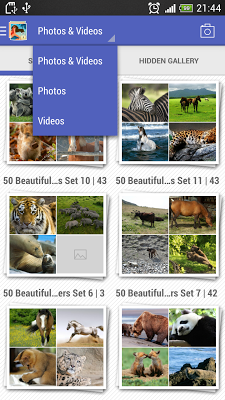
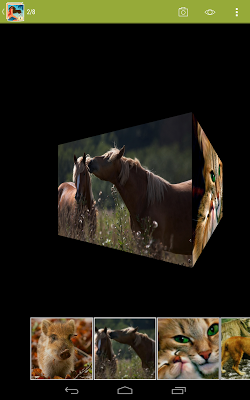
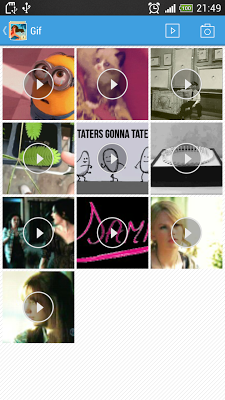
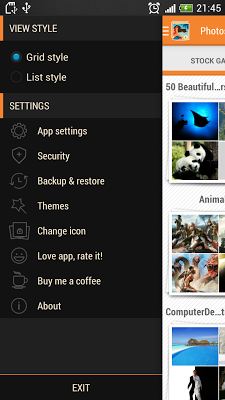
Video:
What's in this version:
Version 2.2.1:
- Add tool fix can't hide/unhide on sdcard kitkat (click read me)
- Update new library load image
- Minor bugs.
Vice info:
Stahuj zde:
Features:
- Hide pictures (hide all videos, photos).
- Support view animated-GIFs, JPG, PNG... (all photos and videos)
- Features change icon application.
- Hide "Hidden Gallery" enable/disable with password.
- Quick camera, create shortcut on home screen quick capture/record and hide it
- Filter photo or video to decrease searching time.
- Fastest and most secure private gallery.
- Working as the original gallery, help you to view and arrange photo from the original gallery and hidden gallery
- The hidden one can replace the original one, with full of photo gallery ‘s ability such as set wallpaper, share and view photo, etc.
- Load & view photos with more animation
- Backup & Restore photo on cloud
- Hide photo from other apps, such as the app for viewing original photo or the app that manages file, by “Share” feature.
- Storage to hide (sdcard or internel storage)
- Change themes
- Enable/Disable password
- Classic password, pattern password, calculator password
- Hide application icon on app draw.
- Take a photo, recover video and auto hide it
- View gallery with stock gallery and hidden gallery, easy switch between them
- View photos, videos, zoom in, out, slideshow
- Effect scroll then view photos, videos (Flip, 3D, zoom, stack...).
- Multi-select photos, videos to hide.
-...
---------------------------------------------------------------
How to Use:
- Hide photos, videos with Gallery Plus:
+ Tap and hold on album, photos, videos you want hide, unhide and click hide, unhide.
- Hide photos, videos from another apps:
+ Select album, photos, videos from gallery, file manager, etc, and choose "Share" and tap "Gallery Plus", media will auto hide.
Pro features are unlocked
Pozadavky: Android 2.2 a vyssi
Popis: You have photos or videos on your phone and you don't want children, friends or others people to see it? Gallery Plus will help you keep it safe, it to keep them protected from prying eyes.
Screen:
Video:
What's in this version:
Version 2.2.1:
- Add tool fix can't hide/unhide on sdcard kitkat (click read me)
- Update new library load image
- Minor bugs.
Vice info:
Kód: Vybrat vše
https://play.google.com/store/apps/details?id=appplus.mobi.galleryKód: Vybrat vše
http://turbobit.net/f5skirsytpyt.html
http://www57.zippyshare.com/v/67207936/file.html
https://www.tusfiles.net/04g12bhkcgcz
http://uloz.to/xoNQ69u2/gallery-plus-pro-v2-2-1-apk
- Hide pictures (hide all videos, photos).
- Support view animated-GIFs, JPG, PNG... (all photos and videos)
- Features change icon application.
- Hide "Hidden Gallery" enable/disable with password.
- Quick camera, create shortcut on home screen quick capture/record and hide it
- Filter photo or video to decrease searching time.
- Fastest and most secure private gallery.
- Working as the original gallery, help you to view and arrange photo from the original gallery and hidden gallery
- The hidden one can replace the original one, with full of photo gallery ‘s ability such as set wallpaper, share and view photo, etc.
- Load & view photos with more animation
- Backup & Restore photo on cloud
- Hide photo from other apps, such as the app for viewing original photo or the app that manages file, by “Share” feature.
- Storage to hide (sdcard or internel storage)
- Change themes
- Enable/Disable password
- Classic password, pattern password, calculator password
- Hide application icon on app draw.
- Take a photo, recover video and auto hide it
- View gallery with stock gallery and hidden gallery, easy switch between them
- View photos, videos, zoom in, out, slideshow
- Effect scroll then view photos, videos (Flip, 3D, zoom, stack...).
- Multi-select photos, videos to hide.
-...
---------------------------------------------------------------
How to Use:
- Hide photos, videos with Gallery Plus:
+ Tap and hold on album, photos, videos you want hide, unhide and click hide, unhide.
- Hide photos, videos from another apps:
+ Select album, photos, videos from gallery, file manager, etc, and choose "Share" and tap "Gallery Plus", media will auto hide.