Notification Shortcuts
Napsal: 20. 06. 2014 21:46
Notification Shortcuts v3.2.3 Unlocked
(Unlocked)
Pozadavky: Android 4.0 a vyssi
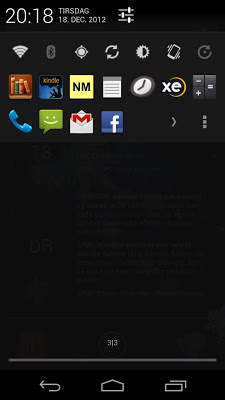
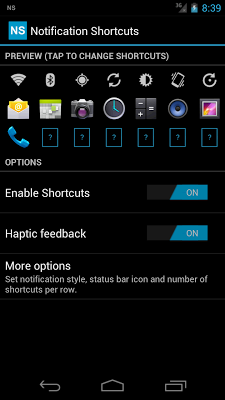
Popis: Notification settings allow you to place shortcuts in the notification area, and not only for settings.
Screen:
What's in this version:
- Added visual touch feedback to shortcut icons
- New haptic feedback options
- Smoother launch of apps, contacts and other shortcuts, especially on Android 4.1+ devices.
- Bug fix for handling misbehaving apps
Vice info:
Stahuj zde:
The Samsung Galaxy Nexus lacks one important feature from older Samsung phones: The ability to toggle settings directly from the notification area. And I missed that feature!
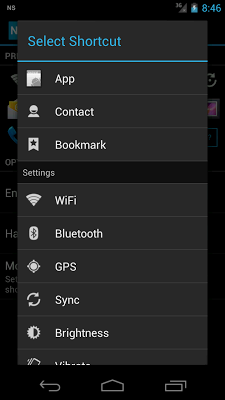
Notification settings allow you to place shortcuts in the notification area, and not only for settings. It supports four different types of shortcuts:
- App shortcuts: Launch your favorite apps
- Contacts: Easy access to favorite contacts
- Bookmarks: Create bookmarks to Tasker items, dropbox folders and more
- Settings: Toggle WiFi, Bluetooth, GPS, Sync, Brightness, Vibrate and Auto-rotate
FREE & PAID VERSION:
The free version gives you one row of shortcut slots. Purchasing the Notification Shortcuts Unlocker from Android Market will allow you to add two more rows with additional shortcuts.
(Unlocked)
Pozadavky: Android 4.0 a vyssi
Popis: Notification settings allow you to place shortcuts in the notification area, and not only for settings.
Screen:
What's in this version:
- Added visual touch feedback to shortcut icons
- New haptic feedback options
- Smoother launch of apps, contacts and other shortcuts, especially on Android 4.1+ devices.
- Bug fix for handling misbehaving apps
Vice info:
Kód: Vybrat vše
https://play.google.com/store/apps/details?id=dk.nicolai.buch.andersen.nsKód: Vybrat vše
http://uploadrocket.net/i9jj9kxgcyvg/dk.nicolai.buch.andersen.ns-3.2.3-signed.zip.html
http://ul.to/clcfuilk
http://www.tusfiles.net/py4xpf77i2ad
http://uloz.to/x5K4L56N/notification-shortcuts-v3-2-3-apk
http://www4.zippyshare.com/v/24358353/file.html
Notification settings allow you to place shortcuts in the notification area, and not only for settings. It supports four different types of shortcuts:
- App shortcuts: Launch your favorite apps
- Contacts: Easy access to favorite contacts
- Bookmarks: Create bookmarks to Tasker items, dropbox folders and more
- Settings: Toggle WiFi, Bluetooth, GPS, Sync, Brightness, Vibrate and Auto-rotate
FREE & PAID VERSION:
The free version gives you one row of shortcut slots. Purchasing the Notification Shortcuts Unlocker from Android Market will allow you to add two more rows with additional shortcuts.