App2SD &App Manager-Save Space PRO
Napsal: 09. 07. 2014 09:44
App2SD &App Manager-Save Space PRO v2.0.6
Požadavky: Android 2.2 a vyšší
Popis: App Manager & App2SD, a powerful tool to manage apps for android devices. App2SD can move apps to external storage and save internal storage if it's supported by your device.
Screen:
Vice info:
Stahuj zde: PRO features Unlocked
App Manager & App2SD, a powerful tool to manage apps for android devices. App2SD can move apps to external storage and save internal storage if it's supported by your device.
#Features
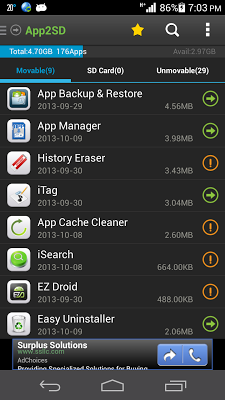
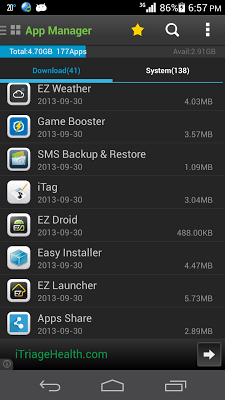
• List all installed & system apps
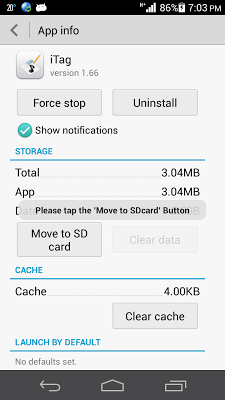
• Move apps to SD (if supported by your device)
• Show app info in detail
• Uninstall apps
• Force stop app
• Clear app cache
• Clear app data
• Hide pre-installed/system apps
• Share apps with your friends
• Locate the app in Google Play
#FAQ
1. What is "App 2 SD"?
"App 2 SD" is short for app to SD card, and it is also called app to sd.
2. Why do so many apps that cannot App2SD?
Only the app is configured to supported to be installed on SD card by the developer that can it App2SD. So you will see many apps are "On Phone Only".
3. What does the green and orange icon mean?
The green icon means that the app can be moved.
The orange icon means that the app is not recommended to be moving to SD card because it might cause the app not work propertly.
4. Why does app2sd not supported by my device?
Android system determins if your device is supported.
5. How to hide some pre-installed/pre-loaded system apps?
Go to the App Manager, then switch to the system apps tab, select the app that you want to hide and click hide.
#KW
app manager, app 2 sd, app to sd, hide apps
Požadavky: Android 2.2 a vyšší
Popis: App Manager & App2SD, a powerful tool to manage apps for android devices. App2SD can move apps to external storage and save internal storage if it's supported by your device.
Screen:
Vice info:
Kód: Vybrat vše
https://play.google.com/store/apps/details?id=mobi.infolife.app2sdKód: Vybrat vše
http://ul.to/mol90ch4
http://www.tusfiles.net/6u5pqgk2cnxw
http://ulozto.cz/xZzqjTPv/app2sd-apk
https://webshare.cz/group/22e6c3a7Ga/
http://www30.zippyshare.com/v/71142736/file.html#Features
• List all installed & system apps
• Move apps to SD (if supported by your device)
• Show app info in detail
• Uninstall apps
• Force stop app
• Clear app cache
• Clear app data
• Hide pre-installed/system apps
• Share apps with your friends
• Locate the app in Google Play
#FAQ
1. What is "App 2 SD"?
"App 2 SD" is short for app to SD card, and it is also called app to sd.
2. Why do so many apps that cannot App2SD?
Only the app is configured to supported to be installed on SD card by the developer that can it App2SD. So you will see many apps are "On Phone Only".
3. What does the green and orange icon mean?
The green icon means that the app can be moved.
The orange icon means that the app is not recommended to be moving to SD card because it might cause the app not work propertly.
4. Why does app2sd not supported by my device?
Android system determins if your device is supported.
5. How to hide some pre-installed/pre-loaded system apps?
Go to the App Manager, then switch to the system apps tab, select the app that you want to hide and click hide.
#KW
app manager, app 2 sd, app to sd, hide apps