XDictionary
Napsal: 16. 07. 2014 02:55
XDictionary v1.1.0
33,-kc
Požadavky: Android 4.0 | ROOT | Xposed framework
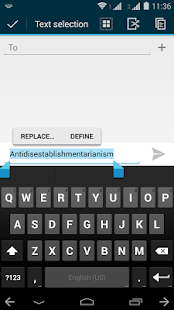
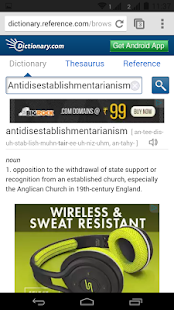
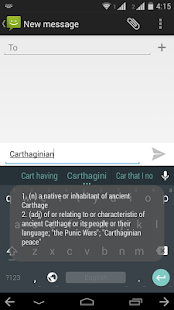
Popis: It adds a quick "Define" popup to text you select, alongside the Paste and Replace popups. Hit the popup, and bam - it'll instantly open up your browser/a popup/Toast, with the meaning of your word waiting for you.
Screen:
Vice info:
Stahuj zde:
XDictionary is a module for the amazing Xposed Framework. It adds a quick "Define" popup to text you select, alongside the Paste and Replace popups. Hit the popup, and bam - it'll instantly open up your browser/a popup/Toast, with the meaning of your word waiting for you.
Now, there's no need to switch to your dictionary app and search - this is practically a one-click procedure.
Future updates will include quick translate options - no more bothering with opening Google Translate/dictionaries!
IMPORTANT: Start the app after installing it, to allow it to completely install all the dictionary data to your external memory/SD card. If you face force closes, delete the /xdictionary folder from your external memory and reboot.
Module now functions offline - dictionary data is installed to your SD card/external memory.
33,-kc
Požadavky: Android 4.0 | ROOT | Xposed framework
Popis: It adds a quick "Define" popup to text you select, alongside the Paste and Replace popups. Hit the popup, and bam - it'll instantly open up your browser/a popup/Toast, with the meaning of your word waiting for you.
Screen:
Vice info:
Kód: Vybrat vše
https://play.google.com/store/apps/details?id=tweaks.vinit.xdictionary&hl=enKód: Vybrat vše
http://www.tusfiles.net/qmwo4j6ihg9m
https://webshare.cz/group/3S539cg5lh/
http://www4.zippyshare.com/v/44344056/file.html
http://ulozto.cz/xQEYg9Vr/xdictionary-v1-1-0-apkNow, there's no need to switch to your dictionary app and search - this is practically a one-click procedure.
Future updates will include quick translate options - no more bothering with opening Google Translate/dictionaries!
IMPORTANT: Start the app after installing it, to allow it to completely install all the dictionary data to your external memory/SD card. If you face force closes, delete the /xdictionary folder from your external memory and reboot.
Module now functions offline - dictionary data is installed to your SD card/external memory.