Hancom office Hwp 2010
Napsal: 24. 07. 2014 14:04
Hancom office Hwp 2010 v1.4.1
(342,- Kc)
Pozadavky: Android 2.2 a vyssi
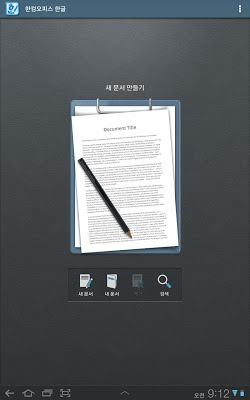
Popis: 'Hancom Office Hwp 2010 for Android’ is the latest office product for mobile compatible with
'Hancom Office Hwp 2010’. Please check out the device supported because it's different from ‘Hancom Office Hwp 2014 for Android'.
Screen:
What's in this version:
v.1.2.2
1. Fixed the error that “Change Korean/Chinese” feature is not working properly when using a Bluetooth keyboard on Optimus G/Optimus VU2
2. Fixed the error that pre-installed Hanword is not working properly after Android OS update
3. Fixed the error that SwiftKey3 soft keyboard is not working properly
v.1.2.1
1. Support additional devices
▷ Galaxy Tab 8.9/Vega R3
2. Clipboard (Text Only)
3. Equation
4. Change Korean/Chinese
5. Block Formula
6. Fixed some bugs
Vice info:
Stahuj zde:
'Hancom Office Hwp 2010 for Android’ is the latest office product for mobile compatible with
'Hancom Office Hwp 2010’. Please check out the device supported because it's different from ‘Hancom Office Hwp 2014 for Android'.
● changed item (1.4)
- screen scroll supported with FHD higher
- basic keyboard shortcut supported
- the name changed : hanword –> hwp 2010
■ This software is optimized for
▷ Samsung : Galaxy tab 10.1/Galaxy Note 10.1/Galaxy S2/Galaxy S3/Galaxy Note1/Galaxy Note2/Galaxy tab 7.0/Galaxy tab 8.9/Galaxy Note3
▷ LG: Optimus VU/Optimus VU2/Optimus LTE2/Optimus G
▷ Pantech: Vega Racer2/Vega LTE/Vega LTE M/Vega R3
▷ Google : Nexus 7/Google Nexus
- Note that using this software on other devices that are not listed above is not guaranteed.
■ Overview
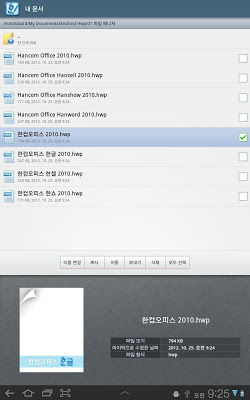
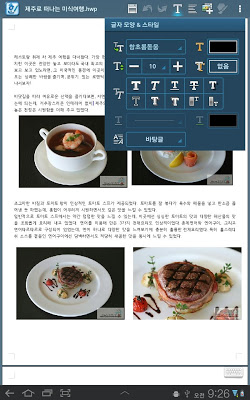
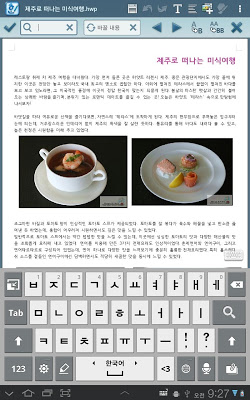
'Hancom Office Hwp 2010 for Android' is a useful word processing application allowing users to create and edit HWP and DOCX documents. 'Hancom Office Hwp 2010 for Android' offers various features: inserting objects such as tables and shapes, formatting paragraphs and fonts, sending the active document to others, finding text within the active document.'Hancom Office Hwp 2010 for Android' with File Manger enables users to conveniently organize files and folders stored in their mobile devices.
○○ Device Requirements ○○
■ Key Features
- Inserting objects such as tables, shapes, images
- Font and paragraph formatting
- Finding and replacing text
- Attaching the active document to an email
- File Manager
- Clipboard (Text Only)
- Equation
- Change Korean/Chinese
- Block Formula
■ System Requirements
- Supported OS: Android 2.3, 3.x, 4.0.x, 4.1.x
- Supported Devices:
▷ Samsung : Galaxy tab 10.1/Galaxy Note 10.1/Galaxy S2
Galaxy S3/Galaxy Note1/Galaxy Note2/Galaxy tab 7.0/
Galaxy tab 8.9/Galaxy Note3
▷ LG: Optimus VU/Optimus VU2/Optimus LTE2/Optimus G
▷ Pantech: Vega Racer2/Vega LTE/Vega LTE M/Vega R3
▷ Google : Nexus 7/Google Nexus
- Storage Capacity : 82MB or more
■ Supported Formats
- Editing: HWP, DOCX
- Viewing: HWP, RTF, DOC, DOCX
■ Languages
Korean, English
(342,- Kc)
Pozadavky: Android 2.2 a vyssi
Popis: 'Hancom Office Hwp 2010 for Android’ is the latest office product for mobile compatible with
'Hancom Office Hwp 2010’. Please check out the device supported because it's different from ‘Hancom Office Hwp 2014 for Android'.
Screen:
What's in this version:
v.1.2.2
1. Fixed the error that “Change Korean/Chinese” feature is not working properly when using a Bluetooth keyboard on Optimus G/Optimus VU2
2. Fixed the error that pre-installed Hanword is not working properly after Android OS update
3. Fixed the error that SwiftKey3 soft keyboard is not working properly
v.1.2.1
1. Support additional devices
▷ Galaxy Tab 8.9/Vega R3
2. Clipboard (Text Only)
3. Equation
4. Change Korean/Chinese
5. Block Formula
6. Fixed some bugs
Vice info:
Kód: Vybrat vše
https://play.google.com/store/apps/details?id=com.hancom.office.hwp.playstoreKód: Vybrat vše
http://ul.to/sxlfh2b1
https://www.tusfiles.net/rvqwrykyxrqy
http://uloz.to/xpucLZSA/hancom-office-hwp-2010-v1-4-1-apk
'Hancom Office Hwp 2010’. Please check out the device supported because it's different from ‘Hancom Office Hwp 2014 for Android'.
● changed item (1.4)
- screen scroll supported with FHD higher
- basic keyboard shortcut supported
- the name changed : hanword –> hwp 2010
■ This software is optimized for
▷ Samsung : Galaxy tab 10.1/Galaxy Note 10.1/Galaxy S2/Galaxy S3/Galaxy Note1/Galaxy Note2/Galaxy tab 7.0/Galaxy tab 8.9/Galaxy Note3
▷ LG: Optimus VU/Optimus VU2/Optimus LTE2/Optimus G
▷ Pantech: Vega Racer2/Vega LTE/Vega LTE M/Vega R3
▷ Google : Nexus 7/Google Nexus
- Note that using this software on other devices that are not listed above is not guaranteed.
■ Overview
'Hancom Office Hwp 2010 for Android' is a useful word processing application allowing users to create and edit HWP and DOCX documents. 'Hancom Office Hwp 2010 for Android' offers various features: inserting objects such as tables and shapes, formatting paragraphs and fonts, sending the active document to others, finding text within the active document.'Hancom Office Hwp 2010 for Android' with File Manger enables users to conveniently organize files and folders stored in their mobile devices.
○○ Device Requirements ○○
■ Key Features
- Inserting objects such as tables, shapes, images
- Font and paragraph formatting
- Finding and replacing text
- Attaching the active document to an email
- File Manager
- Clipboard (Text Only)
- Equation
- Change Korean/Chinese
- Block Formula
■ System Requirements
- Supported OS: Android 2.3, 3.x, 4.0.x, 4.1.x
- Supported Devices:
▷ Samsung : Galaxy tab 10.1/Galaxy Note 10.1/Galaxy S2
Galaxy S3/Galaxy Note1/Galaxy Note2/Galaxy tab 7.0/
Galaxy tab 8.9/Galaxy Note3
▷ LG: Optimus VU/Optimus VU2/Optimus LTE2/Optimus G
▷ Pantech: Vega Racer2/Vega LTE/Vega LTE M/Vega R3
▷ Google : Nexus 7/Google Nexus
- Storage Capacity : 82MB or more
■ Supported Formats
- Editing: HWP, DOCX
- Viewing: HWP, RTF, DOC, DOCX
■ Languages
Korean, English