SQLite Master Pro
Napsal: 22. 11. 2014 20:04
SQLite Master Pro v1.59
41,-kc
Požadavky: Android 3.0 a vyšší
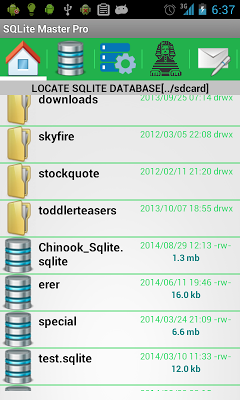
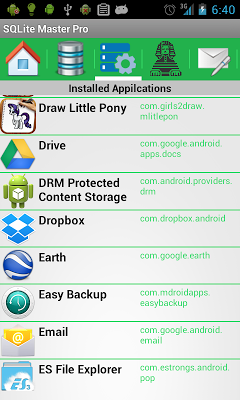
Popis: If you have a rooted system, you can take control of the system. You can browse/edit installed application's Sqlite databases.
Screen:
Vice info:
Stahuj zde:
If you have a rooted system, you can take control of the system. You can browse/edit installed application's Sqlite databases. It requires busybox installed on your android device. This app was tested on rooted Android 4.1 and 4.4 (kitkat). Due to limited testing for root access, we can not guarantee that this will work on any rooted device for the purpose of taking control of the app. In case if you find issue please copy the sqlite database using a file explorer into /mnt/sdcard, modify that using this app and copy back the sqlite database to the app directory.
Also you can email us with android version, we will try our best.
[✔] Manage Sqlite databases, create new database
[✔] A wizard to create new Sqlite table just in some clicks.No need to type schema.
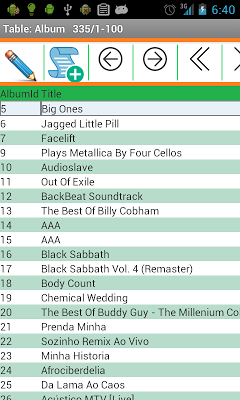
[✔] Visual grid view to view table data
[✔] Sort table data by simply tapping on the column headers (first tap - ascending, second tap - descending)
[✔] Export table data into a text file which can be viewed by text editor.
[✔] Add, delete, update table row
[✔] Copy table row to clipboard by double tapping on a row
[✔] Easy to use intuitive Query Maker to build custom queries and save queries, easy to use interface
[✔] Any query that needs to be used to edit database is supported
[✔] Export Table, SQL results from query maker to text file etc.
[✔] Import highly configurable CSV data into Table.
[✔] Pre-generated SQL Select Queries for existing tables.
[✔] Save SQL queries which can be used later.
[✔] Delete saved queries which are not needed.
[✔] Import exiting queries into this app.
[✔] View/Copy table definition, triggers, views in the database.
[✔] Add table column, drop table, rename table etc
[✔] Close table data, clone table schema etc
[✔] In table list page, long press has many options such as clone schema, clone data, drop/rename table etc.
[✔] History of recently Opened SQLite databases.
Testing:
* Lot of testing was done on three different sizes android screens
* Full cycle test was done for four major Sqlite data types (INTEGER, TEXT, REAL and NULL)
* Full test was done using famous Chinook Sqlite database using 15000 rows and 11 tables
* Tested on Android 4.0, 4.1.2(rooted), Android Kitkat 4.4(rooted)
Email us for any support.
Although this product was developed by our database internal engineer who worked for famous open source
database, we would like to hear from you if you have feature request. Please send us email if you encounter any bug. We will enhance and try to resolve issue as soon as possible. Your satisfaction is our priority. A review comment would always be a great thing to get assessment of our product.
If you want to use this only for rooted user to configure/modify apps internal database but not for general SQLite database management and editing, you can use use our low cost "SQLite Editor Root" from Dundas Software.
41,-kc
Požadavky: Android 3.0 a vyšší
Popis: If you have a rooted system, you can take control of the system. You can browse/edit installed application's Sqlite databases.
Screen:
Vice info:
Kód: Vybrat vše
https://play.google.com/store/apps/details?id=com.dundastech.sqlitemasterproKód: Vybrat vše
http://ul.to/9gir4qqi
https://www.tusfiles.net/eqlq7pptfwwd
https://webshare.cz/group/Zo6Ul6iz7d/
http://ulozto.cz/xfQJ2XJM/sqlite-master-pro-apk
http://ulozto.net/xSMunVug/sqlite-master-pro-apkAlso you can email us with android version, we will try our best.
[✔] Manage Sqlite databases, create new database
[✔] A wizard to create new Sqlite table just in some clicks.No need to type schema.
[✔] Visual grid view to view table data
[✔] Sort table data by simply tapping on the column headers (first tap - ascending, second tap - descending)
[✔] Export table data into a text file which can be viewed by text editor.
[✔] Add, delete, update table row
[✔] Copy table row to clipboard by double tapping on a row
[✔] Easy to use intuitive Query Maker to build custom queries and save queries, easy to use interface
[✔] Any query that needs to be used to edit database is supported
[✔] Export Table, SQL results from query maker to text file etc.
[✔] Import highly configurable CSV data into Table.
[✔] Pre-generated SQL Select Queries for existing tables.
[✔] Save SQL queries which can be used later.
[✔] Delete saved queries which are not needed.
[✔] Import exiting queries into this app.
[✔] View/Copy table definition, triggers, views in the database.
[✔] Add table column, drop table, rename table etc
[✔] Close table data, clone table schema etc
[✔] In table list page, long press has many options such as clone schema, clone data, drop/rename table etc.
[✔] History of recently Opened SQLite databases.
Testing:
* Lot of testing was done on three different sizes android screens
* Full cycle test was done for four major Sqlite data types (INTEGER, TEXT, REAL and NULL)
* Full test was done using famous Chinook Sqlite database using 15000 rows and 11 tables
* Tested on Android 4.0, 4.1.2(rooted), Android Kitkat 4.4(rooted)
Email us for any support.
Although this product was developed by our database internal engineer who worked for famous open source
database, we would like to hear from you if you have feature request. Please send us email if you encounter any bug. We will enhance and try to resolve issue as soon as possible. Your satisfaction is our priority. A review comment would always be a great thing to get assessment of our product.
If you want to use this only for rooted user to configure/modify apps internal database but not for general SQLite database management and editing, you can use use our low cost "SQLite Editor Root" from Dundas Software.
