



(25,- Kc)
Pozadavky: Android 2.3 a vyssi
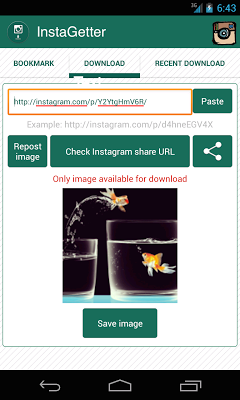
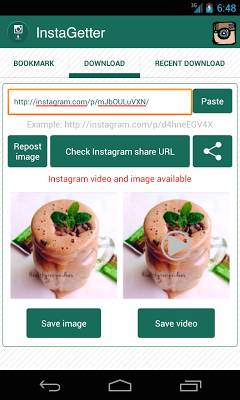
Popis: ○ 【InstaGetter】 is a plugin, which helps to download image and video post from PUBLIC profile in fast and easy way. Moreover, the offline videos can be view in a built-in player with looping mode.
○ 【NO LOGIN REQUIRED】
Screen:

What's in this version:
v1.4.2:
→ Fix bug FC when open app or after checking URL.
v1.4:
→ [New] Queue feature for checking multi URL (Android 4.0 and higer).
◎ If you need a refund, please send ORDER NUMBER to [yahami.lab@gmail.com].
◎ Please make sure free-version works properly on your devices before purchasing this paid-version.
◎ Version is ads-free but not bugs-flawless. Please keep sending crash reports when app forces-close to help us detect error.
Vice info:
Kód: Vybrat vše
https://play.google.com/store/apps/details?id=com.instadownloader.instagetterKód: Vybrat vše
https://www.tusfiles.net/3v6wbus37gpo
http://uloz.to/xxFJmXo4/instagetter-pro-v1-4-2-apk
https://webshare.cz/file/3rK4213fN3/instagetter-pro-v1-4-2-apk
① On each post: copy share URL
② Open the 【InstaGetter】, paste the URL and press download
③ Wait, open video and enjoy!
▶ IMPORTANT
① Image/video re-uploading is NOT encourage, plz credit Owner!
② Private profiles hide their share URL, use our app 【InstaLiked Saver】 to get your favorite but private post!
③ For known Instagram issue, audio is broken into slow motion on major Samsung devices if re-upload.
※ User with Kitkat 4.4:
→ Take care of choosing file location to save to internal storage.
※ Common Issue:
→ On Samsung devices, player cannot play or only Audio but no Image, consider to use 【MX Player】
(example: Galaxy Y/Young, Ace,...)
◎ How to use 3rd video player:
→ Search【MX Player】and install
→ Save video with【InstaGetter】
→ In tab 【Storage】, long-press on file.
→ From option list, choose 【Select Player】 and choose 【MX Player】


