



Remove Ads Unlocked
Pozadavky: Android 1.6 a vyssi
Popis: ☆Bookmark management app
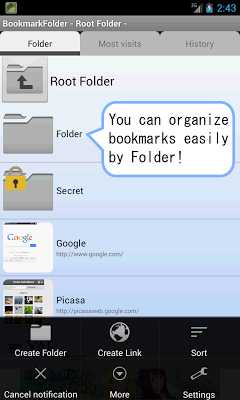
- Let's manage bookmarks by folder!
- You do NOT need to re-register bookmarks when you have changed the browser that you usually use!
- Recommended for those who want to use multiple browser, because it is possible to specify the launching browser for each bookmark.
Screen:
What's in this version:
2015/01/14:
"Warn existing url" setting was added.
Bug fix.
2015/01/07:
Changing tab with swipe was enabled.
Warn when Bookmark adding if the URL is exist.
Stable app system.
2014/12/15:
Support Android5.0 notification icon.
Bug fix.(Force closing occurred on some devices.)
2014/12/10:
Creating folder shortcut was enabled.
Fix some bugs.
Vice info:
Kód: Vybrat vše
https://play.google.com/store/apps/details?id=com.coconuts.webnavigatorKód: Vybrat vše
https://userscloud.com/eoy4fpy53yle
http://ul.to/j4w8v02p
http://www46.zippyshare.com/v/6PvnlNOH/file.html
http://uploadrocket.net/ag8gthpjbjxg
http://uloz.to/xExmCUJM/bookmark-folder-full-v3-4-6-apk
https://webshare.cz/file/yd42t3fO4p/bookmark-folder-full-v3-4-6-apk▼Easy organize bookmarks
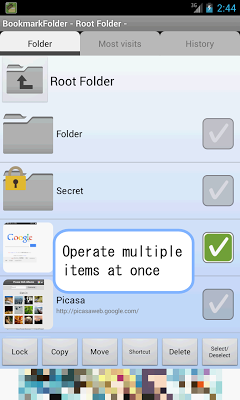
- You can manage bookmarks by folder.
- No limit of folder level.
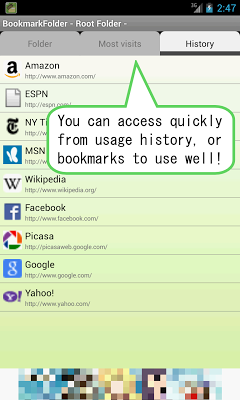
- Because the app has a favicon and thumbnail of web pages, web page you want to see will be found soon.
- You can easily add a bookmark by using "Share" menu of your browser.
- You can sort in any order by dragging the bookmark.
▼Customized to suit your taste
- It is possible to specify the launching browser for each bookmark.
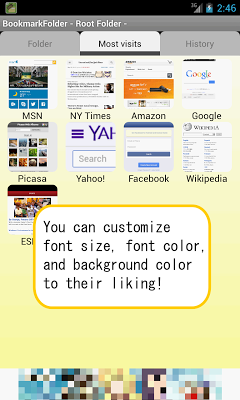
- You can select a view type of bookmarks in List or Grid.
- You can customize a variety of settings to suit your taste. eg: Background color, text color, text size, icon size, etc.
- You can launch this app anytime from status bar icon.
▼Safe backup
- You can create backup file of bookmarks.
- If you use automatic backup feature, it is okay even if you forgot create backup.
▼Easy to move when change your device
- You can import bookmarks from default browser.
- You can import HTML bookmark file created by browser on pc.
- You can move bookmarks to new device easily by transferring a backup file to new device.
☆Permission
▼INTERNET, ACCESS_NETWORK_STATE
- To get ads, favicons, thumbnails, and check update.
▼READ_HISTORY_BOOKMARKS
- To import bookmarks from default browser.
▼WRITE_HISTORY_BOOKMARKS
- To export bookmarks to default browser.
▼READ_EXTERNAL_STORAGE
- To import bookmarks from files in external storage.
▼WRITE_EXTERNAL_STORAGE
- To export bookmarks to files in external storage.
▼INSTALL_SHORTCUT
- To create shortcut to home screen.
▼RECEIVE_BOOT_COMPLETED
- To show icon in status bar when Android system has booted.


