G-NetTrack Pro
Napsal: 31. 07. 2015 01:59
G-NetTrack Pro v3.8
401,-Kc
Požadavky: Android 2.2 a vyšší
Popis: G-NetTrack Pro is a fieldtest/netmonitor application for UMTS/GSM/LTE/CDMA/EVDO network. It allows monitoring and logging of mobile network parameters without using specialized equipment. It's a tool and it's a toy. It can be used by professionals to get better insight on the network or by radio enthusiasts to learn more about wireless networks.
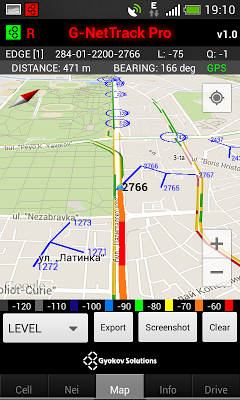
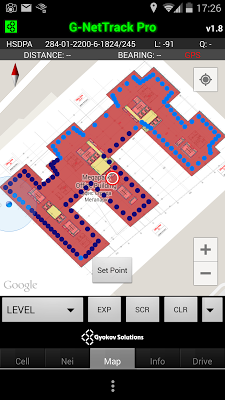
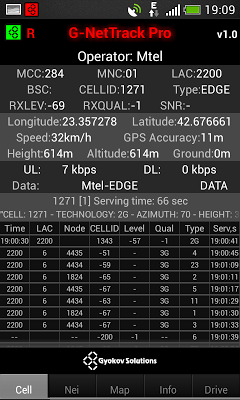
Screen:
Vice info:
Stahuj zde:

- 2G/3G/4G serving and neighbor cells measurements
- OUTDOOR and INDOOR measurements
- AUTO INDOOR mode for tunnels and places with bad GPS reception
- Measurements logging in text and kml files
- Cellfile import/export and cell visualization on map
- 3D map - different types of maps, 3D buildings, maps auto caching
- Voice/Data (upload,download,ping)/SMS test sequence
- Chart with serving and neighbor cells levels
- Floorplans loading
- Predefined routes loading
- Unlimited number of cell layers and custom cell colors
- Send measurements online to G-NetWorld database
- Screen orientation change (portrait/landscape)
1. Instant mode - this is a quick mode for fast measurements
- start the app
- enable the mapview (Menu - Enable Map and GPS)
- select measurement (LEVEL, QUAL, CELLID, DL-bitrate, UL-bitrate, Speed)
2. Log mode - this is more sophisticated mode. During the log mode the screen should be on in order serving cell to be updated. You can also start optionally voice, data or SMS sequences in order to monitor the network for blocked and dropped calls and to measure upload and download bitrate and SMS service success rate.
- start log (Menu - Start Log)
- the app starts to create kml and text tab export for the selected measurements
- it also creates event kml and text file - for cell reselections, handovers, Call Start, Call End, Call Drop, Call Block and SMS
- when you are finished with measurements press End Log button
- you can find kml exports and tab exports in folder G-NetTrack_Pro_Logs on sdcard.
401,-Kc
Požadavky: Android 2.2 a vyšší
Popis: G-NetTrack Pro is a fieldtest/netmonitor application for UMTS/GSM/LTE/CDMA/EVDO network. It allows monitoring and logging of mobile network parameters without using specialized equipment. It's a tool and it's a toy. It can be used by professionals to get better insight on the network or by radio enthusiasts to learn more about wireless networks.
Screen:
Vice info:
Kód: Vybrat vše
https://play.google.com/store/apps/details?id=com.gyokovsolutions.gnettrackproplus Kód: Vybrat vše
http://ulozto.cz/xG4LucCz/g-nettrack-pro-zip
http://ulozto.net/xbauWzZw/g-nettrack-pro-zip
https://webshare.cz/file/67oXd46g7j/g-nettrack-pro-zip
- 2G/3G/4G serving and neighbor cells measurements
- OUTDOOR and INDOOR measurements
- AUTO INDOOR mode for tunnels and places with bad GPS reception
- Measurements logging in text and kml files
- Cellfile import/export and cell visualization on map
- 3D map - different types of maps, 3D buildings, maps auto caching
- Voice/Data (upload,download,ping)/SMS test sequence
- Chart with serving and neighbor cells levels
- Floorplans loading
- Predefined routes loading
- Unlimited number of cell layers and custom cell colors
- Send measurements online to G-NetWorld database
- Screen orientation change (portrait/landscape)
1. Instant mode - this is a quick mode for fast measurements
- start the app
- enable the mapview (Menu - Enable Map and GPS)
- select measurement (LEVEL, QUAL, CELLID, DL-bitrate, UL-bitrate, Speed)
2. Log mode - this is more sophisticated mode. During the log mode the screen should be on in order serving cell to be updated. You can also start optionally voice, data or SMS sequences in order to monitor the network for blocked and dropped calls and to measure upload and download bitrate and SMS service success rate.
- start log (Menu - Start Log)
- the app starts to create kml and text tab export for the selected measurements
- it also creates event kml and text file - for cell reselections, handovers, Call Start, Call End, Call Drop, Call Block and SMS
- when you are finished with measurements press End Log button
- you can find kml exports and tab exports in folder G-NetTrack_Pro_Logs on sdcard.