AudioRec Pro Voice Recorder
Napsal: 16. 05. 2017 03:02
AudioRec Pro Voice Recorder v5.1.9
180,-Kc
Požadavky: Android: 4.1 a vyšší
Popis:

Vice info:
Stahuj zde:
This audio recorder has a very intuitive interface and it is very easy to use while allowing both audio recording and audio playback.
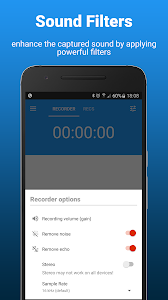
You can make the audio recording sound louder by increasing the mic gain, you can record in stereo mode if your phone has 2 microphones, you can select between 8 kHz - 48 kHz sample rate, you can easily save the recordings into the external SD card, and much more, all for free. Also, you can rename and share your voice recordings to your friends.
This audio recorder is the perfect choice if you are a musician and want to record your classes, your concerts, or you just want to record a simple voice memo. Others are using it as a voice recorder for taking interviews, others are using it as a voice recorder to record snoring in the night. Just give it a try, you will have your own home audio recording equipment inside your pocket.
NOTE:
This audio recorder IS NOT A CALL RECORDER, so it can't record phone conversations.
Functionality:
- WAV - PCM, 3GPP - AMR and MP4 - AAC formats supported
- Audio recording in background (even with display off)
- Start/Pause/Resume/Abort recording options
- Option to append(continue) an existing audio recording (only for WAV files)
- Mono and stereo recording (for devices that supports stereo recording)
- Gain (you can adjust the microphone's volume so it can record louder) - only for WAVE/PCM format
- Supported sample rates: 8 kHz, 11 kHz, 16 kHz, 22 kHz, 32 kHz, 44.1 kHz, 48 kHz
- It can record using the microphone used by the camera (rear mic) for a clearer and louder sound (if your phone has this microphone)
- It is possible to use custom folder for the recordings (even on external SD card)
- Option to auto-upload on cloud services like DropBox or Google Drive
- Each record file can be renamed, shared, set as ringtone, deleted.
- Recordings can be named using the current time as name or you can choose a custom one
- Recording & playback can be controlled using the notification buttons (for android 4.1+)
- Audio recorder can be controlled using home widget and lockScreen widget (for supported devices)
- Playback loop feature
180,-Kc
Požadavky: Android: 4.1 a vyšší
Popis:
Screen:AudioRec Pro - Voice Recorder je nejlepším hlasovým záznamníkem pro záznam hlasu a zvuku při nejvyšší kvalitě pro Android.
Vice info:
Kód: Vybrat vše
https://play.google.com/store/apps/details?id=com.audioRec.pro2Kód: Vybrat vše
https://ulozto.cz/!eYHLocaJwmxw/audiorec-5-1-9-pro-apk
https://webshare.cz/file/5r84ex2g6l/audiorec-5-1-9-pro-apkYou can make the audio recording sound louder by increasing the mic gain, you can record in stereo mode if your phone has 2 microphones, you can select between 8 kHz - 48 kHz sample rate, you can easily save the recordings into the external SD card, and much more, all for free. Also, you can rename and share your voice recordings to your friends.
This audio recorder is the perfect choice if you are a musician and want to record your classes, your concerts, or you just want to record a simple voice memo. Others are using it as a voice recorder for taking interviews, others are using it as a voice recorder to record snoring in the night. Just give it a try, you will have your own home audio recording equipment inside your pocket.
NOTE:
This audio recorder IS NOT A CALL RECORDER, so it can't record phone conversations.
Functionality:
- WAV - PCM, 3GPP - AMR and MP4 - AAC formats supported
- Audio recording in background (even with display off)
- Start/Pause/Resume/Abort recording options
- Option to append(continue) an existing audio recording (only for WAV files)
- Mono and stereo recording (for devices that supports stereo recording)
- Gain (you can adjust the microphone's volume so it can record louder) - only for WAVE/PCM format
- Supported sample rates: 8 kHz, 11 kHz, 16 kHz, 22 kHz, 32 kHz, 44.1 kHz, 48 kHz
- It can record using the microphone used by the camera (rear mic) for a clearer and louder sound (if your phone has this microphone)
- It is possible to use custom folder for the recordings (even on external SD card)
- Option to auto-upload on cloud services like DropBox or Google Drive
- Each record file can be renamed, shared, set as ringtone, deleted.
- Recordings can be named using the current time as name or you can choose a custom one
- Recording & playback can be controlled using the notification buttons (for android 4.1+)
- Audio recorder can be controlled using home widget and lockScreen widget (for supported devices)
- Playback loop feature
