Glass Slides
Napsal: 17. 08. 2014 01:04
Glass Slides v15
37,-kc
Požadavky: Android 4.0 a vyšší
Popis: I'm trying to replicate the idea of glass slides viewed at an angle and lit from above. The icons are downright magical.
Screen:
Vice info:
Stahuj zde:
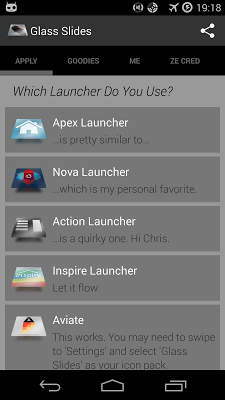
I'm trying to replicate the idea of glass slides viewed at an angle and lit from above. The icons are downright magical, because on a dark background you can see the blurred outline of the motive, while they will cast a shadow on bright backgrounds.
They're set at a buck eighty under my ususal charity umbrella.
Supported launchers include Nova, Apex, Action Launcher, Inspire, Aviate and ADW and to some extent Smart Launcher and Next Launcher.
Atom Launcher can use the icons via its own settings panel.
Go doesn't work. The same goes for Mini Launcher.
INSTALL NOTES
- Install the app and open it.
- - Select your launcher to apply the icon pack.
- - Swipe left/right to navigate between tabs/pages.
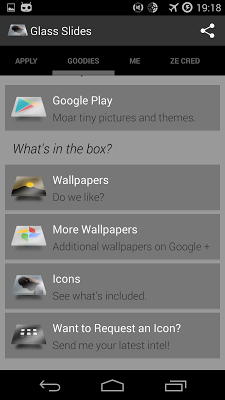
- - Select "Wallpapers" to check out and apply one of the cool wallpapers.
- If one of your apps doesn't theme, you can press-and-hold the icon, select "Edit" and select one of my icons manually.
37,-kc
Požadavky: Android 4.0 a vyšší
Popis: I'm trying to replicate the idea of glass slides viewed at an angle and lit from above. The icons are downright magical.
Screen:
Vice info:
Kód: Vybrat vše
https://play.google.com/store/apps/details?id=com.hooolm.glassslides&hl=enKód: Vybrat vše
http://ul.to/68ys78vd
https://www.oboom.com/A62INUXE
http://www.tusfiles.net/466r66qi20a8
https://webshare.cz/group/aa1oz4Eh71/
http://ulozto.cz/xuLM3rQU/glass-slides-v-15-apk
http://ulozto.net/xV4cYjnR/glass-slides-v-15-apkThey're set at a buck eighty under my ususal charity umbrella.
Supported launchers include Nova, Apex, Action Launcher, Inspire, Aviate and ADW and to some extent Smart Launcher and Next Launcher.
Atom Launcher can use the icons via its own settings panel.
Go doesn't work. The same goes for Mini Launcher.
INSTALL NOTES
- Install the app and open it.
- - Select your launcher to apply the icon pack.
- - Swipe left/right to navigate between tabs/pages.
- - Select "Wallpapers" to check out and apply one of the cool wallpapers.
- If one of your apps doesn't theme, you can press-and-hold the icon, select "Edit" and select one of my icons manually.