Avionic Depth HD Watch Face Premium
Napsal: 13. 11. 2016 15:11
Avionic Depth HD Watch Face Premium v2.8 [Unlocked]
Premium Features Unlocked
Pozadavky: Android 2.2 a vyssi
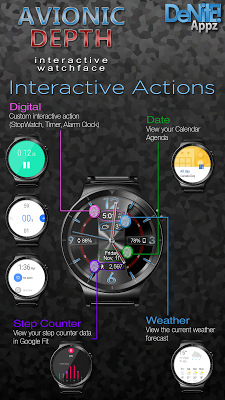
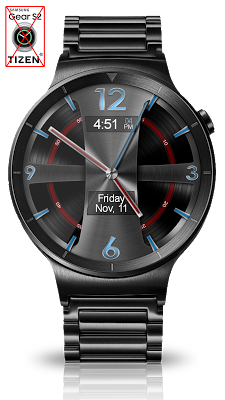
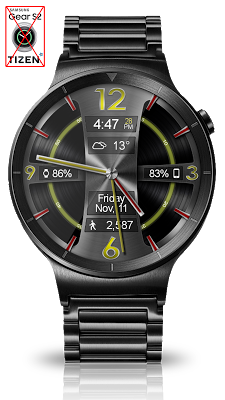
Popis: This completely customizable interactive HD Android Wear Watch Face and Clock Widget brings a classic elegance to your wrist and Launcher. Features include battery levels, weather conditions, Google Fit step counter, color picker & date information.
Screen:



What's in this version:
- na GP se zatim neuvadi
Vice info:
Stahuj zde:
This completely customizable interactive HD Android Wear Watch Face and Clock Widget brings a classic elegance to your wrist and Launcher. Features include battery levels, weather conditions, Google Fit step counter, color picker & date information. A settings app will also be installed on your mobile device to configure the watch face for any look you desire. Select any color and create a completely custom look for yourself! Don't have an Android Wear watch? No Problem! You can use the clock widget on your launcher!
IMPORTANT - Please note that as this is an HD watch face, the file is a bit larger and can take up to 5 minutes to transfer to your watch. This is normal.
★Basic Features★
✔ Launcher Clock Widget
✔ Customizable digital & or analog clock
✔ Interactive Actions (Digital, Date)
✔ Time zone selection
✔ Custom date format picker
✔ Smooth second hand
✔ 24-Hour
✔ Burn-In protection
✔ Animated
★Premium Features★
✔ Screen Modes (Normal, Always Ambient, Always On)
✔ Screen on Time selection
✔ Interactive Actions (Weather, Step Counter)
✔ Peek card size selector
✔ Ambient modes selector
✔ Screen on-time selector
✔ Color picker to select any color you like for the background, clock hands, text, & numbers
✔ Save personal color themes (long press to delete theme)
✔ Clock numbers toggle
✔ Watch battery status
✔ Phone battery status
✔ Current date
✔ Google Fit Step Counter
✔ Weather conditions (Yahoo Weather & OpenWeatherMap)
★Translations★
✔ English
✔ Chinese
✔ Czech
✔ French
✔ German
✔ Italian
✔ Japanese
✔ Korean
✔ Russian
✔ Spanish
★How to install★
Watch Face - Once you have installed from the Play store, you may be asked to grant permissions to the app on your phone - be sure to approve all permissions. Once the app has installed on your phone, it may take 5-10 minutes to transfer over to you watch and the Android Wear app. Please be patient. Once installed, simply long press on your watch face to bring up the selection menu, or select this watchface from the Android Wear app. Use the accompanying settings app to configure the settings and options
Widget - Depending on what launcher you are using, you can either long press on your launcher to place a widget, or select this widget from the App Drawer -> Widgets list. Customize and change the widget settings with the accompanying App.
Premium Features Unlocked
Pozadavky: Android 2.2 a vyssi
Popis: This completely customizable interactive HD Android Wear Watch Face and Clock Widget brings a classic elegance to your wrist and Launcher. Features include battery levels, weather conditions, Google Fit step counter, color picker & date information.
Screen:
What's in this version:
- na GP se zatim neuvadi
Vice info:
Kód: Vybrat vše
https://play.google.com/store/apps/details?id=com.denite.watchface.avionicdepthKód: Vybrat vše
http://www109.zippyshare.com/v/S3u9IN5A/file.html
https://userscloud.com/ip7fcdrgkcfh
https://tusfiles.net/uvvhzbmpuhn7IMPORTANT - Please note that as this is an HD watch face, the file is a bit larger and can take up to 5 minutes to transfer to your watch. This is normal.
★Basic Features★
✔ Launcher Clock Widget
✔ Customizable digital & or analog clock
✔ Interactive Actions (Digital, Date)
✔ Time zone selection
✔ Custom date format picker
✔ Smooth second hand
✔ 24-Hour
✔ Burn-In protection
✔ Animated
★Premium Features★
✔ Screen Modes (Normal, Always Ambient, Always On)
✔ Screen on Time selection
✔ Interactive Actions (Weather, Step Counter)
✔ Peek card size selector
✔ Ambient modes selector
✔ Screen on-time selector
✔ Color picker to select any color you like for the background, clock hands, text, & numbers
✔ Save personal color themes (long press to delete theme)
✔ Clock numbers toggle
✔ Watch battery status
✔ Phone battery status
✔ Current date
✔ Google Fit Step Counter
✔ Weather conditions (Yahoo Weather & OpenWeatherMap)
★Translations★
✔ English
✔ Chinese
✔ Czech
✔ French
✔ German
✔ Italian
✔ Japanese
✔ Korean
✔ Russian
✔ Spanish
★How to install★
Watch Face - Once you have installed from the Play store, you may be asked to grant permissions to the app on your phone - be sure to approve all permissions. Once the app has installed on your phone, it may take 5-10 minutes to transfer over to you watch and the Android Wear app. Please be patient. Once installed, simply long press on your watch face to bring up the selection menu, or select this watchface from the Android Wear app. Use the accompanying settings app to configure the settings and options
Widget - Depending on what launcher you are using, you can either long press on your launcher to place a widget, or select this widget from the App Drawer -> Widgets list. Customize and change the widget settings with the accompanying App.