Veškeré programy pro Androidy.
Veškeré programy pro Androidy.
Kamilos
Moderátor
Zařízení:
SG S9+, SG Gear S3 Frontier
Příspěvky:
34228
Registrován:
24. 12. 2006 00:13
Odesláno:
01. 09. 2012 21:12
PhotoViva
PhotoViva v2.04
(20,- Kc)
Pozadavky: Android 2.3.3 a vyssi
Popis: Aplikace pro upravu obrazku/fotek
Screen:
 Vice info:
Kód: Vybrat vše
https://play.google.com/store/apps/details?id=com.laminadesign.PhotoViva
Kód: Vybrat vše
http://www.embedupload.com/?d=4XUIJHGUEM
http://multiupload.biz/7rtwfm9c5hga/PhotoViva%20v2.04_MultiUpload.biz.apk.html
http://www.directmirror.com/files/BN2APISJ
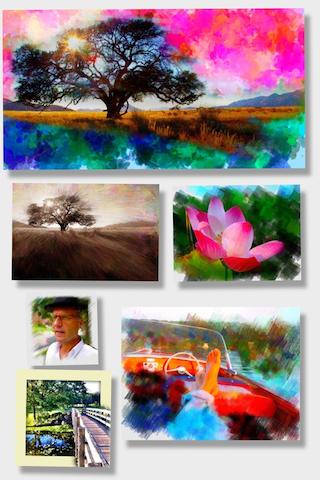
 PhotoViva is a powerful application for photo editing and freeform painting. It can help you transform your pictures into expressive and colorful works of art.
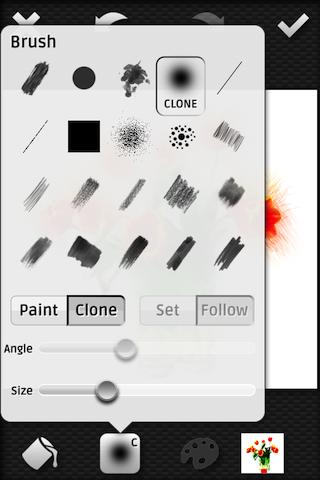
In addition to tools for enhancing your photos, there are paint brushes that let you make abstract painted interpretations of photos. You can select a brush and copy image features by cloning or painting. Brushes can track the direction of movement, or you can set the brush direction. You can also change the hue, saturation and blur of brush strokes as you go.
App Hints
• Use large brush strokes to fill the canvas, then use smaller brush strokes to reveal detail
• Use Brushes in "Clone" mode instead of "Paint" mode to copy the source image to the canvas
• Use Tools->Blend undo.. to vary the density of your most recent change to the canvas
• Use the Airbrush in "Clone" mode to blend the image directly to the canvas after painting with brush strokes
• Try clearing to White, Black or Cream using the Fill menu before painting
• Add color noise to brush strokes to make a lively variation in the color
• Use less or no color noise when painting on skin tones
• Use the HDR correction feature on images that have people in the shadows
Note
The maximum output image size is based on the CPU and graphics capabilities of your iOS device.
Featured Functionality
• Zoom and pan your canvas to do detailed work
• Image cropping
• 10 levels of undo and redo
• Camera support for devices with cameras
• Gallery of sample images provided
Terrific Tools
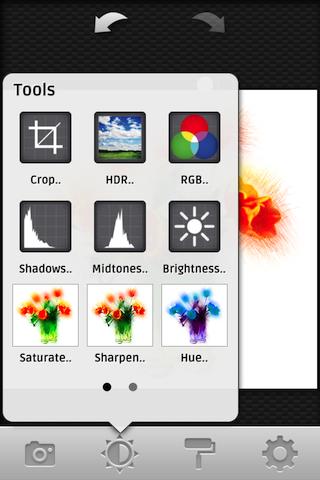
• High Dynamic Range (HDR) correction
• RGB adjustment
• Shadows, midtones, and brightness control
• Saturation and Sharpening
• Autopaint mode
• Hue adjustment
• Add noise function
• Watermarking
• Blend functions
• Fill to white, black or cream
• Fill frame, outline or center
• Fill to current color
Brilliant Brushes
• 20 brushes are provided
• Set the angle or let the brushes track your touch
• Brushes paint or clone
• Brush size and color can be varied
Color Creativity
• Edit colors or pick colors from the canvas
• An image can be used as a source of color
• Adjust brightness, blur, saturation and hue on the fly
• Current canvas can be used as a source of image color
• Noise can be added to the color to vary the paint strokes

Kamilos
Moderátor
Zařízení:
SG S9+, SG Gear S3 Frontier
Příspěvky:
34228
Registrován:
24. 12. 2006 00:13
Odesláno:
12. 09. 2012 08:28
PhotoViva v2.06
What's in this version:
Now you can select the image size to paint higher resolution images. There is an improved user interface with enhance and paint modes, and the app uses less memory on your device. You can also choose to start painting with a blank canvas when a new image is loaded. Image processing is made faster with OpenGL ES 2.0, and PhotoViva also now links to online documentation.
This app has NO advertisements
Vice info:Kód: Vybrat vše
https://play.google.com/store/apps/details?id=com.laminadesign.PhotoViva
Kód: Vybrat vše
http://www5.zippyshare.com/v/66854936/file.html
http://www.directmirror.com/files/1KWKDW5D
http://www.embedupload.com/?d=3SGABBEKVS
Germanicus
Mobil Member User
Zařízení:
One M8 /One M7 / HOX / Note 10.1
Příspěvky:
6021
Registrován:
23. 11. 2010 20:47
Odesláno:
28. 09. 2012 17:57
PhotoViva v2.07
Požadavky: Android 2.3.3+
What's in this version:
Now you can select the image size to paint higher resolution images. There is an improved user interface with enhance and paint modes, and the app uses less memory on your device. You can also choose to start painting with a blank canvas when a new image is loaded. Image processing is made faster with OpenGL ES 2.0, and PhotoViva also now links to online documentation.
Další info:
Kód: Vybrat vše
https://play.google.com/store/apps/details?id=com.laminadesign.PhotoViva
Kód: Vybrat vše
http://www3.zippyshare.com/v/74703352/file.html
Kód: Vybrat vše
http://www.embedupload.com/?d=3XAGGQZDBC
http://uploadmirrors.com/download/N3MPRFQA/PhotoViva_v2.07.apk
Kamilos
Moderátor
Zařízení:
SG S9+, SG Gear S3 Frontier
Příspěvky:
34228
Registrován:
24. 12. 2006 00:13
Odesláno:
06. 11. 2012 17:02
PhotoViva v2.09
What's in this version:
Now you can select the image size to paint higher resolution images. There is an improved user interface with enhance and paint modes, and the app uses less memory on your device. You can also choose to start painting with a blank canvas when a new image is loaded. Image processing is made faster with OpenGL ES 2.0, and PhotoViva also now links to online documentation.
Vice info:Kód: Vybrat vše
https://play.google.com/store/apps/details?id=com.laminadesign.PhotoViva
Kód: Vybrat vše
http://uloz.to/xZuetfw/laxopica209-apk
http://www.directmirror.com/files/0ETYYA5I
http://www.embedupload.com/?d=2SRGHRYYEH
Kamilos
Moderátor
Zařízení:
SG S9+, SG Gear S3 Frontier
Příspěvky:
34228
Registrován:
24. 12. 2006 00:13
Odesláno:
07. 11. 2012 09:14
PhotoViva v2.10
What's in this version:
In this version frame borders can be made with equal size or larger bottom border. Color balance can be adjusted with RGB tool by clicking on the image.
You can now zoom and pan while in paint mode using pinch gesture and the brush size inverse scales with the zoom. Now you can also "Liquify" your image. Images are saved to a directory called "PhotoViva" on the sdcard.
Romona and Deborah - please contact me, maybe you can give me some info to fix the problems you are having.
Vice info:Kód: Vybrat vše
https://play.google.com/store/apps/details?id=com.laminadesign.PhotoViva
Kód: Vybrat vše
http://uloz.to/xSGwQQ7/appxvr210-apk
http://www.directmirror.com/files/QWPKJSUA
http://www.embedupload.com/?d=3CZ0ZUEPWD
Germanicus
Mobil Member User
Zařízení:
One M8 /One M7 / HOX / Note 10.1
Příspěvky:
6021
Registrován:
23. 11. 2010 20:47
Odesláno:
29. 11. 2012 17:10
PhotoViva v2.11
Požadavky: Android 2.3.3+
What's in this version:
In this version frame borders can be made with equal size or larger bottom border. Color balance can be adjusted with RGB tool by clicking on the image.
You can now zoom and pan while in paint mode using pinch gesture and the brush size inverse scales with the zoom.
Now you can also "Liquify" your image. Images are saved to a directory called "PhotoViva" on the sdcard.
Další info:
Kód: Vybrat vše
https://play.google.com/store/apps/details?id=com.laminadesign.PhotoViva
Kód: Vybrat vše
http://www31.zippyshare.com/v/72954921/file.html
Kód: Vybrat vše
http://www.embedupload.com/?d=7OKINTMFRX
http://uploadmirrors.com/download/0UUIWXK9/PhotoViva_v2.11.apk
Kamilos
Moderátor
Zařízení:
SG S9+, SG Gear S3 Frontier
Příspěvky:
34228
Registrován:
24. 12. 2006 00:13
Odesláno:
02. 12. 2012 11:43
PhotoViva v2.12
What's in this version:
In this version frame borders can be made with equal size or larger bottom border. Color balance can be adjusted with RGB tool by clicking on the image.
You can now zoom and pan while in paint mode using pinch gesture and the brush size inverse scales with the zoom. Now you can also "Liquify" your image. Images are saved to a directory called "PhotoViva" on the sdcard.
Now PhotoViva runs on Android version 2.2!
Vice info:Kód: Vybrat vše
https://play.google.com/store/apps/details?id=com.laminadesign.PhotoViva
Kód: Vybrat vše
http://uloz.to/xs3J4jA/photoviva-v2-12-apk
http://www23.zippyshare.com/v/38825622/file.html
http://www.directmirror.com/files/ULYALSKO
Kamilos
Moderátor
Zařízení:
SG S9+, SG Gear S3 Frontier
Příspěvky:
34228
Registrován:
24. 12. 2006 00:13
Odesláno:
06. 12. 2012 21:52
PhotoViva v2.16
What's in this version:
In this version frame borders can be made with equal size or larger bottom border. Color balance can be adjusted with RGB tool by clicking on the image.
You can now zoom and pan while in paint mode using pinch gesture and the brush size inverse scales with the zoom. Now you can also "Liquify" your image. Images are saved to a directory called "PhotoViva" on the sdcard.
Now PhotoViva runs on Android version 2.2!
Vice info:Kód: Vybrat vše
https://play.google.com/store/apps/details?id=com.laminadesign.PhotoViva
Kód: Vybrat vše
http://uloz.to/xvej1Wg/photoviva-v2-16-apk
http://www37.zippyshare.com/v/59562297/file.html
http://www.directmirror.com/files/0QKOKQ2O
milann70
Uploader
Zařízení:
iGET Blackview, Lenovo Phab2 DUAL GOLD, nová Nokia 3310 Kdyby něco,tak SZ
Příspěvky:
25149
Registrován:
04. 06. 2007 09:17
Odesláno:
06. 06. 2014 01:21
PhotoViva v3.02
požadavky: android 2.3.3 a vyšší
What's New?
New clean flat design. Changed name of "HDR" function to "Enlighten" Many small bug fixes.
info:
Kód: Vybrat vše
https://play.google.com/store/apps/details?id=com.laminadesign.PhotoViva
:
Kód: Vybrat vše
http://ulozto.cz/xB2sNXcy/photoviva-zip
http://ulozto.net/x1JQ5aNX/photoviva-zip
Dotazy na SZ.