



(50,- Kc)
Pozadavky: Android 2.2 a vyssi
Popis: Share only selected files, folders or virtual usb , LUKS encrypted or unencrypted, disks via usb with PC/Radio car/Player ...
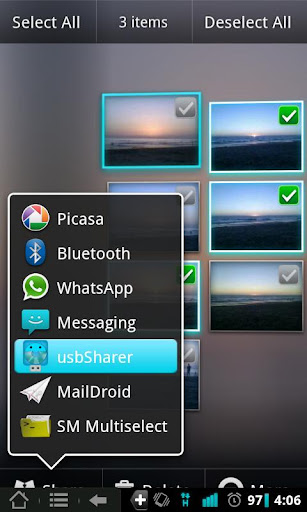
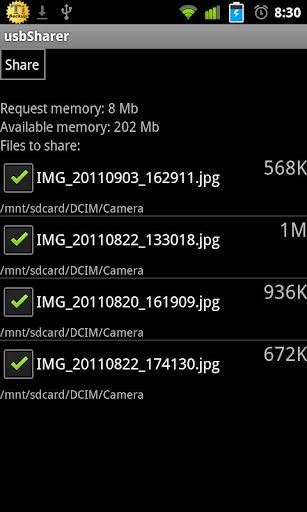
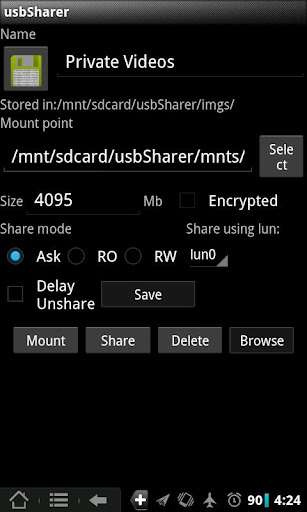
Screen:
What's in this version:
1.7.3:
Dont auto unshare images added
Check if UMS(Usb Mass Storage) is enabled in ICS JB devices
1.7.1:
UI changes
Shortcuts to images/virtual usbs added
Better FUSE driver integration
Better ICS and JB support
Added multifolder sharing
Added mapping names for multifolder sharing
Selectable icon for images/usbs
New icon
Some bug fixes
Vice info:
Kód: Vybrat vše
https://play.google.com/store/apps/details?id=os.devwom.usbsharerKód: Vybrat vše
http://uloz.to/xr1yrHK/usb-sharer-root-v1-7-3-apk
https://mega.co.nz/#!dZYyRJ7D!DNuikVQq1i5hVi8VG5OxYE1e5x4ncHPucTh4qntv7gM
http://www5.zippyshare.com/v/63029908/file.htmlShare only selected files, folders or virtual usb , LUKS encrypted or unencrypted, disks via usb with PC/Radio car/Player ...
Also mount virtual Un/encrypted images in your device.
Usb Sharer uses UMS protocol, skipping MTP/PTP.
Test Usb Sharer eval version before install it.
* Share only selected folders/directories.
* Share only desired files, preventing visibility of undesired files on your SD card.
* Share system files/directories.
To do that, select desired files/folders with your favorite application and use "Usb Sharer" to this job.
* Create virtual USB encrypted or unencrypted disks and share only files inside it, rejecting access to other files in your sdcard.
Also you will encrypt all files and data if your disk is selected as encrypted. By default encryption is AES, and uses LUKS standard.
It is possible share virtual disk as RO (read only) mode (if your device implements such function).
* Save your favorite Ubuntu, Backtrack, or preferred rescue image and boot your PC from it. Instead having one different USB flash drive for each distribution.
To do this, upload image to your device and select to share with Usb Sharer. Or save it in /sdcard/usbSharer/imgs/ directory.
* Mount disk images on your android device. Majority of kernels supports vfat/fat and ext2/ext3/ext4. But if you have custom kernel also could mount other file-systems like iso9660
In order to test if Usb Sharer works in your device you should follow next steps.
1 - Install Usb Sharer.
2 - Select some files with your favorite application, for example 4 or 5 photos from gallery, and use Usb Sharer to this job.
3 - With Usb cable connected to your PC, press share button, and check if your PC recognises the USB and only selected files are on it.
4 - Unshare this virtual image or disconnect usb cable.
5 - Open Usb Sharer application from applications menu.
6 - Create new virtual usb with desired size and share it.
7 - Check the new image is correctly recognized from your PC.


