



(20,- Kc)
Pozadavky: Android 4.0 a vyšší
Popis: Start Google Now with you voice on the Galaxy Note3, S5" - No root necessary
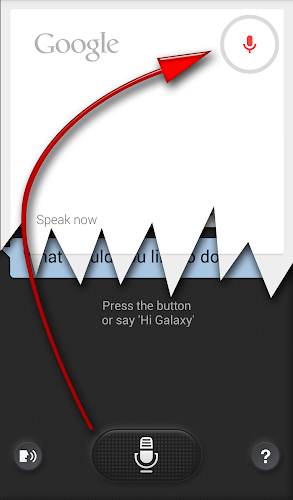
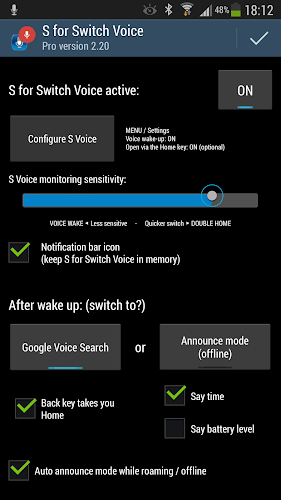
Screen:
Video:
What's in this version:
2.21 Device Administrator status to keep screen off in Offline Announce mode
(device admin status is only needed for this, as it is confirmed by the system - see screenshot).
Quicker switching for Root users. Your default voice is used instead of Google TTS.
2.20 Improved Offline Announce Mode in Pro version. See new video!
Permissions:
DISABLE_KEYGUARD=persistent notification bar icon to avoid getting unloaded
ACCESS_NETWORK_STATE +
ACCESS_WIFI_STATE=Automatic time announce mode when offline
Vice info:
Kód: Vybrat vše
https://play.google.com/store/apps/details?id=hu.viczian.deathtosvoicedKód: Vybrat vše
http://www35.zippyshare.com/v/79952102/file.html
https://www.tusfiles.net/9gpfv0aqcz5n
http://www50.zippyshare.com/v/93891729/file.html
http://www.tusfiles.net/b0vojux0k1re
http://uloz.to/xMMzG8Ph/s-for-switch-voice-pro-v2-21-apk
http://ulozto.sk/xfRpq951/s-for-switch-voice-pro-v2-21-apkTry FREE version to see if it works you before buying PRO
If you liked v1.0 better (without any settings and notification icon), it is still available below - Do not install both!
Did you know your Galaxy Note 3 could do always listening voice wake-up similar to the highly advertised "Okay, Google Now" Motorola Touchless Control on the Moto X?
Differences:
#1 You have to say "Hi Galaxy" (while the screen is off)
#2 SVoice will try to service you, which is much less capable (to say the least) than Google Now
While there is no way to fix #1, the more important problem #2 can be solved with my little app. It does a "bait and switch" style intervention whenever S Voice would start, you are redirected to Google Voice Search
Preparations: (see video)
1. install this app S for Switch Voice
2. open it (when asked grant root for quicker switching)
3. click "Configure S Voice" button
4. in S Voice - MENU / Settings
5. enable "Voice wake-up"
6. [optionally enable "Open via the home key"]
7. press BACK, BACK to return to S for Switch Voice
8. activate: ON (upper right)
9. check mark
Usage:
Whenever (and however) you launch S Voice my app will switch to Google Voice Search:
+ Voice wake up (Say "Hi Galaxy" with screen off)
+ Double tap on the Home key (setting in S Voice)
+ Double click / long-press headset button
Pro features:
Stays enabled at the end of the day and after reboot The free version needs to be re-enabled every 3rd morning and when the phone is restarted
Time/battery announce mode: Instead of starting Google Voice Search, you can have the phone announce the time and/or battery level, when you wake it up by saying "Hi Galaxy". This can be convenient when abroad, since without data connection neither S Voice nor Google Voice search could do anything. Select Offline announce mode in Settings, or have it auto enable while offline. Choose what to announce: time and/or battery level. I used this mode while skiing, I could just say "Hi Galaxy" (or "Time Galaxy") without even taking the phone out of my pocket.


